My Teacher Training Failed Me

IMG_1964.JPGWell, it didn’t totally fail me. I did go through all my methods courses, learned how to create meaningful and engaging lessons, and even practiced in several classrooms before I was let loose on my own.

It failed me in other ways, and most of us too, I’d guess. It failed to teach me how to deal with:

  • The first grader who was molested by mommy’s ‘friend’.
  • The child who was dropped off at school by mom, who then walked to the nearest crack house.
  • The boy who was being beaten at home.
  • The girl who lived in a tent, in the woods, with her mother.
  • The child who is raising themselves because the ‘adult’ in the home is unreliable.
  • The girl whose mother was murdered, by her father.
  • The boy who came to school hungry, every day, and most likely took classroom food home with him.

Or the 10-year-old girl who lost her mother 2 1/2 months ago. The girl who had to sit and listen to a great opportunity to come to classes and have bonding experiences ‘with your mom’. The girl who wanted to go and bravely asked, “What if you don’t have a mom?” The girl who was eyed, sympathetically, by all the other girls in the room. The girl who has to figure out a new normal at a young age.

These are the ways in which teacher training failed me.

Google Classroom – Adding Materials

One feature that I really like in Google Classroom is the ability to add materials. My class is currently working on a project, with a digital text. I want them to be able to access the text at any point.

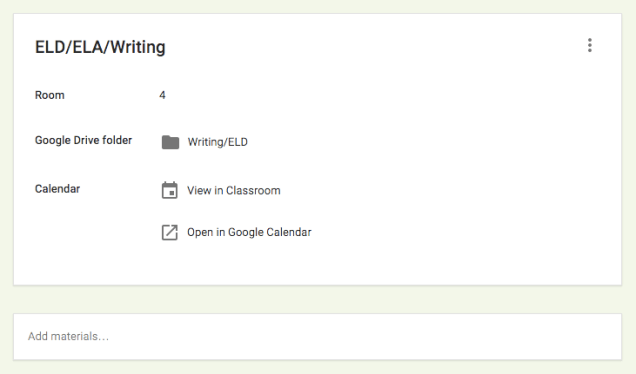
After logging into Google Classroom, I navigate to the classroom where I’d like to add materials. From the Stream page, I click on About.

Screen Shot 2016-03-13 at 8.01.06 PM

Now that I am on the ‘About’ page, I can add the desired materials. The first box on the page contains Course Information. The second box allows you to ‘Add Materials’.

Screen Shot 2016-03-13 at 8.06.48 PM

Simply by clicking on ‘Add materials’, the box changes to give you choices.

Screen Shot 2016-03-13 at 8.07.30 PM

You’ll notice that after adding a title to your materials, you have the option to add a file from your computer, Google Drive, YouTube, or a link. You have the ability to add as many as needed.

Screen Shot 2016-03-13 at 8.09.50 PM

The three dots in the right corner allow you to edit or delete the materials.

This feature is a great way to keep all important materials in one place. In Writing, you can house all your rubrics. Math can house tutorials. The possibilities are endless, syllabus, study guides, videos, whatever you can think of!

Draftback

Recently, I became aware of an AMAZING Chrome Extension: Draft Back. Veronica Tadeo (@MsTadeo) introduced me to this. It’s simple, it plays back your, or your students’, Google Docs.

Once the Extension is installed, you will see a Draftback button next to the Share and Comment button on the top right corner.

Screen Shot 2016-03-06 at 6.39.37 PM

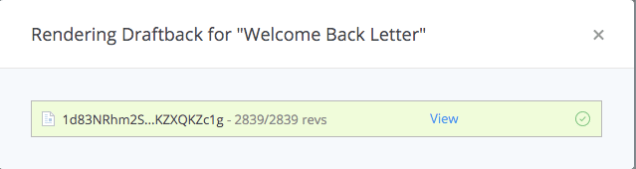
Once the function is selected, it creates a playback. Choose ‘View’. Once selected, a new tab will appear with the playback.

Screen Shot 2016-03-06 at 6.42.38 PM

You can see that at one point I copied and pasted text. Pretty cool, right?

Draftback.gif


A Tale Unfolds & Writing

At the beginning of February, I began A Tale Unfolds. Since then, I have noticed an improvement in my students’ writing. Their sentences are more interesting and they try to vary the types of sentences they use. Here is a picture of a student who has writing difficulties, practicing her sentences in her spare time!

Photo Credit: Tressa Luke

Another teacher was so impressed, she took these photos and HAD to share with me! This is awsome! Look  at all those adjectives.

Playlists in YouTube

I’m a huge fan of YouTube, but then again who isn’t? One of my favorite features is the ability to create Playlists. These are a collection of videos of your choice. For example, I have a playlist for grammar to help students who are struggling with various grammar issues.

In YouTube, on the left side is my menu. The second section shows my ‘Library’ (aka playlists). creating them is SUPER easy!

Screen Shot 2016-02-18 at 7.26.57 PM

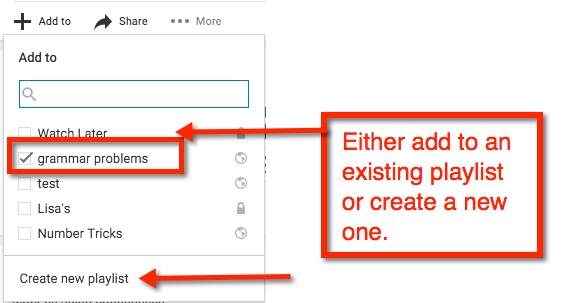
When I find a video I like, I add it to (or create a new) playlist. The ‘Add to’ choice appears just below the video.

playlist 1

playlist 2

If you are creating a new playlist, you will have the option to have it ‘Public’ (open for anyone to find), ‘Unlisted’ (other can view if they have the link), or ‘Private’ (must be shared directly with others).

playlist 3

After you name your playlist, select ‘Create’. Viola! You now have started your playlist collection

playlist 4

Mathbowl 2016

WMathbowl 1hile our school didn’t win, we had a lot of fun! I have never seen my students so focused and determined. One student asked if I could assign MORE challenges! Yes, MORE! How awesome is that?

In the midst of it all, we were challenged to participate in a Fai-To! This is where our school and another go head to head. Considering that our Internet went down twice in the past week, I was pleased to learn that we WON the last Fai-To!

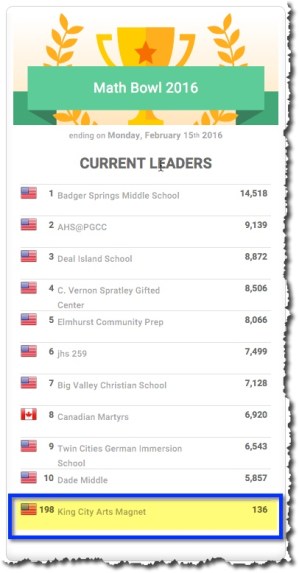
There aren’t many classrooms at my school using Mangahigh, so to have 136 points is pretty big for us.

mathbowl 2

To top it all off, I had an IEP for a student on Friday. The parents commented how much the student, who struggles academically, enjoys Mangahigh. The student often asks to try, “Just one more time,” in order to achieve a higher score, beat another student, or gain another medal.

Just another reason to love this program! And to all the winners, congratulations!

A Tale Unfolds: Part 1

a tale unfolds Next week I will start A Tale Unfolds with my class. It is an 11 week ELA/ELD/Writing unit where the end product is a movie that the class has written, performed, and taped. As this is a UK Standards aligned unit, I looked over the lessons for the upcoming week and was pleased that on Day 1 ten (5th grade) CCSS are covered. While the lessons are complete on their own, I will be able to enrich them with conversations and expectations.

Along with the lesson plans, there are Promethean Flipcharts and SmartBoard resources, a ‘book’ (2 levels), and in certain cases leveled resources (depending on the activity). The focus of the writing is on quality, not quantity.

Overall, I am excited to get the unit started. I think the students are really going to enjoy it.

You Know It’s Working

I had a few ‘it’s really working’ moments this week. Two of them centered around ‘8*pARTS of Speech‘ by Jon Corippo. In this activity, students are shown a rather silly picture (my favorite was the elephant on a giant toilet). The sillier the better! Each day my students practice writing and using the 8 parts of speech. We also address subject, predicate, and similes. Oh, and write 1 paragraph EACH DAY. They are also getting pretty proficient at using quotation marks.

clutter-560701_960_720

Writing the parts of speech and a paragraph based on a photo (from pixabay) is more engaging than a boring prompt!

It’s Working Moment #1

We were working on writing. A student commented that the word ‘on’ was an interjection. Immediately, another student corrected the first by stating, “No, ‘on’ is a preposition.”

The first student looked at the second and said, “Oh yeah, that’s right.”

Seriously, how awesome is that? AND we’ve only been doing this activity for 3 weeks!

It’s Working Moment #2

Earlier in the week, a student asked if she could find pictures we could use for the daily activity. Um, yes! Now I don’t have to look for photos for a few weeks. This has caught on and I have a few students sending me pictures. Looks like I’ll have to make a GForm in order to help organize it all.

Here’s My Advice

Try it! The first few times, my 5th graders and I did it together. They quickly caught on and can now complete the entire page in 15 minutes or less. I still have a few that need extra help (in the form of previously completed papers). That’s okay, they’re making improvements and that’s what I want to see!

And finally, a big thank you and shout out to Jon Corippo for sharing this nugget of awesomeness!

Gamification: Here’s the Deal

And what a deal it is! I have written about my use of Mangahigh in my classroom in the past (Gamify My Homework, Math In the Summer, Engage Student With Mangahigh, and Online Homework). I really do like the tool!

Here’s an opportunity to check it out…for FREE (for a limited time). Not only do you get to check out all the features, your class/school can participate in an online challenge! Adding to the gamification fun. Go ahead, sign up for the challenge. What do you have to lose? It’s FREE.

10% Discount

And if you like it and decide to purchase…You can receive a 10% discount and a 30-day FREE trial. See, it just keeps getting better! Email Amber (amber@mangahigh.com) with the code: NOWATECHIE10.

Mangahigh

Challenge Details

The challenge will run from February 1st – 15th 2016 for all K-10 students at schools in the US and Canada. It’s completely free to participate and we encourage you to take advantage of this opportunity to explore Mangahigh and see the impact digital games-based solutions can have on students’ learning.


During the challenge, you will have full access to all of Mangahigh’s premium features, including 600+ activities aligned to Common Core and other state standards. You can assign specific challenges to support the topic you are currently teaching, or simply allow students to complete challenges independently.

What do we win?

The school that scores the most points during the competition will be crowned the Math Bowl Champion, winning a $500 Amazon voucher, $500 Mangahigh voucher, trophy plus medals and certificates for their top 10 students.

The 9 runners up with all receive a $100 Amazon voucher$200 Mangahigh vouchermedals, and certificates for their top 10 students.

Students with 200 points or more will receive a Mangahigh medal!

Who can enter?

The competition is open to all schools in the US and Canada for grades K-10 regardless of school size, location and previous experience with Mangahigh.com. You are welcome to enrol as many teachers and students as you like.

Who will join me?

I’ve already signed up. Who will join in the challenge?