During class today, I assigned a quick summary of what we read together. It was at that point that I pulled a small group aside so that they would be successful and get small group instruction on specific skills.
While working with the small group, I noticed a few students who seemed to not be working. So I pulled out my phone! I quickly pulled up the Classroom App and went into select students’ work to monitor their progress. Needless to say, my observations proved correct. This allowed me to have a quick correction with those students and at the same time putting the rest of the class on notice. Just because I am working with a small group doesn’t mean I don’t know what you’re doing!
Ah, the wonders of modern technology. Used correctly, it can be a powerful tool.
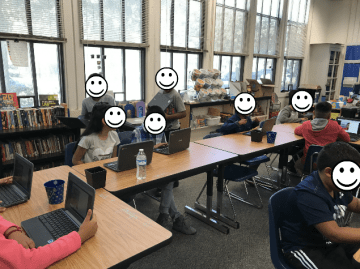
Over the summer, I had the idea that I wanted my students to participate in a Mystery Hangout with a classroom from each of the 50 states. I’m glad I started this journey.
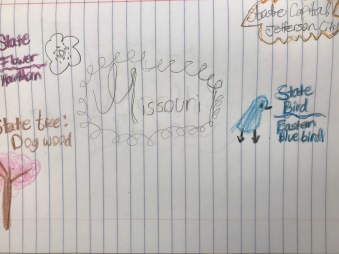
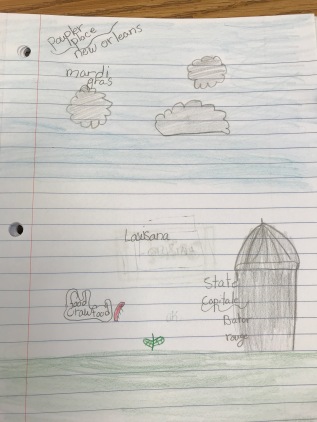
So far we have connected with 3 states. In addition to the Mystery Hangouts, I wanted my students to start sketch noting the information we collected. I’m so glad I included this aspect. It wasn’t easy for them at first. In fact, I still have a few that write lists. But overall I’m pleased with how they are experimenting with becoming more and more creative.
Last year I created some 5th-grade math protocols. Simple pages students could fill in to help solidify and keep up previously learned skills. This year, I decided to create grades K – 8. A friend and I got together this weekend and hammered out the beginning of 1st grade. And, we gamified it! The directions and gameboards are in Google Slides. This allows you to copy it and customize it.
I also created a video, based on the 1st-grade teacher’s recommendation. Thank you Cris McKee!
I’d love to hear how you use it. Have suggestions for other 1st-grade MathReps? I’d love to hear your thoughts.
Yup, I’ve got #FlipgridFever along with my students. Over the summer I learned about Flipgrid. I was intrigued by the idea that students could respond using video and their videos would be organized! No messing around with creating and uploading. The whole thing is wrapped up in one neat package.
So the first week of school was the perfect chance to play around with the tool with my students. After listening to a speaker, Steve Ventura, I was inspired to ask my students “What does a good learner look like?” He asked students in a school and the answers were of passive students – “Doesn’t disrupt the class,” “Listens,” and so on. Based on his experience, I wondered what my students had to say. Sadly, much of the same: “Someone who does well on tests,” “Someone who reads a lot,” etc. I plan to ask them again later in the year in hopes that they realize that a good learner collaborates, questions, defends, disrupts (respectfully), etc.
They LOVED the stickers!
Now I’ll be honest, I had no idea how to use Flipgrid. And I told my students that! They were eager to explore the tool. They had no problem jumping in and figuring it out. And then…they discovered the stickers they could put on their pictures. Some enjoyed the experience so much they asked to create another video. Yes, I allowed them to. I wanted them to play with the tool now so that when we use it for learning they can focus on the learning and not the stickers!
And they couldn’t get enough of watching each others’ answers. They loved that they could ‘like’ or ‘love’ a particular video. In fact, they had so much fun they came in the next day asking if they were going to do it again!
I plan on using Flipgrid for responses in literature, defending a math problem, and self-reflections on projects and work. The possibilities are endless. I know that we will read Bud, Not Buddy this year. It might be fun to have students use Flipgrid to respond as if they were a character. I am so excited to use this throughout the year!
Last night was Back to School Night. We have it the night before school starts. I like it this way. It helps to alleviate a lot of anxiety for both teachers and students – and I’d suspect some parents too.
I’m no stranger to Back to School Night. I’ve done them for over 20 years. However, last night I had a first. And the nerd in me was so excited! A mom came to me with her phone explaining that the father couldn’t be there but wanted to participate. She had him on Facetime! We were able to introduce ourselves, talk for a bit, and have a ‘regular’ Back to School Night!
It’s the little things that make us happy. Being able to stay connected to parents is so important. I’m glad dad was able to ‘attend’. It make everyone’s night!
Not so long ago, I wrote about a year-long project (2 Truths & a Lie) that I will be collaborating on with a teacher from Texas. In short, we are working with States as it is a 5th-grade standard. Students will be researching and recording information on a shared Google My Map.
This got me thinking. First of all, anyone who knows me knows that I LOVE using Google My Maps in the classroom. This lesson design can be used with other grades and topics.
I believe that 2nd-grade studies habitats. Why not draw a polygon around the regions students will be studying and have them create their own 2 truths and a lie on a shared map? Or in 4th-grade for the California Missions, using the draw line tool, draw the Mission Trail and have them create place markers with the information for each Mission. Again, using the draw a line tool, older students can draw the route of armies for the Battles of Lexington and Concord. Or routes and pin markers can be placed on maps to show battles during the Civil War. A class that studies ecology can log information on a map. In ELA, while reading a story, plot points that correspond with locations and practice comprehension using 2 truths and a lie.
I guess what I’m trying to say is that the possibilities are endless with this lesson design. It makes students dig a bit deeper and think about what they read and think. They have to be ready to analyze the information given in order to find the lie.
So what sort of lessons will you do with your students using 2 Truths and a Lie?
I, like many teachers, like to share my creations and ideas. I believe that when we share – freely, not paid for (this is a different rant) – that we build a strong community of teachers. We want our students to collaborate, so we should be setting that example. As always, two heads are better than one.
Okay, now that my rant is over I will get back on topic. Some of you may have been in a session where the presenter wanted to share his/her work. If that work is on a GSuite product, like docs or slides, when you went to the URL you may have seen this screen:
Auto Copy
If you have, you know that you simply select the blue ‘Make a copy’ button and your own copy is made in YOUR Drive! So easy! Here’s how it’s done:
Find the word ‘edit’ in the URL of your doc or slide or spreadsheet. Then replace the word ‘edit’ with ‘copy’.
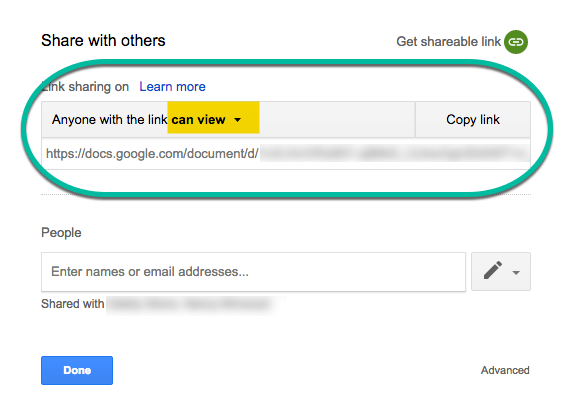
That’s it. Now take that URL and use a URL shortener like goo.gl (Google) or bitly to share with others. When sharing, even this way, make sure that your document is viewable to others in your share settings. I like to have ‘anyone with the link can view.’
One final note. I have noticed that when many people (maybe 50+) are trying to copy your document with this method at once, it is unsuccessful. A message appears stating that the item isn’t available. This was a fun fact I learned during a presentation (the first time I thought it was a fluke) and then later at another presentation. So this method works best with smaller groups or when sharing on your blog.
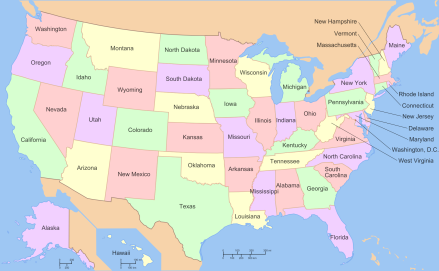
I teach 5th grade. Traditionally, 5th graders write ‘State Reports’. I, however, HATE the state report model. I get it, kill 2 birds with one stone. Write and research, combine Social Studies with ELA. But does the state report model actually meet the Social Studies standard? No, it does not. The standard, according to the California Dept. of Education, states: “Students know the location of the current 50 states and the names of their capitals.” How does writing about Iowa inform me about the other 49 states and their capitals? Simple, it doesn’t. And when you assign states, there is a group that is disappointed in the state they got. So now you are torturing a large group of students to do something that they aren’t passionate about and it doesn’t even meet one of the standards you think you are teaching. Not to mention torturing yourself when you read through the reports. Furthermore, your class will not have 50 students, so even if you are having students present, they won’t learn about all 50 states.
So how to meet this standard in an interesting way? Hangouts! Sure you could teach a song to learn the capitals and give the students a blank map to label, but come on, that is so boring!
goo.gl/sfuzT3
My vision for this year is to connect my class with at least one class in each of the other 49 states via Mystery Hangouts. This is NOT my idea. I saw it online last year. I don’t remember the teacher otherwise I would be giving credit where credit is due. What I have done is to create a Google Form for teachers to fill out. Using the Add-on Choice Eliminator 2 I can automatically wipe out state choices. When a teacher from Illinois fills out the form, Illinois is no longer a choice for a state. However, a teacher who wants to do this with my class, and doesn’t see their state listed, can simply contact me and they will be included in the fun. I also have carved out 2 days each week to complete my vision. There are more than enough days to complete this.
I would also like my students to keep notes on the states that we connect with. I’m not sure how this will be done. I could use a Google Form for each student to write one fact that they learned which could then be uploaded into a Google My Map. But that seems like a bit of work on my part and I want the students doing the work. I could have the students create their own Google My Map to log information. But my district has a ‘Walled Garden’ so the students wouldn’t be able to share their learning outside of our district; not what I am looking for. I could have students write on a shared doc or slide, but with 30+ students, it could get messy. We could create a Google Site or use a Padlet for each state, but 50 Padlets… So quite honestly, I’m not sure how to collect and archive their learning.
My idea for the notes is to track their growing knowledge. They need to know the state capitals and where the states are located. I would like for them to record capital, what region, maybe time-zone, what states border it, land locked or coastal, if coastal, what bodies of water, etc.
What are your thoughts? How would you have students record their learning? I’d love to hear what you have to say.
This marked the 3rd year that California has invested in teachers in this way; a summit. This FREE event is held across the state, simultaneously. Held at California Universities, teachers come together to learn, grow, and become inspired.
This year, the keynote speaker was former VP first lady, Dr. Jill Biden. She spoke of her experiences as a teacher. How she was inspired by her grandmother and her grandmother’s brass bell. How after moving to Washington, D.C. she couldn’t leave teaching behind and taught at a community college. She spoke of the importance of education and the value that we as teachers bring to the profession. This speech was live streamed to all sites. I sat listening to her at CSUMB – California State University Monterey Bay.
This was the first year that I attended. I had registered for the previous two years, but due to vacations – just getting back a day or two before – I wasn’t able to attend. I had been too tired. However, this year was different. I was ready to go! And I’m glad I did.
The conference was from 8 – 12:30 pm. After the keynote, our first EdTalk was given by Mark Cisneros of Alisal High School. He spoke about Literacy. How literacy impacts our students; specifically our second language learners. And how we should feel passionate about what we teach. If we aren’t passionate and excited, the kids won’t be either.
Then, came my favorite part: EdCamp. Based on what WE wanted to talk about, learn about, share about, sessions were created. No presenters, just like minded teachers talking and learning from one another. Along with that, was a shared doc with notes for all sessions.
We then closed the day out with our second EdTalk. Alex Hofsteen, Internation School of Monterey, shared his passion for teaching science in meaningful ways. Having the kids act out, create, and be hands-on in their own learning.
This was a great experience. Along with the learning, I was able to connect and grow my PLN. We’re all in this together. If you’re in California, looking into attending the event next year. It will be held Friday, July 27, 2018: It’s Personal.
Note: The two EdTalks were given by local teachers. Each site throughout the state had local teachers talk and share their knowledge and passion with others.
It’s no secret that I LOVE incorporating Google My Maps whenever and where ever I can in the classroom. So a teacher friend, Jennifer Stimpson (who is an AMAZINGLY inspirational scientist/teacher), thought it would be fun to get our classes to collaborate. She is a teacher in Texas and I teach in California. Our students come from drastically different backgrounds, which makes this project all the more appealing. We are going to play 2 Truths and A Lie: State Style.
In short, although the details have yet to be worked out, we will divide our classes into groups. Each group will be assigned a state in which, using Google My Maps, they will need to research the state and write 2 truths and 1 lie. They must cite their source and they may embed a video. This is phase 1.
Phase 2 will then see the teams working on another state, one the other class has completed, to find the 1 lie. Once the lie is found, it must be corrected and sources must be cited.
Finally, phase 3 the two classes will play either a Kahoot or Quizzizz game together. The idea is that students need to know the information for ALL 50 states, not just the ones they did. So students will have to work together, maybe digital notebooks, to study and learn.
We figured that this was way more fun than filling out a blank map of the U.S. What are your thoughts? How can we make it better? Want to join in on the fun? Here is the link to our document with a few more details.
 Yup, I’ve got #FlipgridFever along with my students. Over the summer I learned about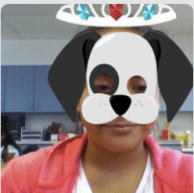
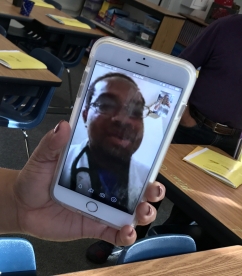 I’m no stranger to Back to School Night. I’ve done them for over 20 years. However, last night I had a first. And the nerd in me was so excited! A mom came to me with her phone explaining that the father couldn’t be there but wanted to participate. She had him on Facetime! We were able to introduce ourselves, talk for a bit, and have a ‘regular’ Back to School Night!
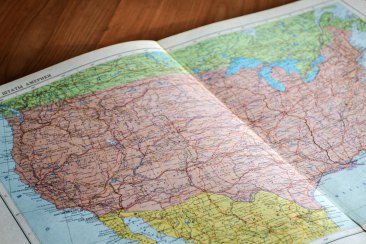 Not so long ago, I wrote about a


 That’s it. Now take that URL and use a URL shortener like