Math Dash Chats: 5 Minutes to Boost Daily Student Discourse and Spiral Review

As a teacher, I make a point every single school year to pick one specific area to refine and make better than the year before. Last year, my focus was clear: creating meaningful, daily mathematical discourse teachers could easily incorporate into their classrooms.

The traditional math curriculum my district used for over a decade had virtually no opportunities for student talk built in. When you combine a lack of built-in discourse with the challenge of fitting in manageable, productive spiral review, especially for standards like measurement, data, and geometry that so often get crammed into the final weeks of the school year, I knew teachers needed a structured, low-prep tool.

That is why I created Math Dash Chats.

I have built them for 2nd through 6th grade, and I am more than happy to expand the series if there is a demand for other grade levels! You can access the entire collection directly in this free Google Drive folder.

How Math Dash Chats Work

The premise is simple, efficient, and intentional:

  • 36 Weeks of Ready-to-Use Content: Each grade level includes 36 weeks of slides—one for every single week of the school year.
  • 5 Weekly Talk Prompts: Each slide features five distinct opportunities for review and mathematical reasoning; one for each day of the week:
    • Which One Doesn’t Belong
    • Convince Me That (adapted from Dan Kauffman)
    • Geometry
    • Data
    • Measurement
  • Interactive “Door” Covers: Off to the side of each slide is a set of visual “doors” that cover the five spaces. Setting them aside allows teachers to preview the content before presenting it. (Pro-Tip: Highlight and grab all five doors at once to slide them directly over the prompts – they are pre-aligned perfectly for you!)
  • Video Explanation: If you want a quick visual walk-through of how to set up and run the slides, check out slide #2 in any grade-level deck or watch this quick Math Dash Chats video tutorial.

Why Structured Discourse Matters

We know that when students are required to explain their mathematical reasoning aloud, their conceptual understanding shifts from superficial memory to deep mastery.

The primary barrier for teachers isn’t a lack of desire; it’s a lack of time. Teachers don’t have the mental bandwidth to invent a new discourse prompt every single morning. While informal partner talk can happen naturally, Math Dash Chats provides intentional, structured spiral review that follows a thoughtful progression across the year. Early-year slides ground students in prerequisite standards from previous grades, letting them focus on building communication habits with math they already know before tackling new grade-level standards.

Because the heavy lifting of curriculum alignment and slide design is already done, implementation is manageable.

3 Ways to Run a 5-Minute Math Dash Chat

Designed to take just 5 minutes at the start of your math block, here are three ways you can begin to execute them:

  1. The Morning Bell-Ringer: Have the slide projected first thing in the morning. Allow students to partner up and talk through the prompt as they settle into class before launching into whole-group discussion.
  2. Whiteboard Pre-Writes: Have students jot quick notes or sketch models on individual whiteboards before speaking. Writing down their thoughts first forces them to slow down, clarify their thinking, and articulate their reasoning more precisely when they begin sharing orally.
  3. Academic Vocabulary Warm-Up: Use the prompts specifically to practice domain-specific math language in context, giving multilingual learners a low-stakes environment to test out new vocabulary before encountering deeper concepts later in the lesson.

Ready to Start?

If your curriculum is missing structured student talk, or if you need an effortless way to keep geometry, data, and measurement standards fresh all year long, give Math Dash Chats a try.

Which grade level are you going to test out first? Let me know how your students respond in the comments!

Effective Communication of School District Goals

Do you know, without a doubt, what your district’s core goals and initiatives are for this school year?

After 31 years in education, I can finally say that I do, and so does every single teacher in our district. That isn’t to say we didn’t have goals in previous years; we certainly did. But like many educators, I was often unclear on what they actually were, or how they were supposed to shape my daily work in the classroom.

Living in California, the beginning of August signals our return to work. Our annual district orientation took place this week. We are also in the midst of some organizational shifts: navigating a potential unification with our local high school district, welcoming a new interim superintendent, and preparing for an upcoming math curriculum pilot.

When our new Interim Superintendent took the mic for her welcoming presentation, she included a single slide that clearly outlined our district focus (three core areas) alongside three manageable initiatives. Many of these build directly on the work we started in the last two years, making the vision feel focused rather than overwhelming.

It was deeply refreshing for me. Just as teachers are expected to post learning targets on the board so students know where they are headed, a district must clearly communicate its target destination to its staff.

Years ago, I had a candid conversation with a former district administrator about this very issue. I remember stating that I didn’t know what our district goals were, and that generic phrases like “raising test scores” didn’t qualify as a real goal in my book; it was far too broad and detached from daily practice. The administrator acknowledged that while goals existed, leadership had done a poor job communicating them. Unfortunately, despite that realization, very little changed in how information was shared – until now.

This year, the shift was as simple as presenting a clear visual slide at a district-wide meeting, followed by immediate action from site leadership. My site administrator took that slide, printed copies, and placed one in every teacher’s mailbox. We didn’t just hear the goals once in a crowded multipurpose room; we were given direct, permanent access to them.

Naturally, a piece of paper on a desk or posted next to a desk can easily get lost in the shuffle of daily classroom life. But knowing the administration, those goals won’t sit forgotten in a folder; they will be referenced, revisited, and integrated into teachers’ work throughout the year.

Will this clear communication actually make a difference? Educational research unequivocally says yes (Hattie). When a district aligns its staff around clear, actionable priorities – like our current focus on a new writing plan and expanding standards-based learning – it builds collective efficacy. We stop operating in isolated silos and start moving in the same direction, equipped with a common language and a shared point of reference.

As we kick off another school year, I’m curious about your experience: Does your district or school have clearly communicated goals this year, or are you still trying to guess the target?

Balancing Summer Break and School Communication

As July winds down, a familiar shift begins across the country. Teachers are starting to mentally shift toward the new school year, ordering supplies, sketching out classroom setups, or just enjoying those final, precious quiet mornings.

Behind the scenes, though, our school buildings have been humming with activity all summer. A huge shout-out goes to our maintenance and custodial crews who work tirelessly in the heat cleaning, repairing, and prepping facilities. The same goes for our office staff, secretaries, cafeteria teams, and site administrators who are already deep in the logistics of scheduling, hiring, and organizing. It takes a massive, dedicated team to get a school ready to welcome hundreds of students and staff back through the doors.

With all that prep work in full swing, an interesting seasonal observation always pops up right around this time: the arrival of the first Back To School communications.

We all know the essential information needs to go out at some point: when teachers can access their classrooms, bell schedules, dates for initial professional development, and general orientation details. But as I listen to colleagues across various districts, it brings up some interesting questions about the timing, frequency, and psychological impact of summer communication.

How much communication should schools or districts disseminate while staff is still contractually on summer break? And when is the ideal time to hit “send”?

There seem to be two very different approaches out there:

On one hand, you have the “one-and-done” approach: an email sent roughly two weeks prior to the start date containing the foundational, confirmed details teachers need to plan their return. It’s concise, predictable, and respects the remaining days of break.

On the other hand, there is the “real-time stream” approach: communications starting 2 to 2.5 weeks out, rapidly building to multiple emails a day as new details trickle into the office.

Often, these frequent communications include a thoughtful disclaimer from administration: “It’s still summer break, please don’t feel obligated to read or respond to this now!”

While the intent behind that disclaimer is genuinely kind and meant to relieve pressure, it often creates an unintended mental paradox for teachers. If an email lands in your inbox, human nature kicks in. We wonder: If I don’t need to read it, why was it sent now? Is there something urgent I’m missing? What is the unwritten expectation here? Even if we choose not to open it, the notification itself pings our mental workspace, pulling a little piece of our mind out of “recharge mode” and back into work mode.

Furthermore, when information is sent out rapid-fire, it inevitably leads to the dreaded follow-up email: “Correction: Please disregard the previous message regarding…”

Administrators are under immense pressure, often managing shifting district mandates, late staffing changes, and master schedule puzzles right down to the wire. It is completely understandable why the urge exists to share updates the moment they are finalized. But it leaves me wondering:

  • Could taking a step back, waiting a day or two to let information settle and proofreading it before hitting send, prevent the need for corrective follow-ups altogether?
  • Would batching non-urgent updates into a single, scheduled weekly digest give staff the information they need while preserving their peace of mind?
  • Are we utilizing simple tech features, like scheduled send, to ensure emails land during contract hours rather than on a Sunday afternoon or late July evening?

I don’t bring these questions up to point fingers or call anyone out. Building a healthy, communicative school culture is hard work, and administrators are walking a tightrope between keeping people informed and respecting off-contract time.

My hope is simply that we pause to reflect on how our communication strategies land on the receiving end. By slowing down, batching information, and being intentional with our timing, we can ensure that when that first message arrives, it feels like a helpful roadmap for a great year ahead, not an unintended disruption to a well-deserved break.

What are your thoughts? Which approach works best for you?

Essential Steps to Prepare Your Google Classroom for August

As the school year winds down in June, the last thing anyone wants to think about is August. However, spending just a little bit of time setting up your digital environment now is the ultimate gift to your future self. By organizing your space before you leave for summer, you can walk away completely disconnected, knowing you are ready to roll on day one.

When we talk about setting up for success, it’s not just about teacher sanity; it’s about the student experience. A messy, disorganized digital space creates unnecessary clutter that can quickly overwhelm students before the year even starts.

1. Archive This Year’s Classrooms (Not Just the Work)

Don’t just delete assignments or leave your current classes sitting active on your dashboard. Go to your Google Classroom homepage, click the three dots on your current classes, and then click Archive.

  • Why it matters: Archiving completely removes the class from your and your students’ active dashboards, preserving the data and work without cluttering up the new school year.
  • The Golden Benefit: Archiving keeps all your past assignments safe in the cloud. This means you can easily use the “Reuse post” feature next year to pull forward your best materials without having to recreate them from scratch.

How to Archive Your Google Classroom

Archiving your completed classes is the best way to clear the dashboard for both you and your students while completely preserving your assignments, materials, and student work for future reference.

  1. Navigate to the Classroom Homepage: Go to classroom.google.com or open the app.
  2. Locate the Class Card: Find the specific class you want to archive on your main dashboard.
  3. Open the Menu: Click the three vertical dots (More options) in the top right corner of that class card.
  4. Select Archive: Click Archive from the dropdown menu.
  5. Confirm: A pop-up will appear letting you know that you and your students won’t be able to make changes to the class unless it’s restored. Click Archive again to confirm.

Tip: You can always view, restore, or permanently delete these files by clicking the three horizontal lines (Main Menu) in the top left of your screen and selecting Archived classes.

How to Reuse a Post in Your New Classroom

Instead of recreating assignments from scratch every term, you can pull proven, high-quality assignments from any of your archived classes directly into your active dashboard.

  1. Open Your Active Class: Navigate to the new Google Classroom where you want to publish the assignment.
  2. Go to Classwork: Click on the Classwork tab at the top of the page.
  3. Click Create: Click the + Create button.
  4. Select Reuse post: From the dropdown menu, choose Reuse post (indicated by an icon with two spinning arrows).
  5. Choose the Source Class: A window will pop up showing all your classes. You can scroll or use the search bar to find the archived class that holds the assignment you want. Click on it.
  6. Select the Specific Post: Browse the list of assignments, questions, or materials from that class. Click on the one you want to bring over.
  7. Manage Attachments (Crucial Step): Look at the bottom of the window for the checkbox that says “Create new copies of all attachments.”
    • Check this box if you want fresh, clean templates for your new roster.
    • Leave it unchecked if you are linking to a view-only resource or a public webpage.
  8. Click Reuse: Click the Reuse button in the bottom right.
  9. Edit and Assign: Google Classroom will open the post as a draft. Here, you can adjust the instructions, update the due date, modify your emoji-coded topic headers, and click Assign or schedule it for later.

2. Pre-Load Your Subjects with Emoji-Coded Topics

When you build your new shell for August, set up your organizational structure right away using Topics.

  • Group by Subject or Unit: Create clear, predictable categories to help your students navigate.
  • Add Emoji Coding: Use relevant emojis at the beginning of your Topic titles (e.g., 🔢 MathReps, 📚 Reading). Emojis aren’t just decorative; they serve as powerful visual anchors that help students scan, locate, and navigate their assignments instantly, reducing cognitive load.

3. Queue Up the “Welcome Advice” (Leveraging Student Voices)

One of the best resources you have right now is your current crop of students. Before they leave, have them create quick advice videos or tips for next year’s incoming class. Try using Padlet‘s video feature for this. Even if you don’t have welcome advice for your students, queuing up rules, procedures, and expectations can save you time and stress in August.

  • Go into your new August classroom shell.
  • Use the “Reuse post” feature to pull forward that student-created advice video assignment from your archived class.
  • Change the settings to Save as Draft or Schedule it for the first week of school. Hearing tips directly from peers is an amazing hook for day one.

4. Harness the Power of Drafts and Scheduled Posts

The secret to a calm start to the school year is controlling the flow of information.

  • Avoid the Information Dump: When students log into Google Classroom on the first day and see twenty active assignments, they immediately shut down.
  • The Strategy: Build your first week’s templates, resources, and baseline routines now. Instead of hitting “Post,” use “Save as Draft” or “Schedule.” This allows you to drip-feed the content to your students right when they need it, keeping their digital workspace clean, focused, and approachable.

By archiving the old, structuring the new with visual cues, and queuing up your first week as drafts, you can officially shut your laptop for the summer and truly relax. Your August self will thank you!

Mastery Loops in Math: Redefining Learning with MathReps

On paper, a MathRep might look exactly like a worksheet. I don’t fight that semantic battle with adult critics because the magic isn’t in the photocopy: it’s in the underlying pedagogy.

Traditional math curricula are inherently topical. They are designed as a fast-paced sprint, checking off one complex skill before immediately jumping to the next. This structure puts students at a massive disadvantage. It forces them to constantly use finite cognitive energy to decode new layouts, instructions, and isolated procedures, leaving little bandwidth to actually master the skills, spot the patterns, and make deep mathematical connections.

If we want students to truly own the math, we have to activate the Mastery Loop. And one of the most powerful ways to do that is by looking at the deliberate design, frontloading strategies, and classroom culture that drive true mathematical fluency.

The Anatomy of a Rep: Moving from Silos to Connections

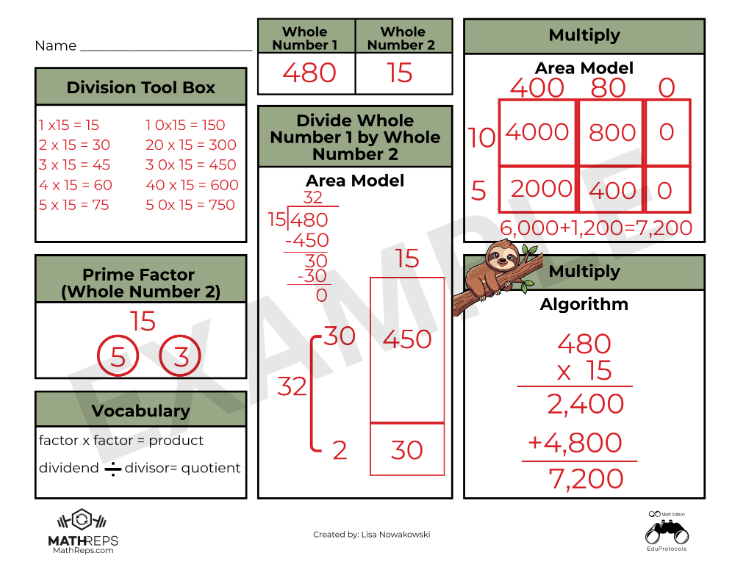
Traditional worksheets treat math concepts like isolated islands. A student might practice “decimals on a number line” on Monday, but if they don’t see a visual area model or a place value chart alongside it, that knowledge stays siloed. When the format inevitably changes, the student gets stuck because the conceptual bridge was never built.

A MathRep completely flips this dynamic by grouping several interconnected standards onto a single page. By keeping multiple formats of a concept alive simultaneously, you shift the cognitive environment from rote memorization to relational thinking.

This design acts as a real-time diagnostic tool for teachers. Because concrete, pictoral, and abstract representations exist side-by-side, you can immediately spot where a student’s understanding breaks down: Can they partition the area model perfectly, but lose the logic when converting it to the abstract numbers of a standard algorithm? The layout reveals the gap instantly, allowing for precision intervention right in the moment.

The Prior-Grade On-Ramp (Frontloading)

This interconnected design makes MathReps the ultimate engine for frontloading upcoming units. Think about what happens when a fourth-grade teacher hits multi-digit multiplication and more complex division. If students don’t firmly grasp the core meaning of those operations, they get entirely lost in the steps.

Instead of diving straight into a frustrating textbook lesson, you can spend one to two weeks activating their prior knowledge with a past-grade protocol to jog the brain:

  1. The Reminders (3rd Grade): Before opening the current grade-level curriculum, pull a basic third-grade MathRep. For ten minutes a day, students interact with a single, simple equation—mapping out fact families, creating equal groups visually, and skip-counting on a number line. It gently reinforces the core foundation: division is sharing, and multiplication is grouping.
  2. The Transition (4th Grade): Once that foundation is secure, you introduce the fourth-grade MathReps. Because the heavy cognitive lifting of understanding “sharing and grouping” was already handled, their working memory is entirely free to tackle the next layer of complexity: the area model, the distributive property, or tape diagrams.

By utilizing a past-grade protocol, you prove to students that they aren’t starting at zero. You lower their anxiety and provide an active, scaffolded on-ramp to novel standards.

The In-Class Daily Glue vs. The Homework Silo

For this strategy to work, it is critical to note a fundamental rule: MathReps must be done in class. Sending them home for traditional homework completely defeats the purpose.

Traditional math homework is sent home into a feedback vacuum, often forcing students back into the “silo trap” of practicing a single procedure 30 times over. If they have a misconception, they spend half an hour reinforcing a bad habit before an adult can catch it.

MathReps acts as the daily glue because it thrives on a live classroom ecosystem built around immediate feedback. When you establish this routine as a daily norm from day one of the school year, you completely re-engineer the classroom culture:

  • Week 1 (The On-Ramp): On Day 1, the routine might take up to 45 minutes because you are teaching the layout and reducing the extraneous cognitive load together. By Days 2–4, the time drops dramatically (down to 12–15 minutes) as the format becomes predictable. Day 5 serves as a low-stakes baseline assessment.
  • Weeks 2–6 (The Sustainable Machine): Days 1–4 become a predictable rhythm: a set time to work, followed by an immediate check. By Day 5, the weekly assessment is just a natural, stress-free extension of what they’ve already mastered.

Starting every math block with this routine sets a predictable, accessible tone. It warms up their “math brain,” lowers anxiety, and allows them to see the big picture.

Of course, when you move daily practice entirely into the classroom, the inevitable pushback arises: “Then what do teachers give for homework?” The answer lies in moving away from compliance-driven worksheets and toward non-traditional, meaningful alternatives like choice boards. Homework shouldn’t copy what happens in the room; it should extend a student’s vision outward. Instead of solving identical equations at a kitchen table, let them apply their mathematical flexibility to the real world, tracking geometric shapes in local architecture, finding the volume of buildings, or calculating the dimensions of a swimming pool.

Shifting the Ownership Loop

When the daily in-class routine is predictable and the layout never surprises them, you can finally pass the wheel to the students.

If a teacher doesn’t want to spend time curating a “Today’s Number” or “Today’s Equation,” you don’t have to. Assign a different student to choose the mathematical focus each day. When you hand over that marker, the routine stops being an exercise dictated by an adult and becomes a space owned entirely by the kids. They track the patterns, they navigate the constraints, and they build the schemas.

I have watched students actively use a visual representation they completely understand, like an area model in multiplication, to independently check their own work and guide themselves through a complex standard algorithm. They didn’t need a teacher telling them they were right or wrong; the interconnected page allowed them to be guided on their own.

Every time we step back and allow them to navigate the page independently, we honor the core truth of the learning process: The person who is doing the work is the one doing the learning.

15-Day Routine for Math Test Confidence

In the sports world, athletes don’t spend the week before a championship learning new plays. They spend it “polishing”, perfecting their form, sharpening their reaction time, and ensuring their fundamentals are second nature. However, as a lifelong Detroit Lions fan, I’m not sure this analogy is always accurate. While I love my Lions, there have been plenty of games where it looked like they just learned the plays in the huddle! But all joking aside, as educators, we are preparing our students for life skills, not just a state test.

The Problem: The “Skill Blur”

When students are sitting at a computer, facing math problems one after another, cognitive overload is a real threat. The “how and when” of the four operations can easily get jumbled with fraction rules, and suddenly, all that geometry vocabulary becomes one big ole mess in their heads. This can be frustrating for both students and teachers.

It’s not that they didn’t learn the material; it’s that the retrieval is getting blocked by the sheer volume of information and tasks that need to be completed.

The Solution: MathReps as a Tactical Warm-Up

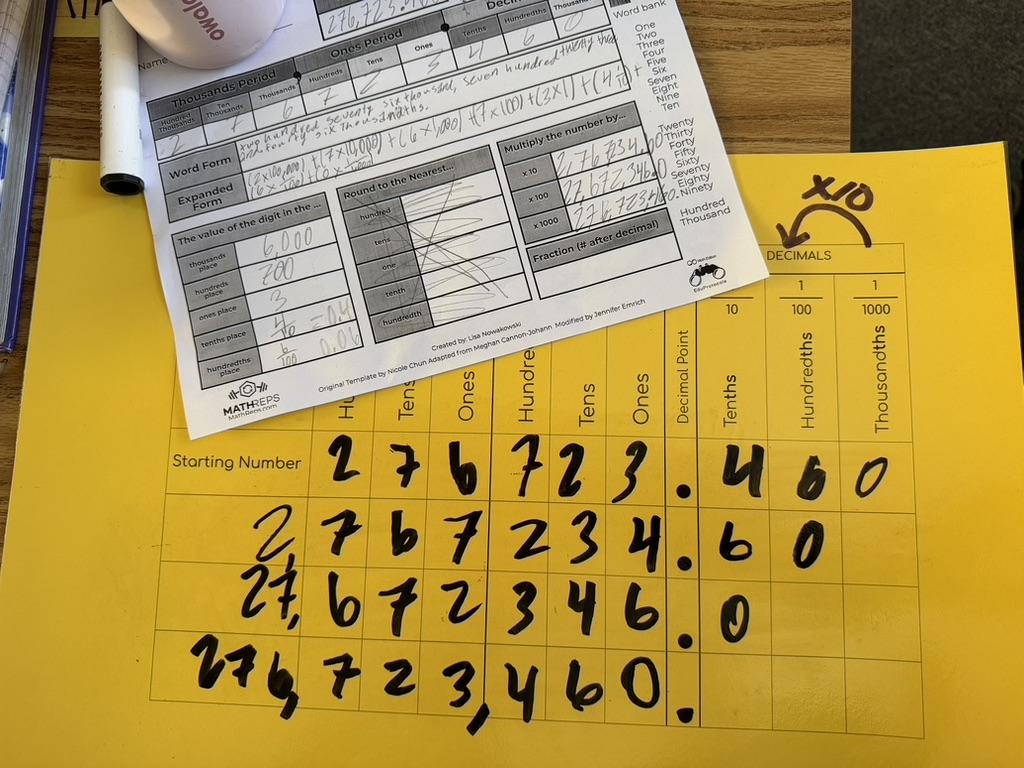
MathReps lower the affective filter by repeatedly practicing these core skills. I remember a year when my students didn’t just “do a unit” on decimals; we consistently spiraled decimal practice into our MathReps alongside other skills.

Because it was part of their regular routine, when they eventually faced a screen with decimal problems and tasks at the end of the year, they didn’t panic. The decimal didn’t throw them because it wasn’t a “guest star” in the curriculum; it was a familiar friend. By using MathReps as a 10-minute daily “Tactical Warm-Up,” we help students:

  1. Filter out the Format: They’ve seen the area model and the number line hundreds of times. The “test screen” is just another canvas for their existing skills.
  2. Sharpen the Fundamentals: We move from “manual labor” math to automaticity.

The 15-Day “Polishing” Routine

If you have 15 days left before the test, don’t reach for a packet. Reach for a Routine or EduProtocol.

  • The Selection: Pick the MathRep that addresses the skill your students find the weakest. If they are tripping over the arithmetic, use an Operations Frame (like the giraffe example below).
  • The Routine: Use the same MathRep at the beginning of your math period for at least one week. Consistency beats variety here. On Day 1, they are reacquainting themselves with the procedures; by Day 5, they are mastering the logic.
  • The Pivot: After 5 days, if you’re feeling good, move to another high-leverage frame. Or, cycle back to a different MathRep you used earlier in the year to keep those older skills from getting lost in the sauce.

The Bottom Line

We aren’t “cramming” for a test; we are clearing the fog. When we polish these skills through MathReps, we give students the confidence to show what they actually know, rather than getting lost in the “mess” of a testing interface and the information overload that bogs them down.

The Importance of Learning Progressions in Math Education

As an instructional coach in a district that recently began Standards-Based Learning in math, I hear similar concerns across the district, especially this time of year. The pressure to have mastery of all the Priority Standards before the year ends. (It’s important to note that all the standards are being taught. There are Priority Standards and supporting standards. The supporting standards do just that: support. They are the prerequisites, if you will, to the Priority Standards.)

But there is a hidden “Instructional Debt” that makes these standards feel like an uphill battle. If we want our students to succeed at high-level problem solving, we have to talk about the one thing that has become a bit of a “taboo” word in modern math: Memorization. Okay, the act of memorization isn’t taboo; some of the old methods are no longer supported by current research. It’s a frustration for all K-12 math teachers. So let’s talk about it and how we can help students master facts using current research.

The “Cognitive RAM” Problem

Every student has a finite amount of mental energy (let’s call it “Cognitive RAM”). I can hear you all now, “So do the teachers!” When we ask a student to solve a multi-step word problem, that task requires a massive amount of RAM for reading comprehension, translation, planning, and strategic persistence.

If that student hasn’t memorized their basic addition, subtraction, or multiplication facts, they are forced to use their limited RAM for “manual labor”: counting on fingers, drawing tally marks, drawing, modeling, or skip-counting. By the time they get to the actual logic of the problem, they’ve run out of “mental memory.” The whole task seems insurmountable.

The truth is: Memorization is Creative Freedom. When the facts are automatic, the brain is finally free to be creative in the approach to solving the problem. It breaks down a barrier. Think about it. If you are trying to solve a problem and realize you need to multiply 376 by 48, but you don’t have your facts memorized, this task just became a slow, muddy drudge. However, if you know you will need to multiply 376 by 48 AND you know your facts, the hard part is behind you once you know what to do. Suddenly, things don’t feel so unattainable.

The Progression is Non-Negotiable

To be clear: I am not advocating for “rote memorization” without understanding. Memorization is the final step of this Learning Progression. It only works if it is built on a solid foundation:

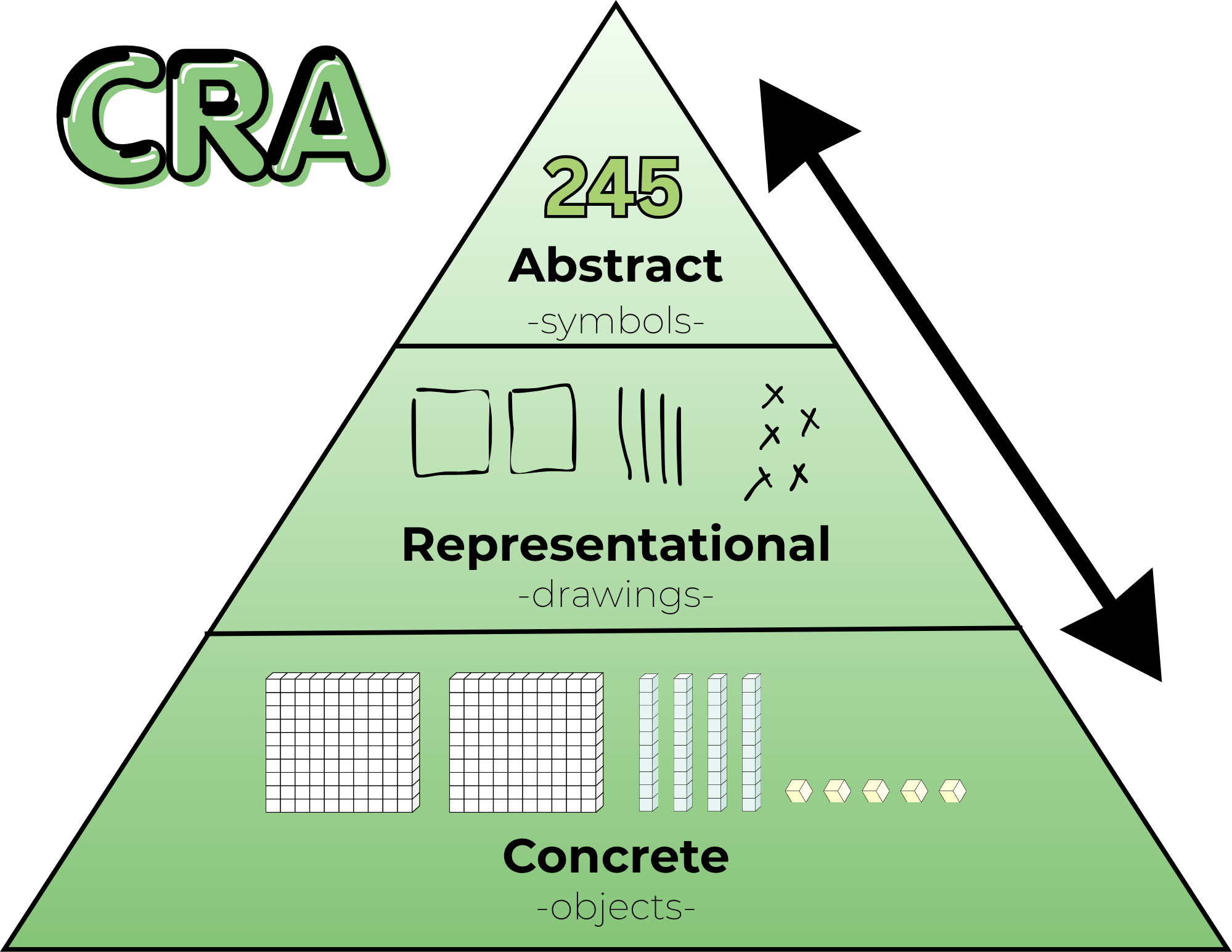
  1. Concrete: Manipulating base ten blocks and counters.
  2. Representational: Drawing tape diagrams, number paths, and arrays.
  3. Abstract (The Goal): Automaticity, mental fluency, and algorithms.

If we jump straight to memorization, we build a house of cards. But if we stay in the “Representational” phase forever, allowing students to rely on skip-counting patterns or finger-counting, we are capping their growth. We are asking them to do “back-breaking” math every single day. We do need to nudge them to move beyond the Representational model and help them see/understand that they are ready for the abstract and that the abstract is, in fact, your friend.

The Three Gaps Holding Students Back

When I listen to teachers discuss where students are “stuck” on a standard, they usually find that there is a gap in one of these three essential progressions:

1. The Missing Floor (Addition & Subtraction Facts)
If a fourth grader is still “counting on” to solve 14 + 6, they aren’t just slow, they are overloaded. Mental math strategies like “Make a 10” are the building blocks for every standard that follows.

2. The Fluency Wall (Multiplication & Division)
Skip-counting (7, 14, 21, 28…) and arrays are beautiful ways to learn multiplication, but it’s a weight around a student’s neck during long division. We have to move them across the bridge to automaticity.

3. The Magnitude Gap (Flexible Thinking)
When a student looks at 1/4 and 5/6, do they see numbers to crunch or magnitudes to visualize? Flexible thinking means knowing that 1/4 is “a little bit” and 5/6 is “almost a whole.” If they can’t visualize this, they aren’t ready for the standard of comparing fractions.

Bridging the Gap with MathReps

This is exactly why the MathReps framework exists. We don’t just “hope” kids learn their facts or develop flexible thinking. We build consistent, high-frequency opportunities to practice these skills alongside the priority standards.

A MathRep ensures that students touch the concrete and/or representational models every single day until those skills settle into the abstract. It allows us to pay off the “Instructional Debt” in small, daily installments so that when students are expected to solve two-step word problems with multiple operations, our students have the mental capital to win.

The Bottom Line: Don’t be afraid to slow down and build the floor. You aren’t “behind” on the pacing if you are busy building the progressions that make those standards possible.

My Reflections, Balance is the Key

This series began with a simple but uncomfortable question: Is tech really the problem, or could it be something else? The teachers care, the students can learn with technology, and technology isn’t inherently bad.

However, the system moved faster than the support.

Across these past few weeks through these posts, we’ve explored how learning science favors retrieval, explanation, and production; how screen use is complex and nuanced; how professional development was often the missing bridge; and how teachers are still finding ways, quietly and creatively, to make learning meaningful within real constraints. It’s not easy, but teachers are doing it.

If there’s one thread that connects it all, it’s this: education doesn’t fail because educators fail. It falters when tools, policies, and expectations lack the support the systems need to sustain them.

Teachers were asked to learn and integrate platforms without pedagogy, manage mandates, and personalize learning without time. And yet, classrooms remain places where curiosity, care, and learning persist. We need to support this with pedagogy and giving time.

This series was never meant to argue for less technology or more technology. It was meant to argue for better use, grounded in research, shaped by pedagogy, and tempered by reality. Balance doesn’t come from extremes. It comes from thoughtful choices, small shifts, and shared responsibility.

Let me leave you with some final thoughts of hope.

Hope lives in teachers who start small.
Hope lives in students who explain their thinking.
Hope lives in leaders who listen before they buy or jump to a new mandate.

And hope lives in the understanding that change doesn’t require perfection: it requires intention.

If this series sparks conversation, reflection, or even quiet validation for someone navigating these tensions, then it has done its job.

A final question: What if we centered learning over tools, trends, or timelines? What could education become?

What Teachers Can Do Now (Without Burning Out)

Post 5 in the Teaching in a Digital Age series. See previous post.

After research, reflection, and hard truths, the question many teachers are left with is a simple one:

What can I actually do, right now, without adding more to my plate?

It’s the question we are often asking ourselves. This post isn’t about sweeping reform or perfect implementation. It’s about small, realistic shifts that rebalance technology use, protect teacher energy, and put learning back where it belongs: with students. As they say, the person doing the work is the person who is learning.

Start With Choice Boards (Without Overthinking Them)

If you’ve read my blog long enough, you know that I am a fan of choice boards. But choice boards don’t have to be complicated or beautifully designed. In fact, many teachers already use a version of them without calling them that: a “must do” and “may do” list.

A simple way to begin, and what I do:

  1. Choose the skill you want students to practice or master.
  2. List familiar ways students can show understanding (write, draw, explain, build, record).
  3. Decide how students will share—digitally or not.

That’s it. I’m a fan of having students share their work, not just turn it in.

The focus stays on skills and mastery, not the tool. Technology becomes an option, not the driver. A student might choose to draw a model, make a poster, record an explanation, design a game, or write a short reflection. Over time, these low-tech options can naturally lead to digital creation, but only when it makes sense.

Choice builds ownership. Ownership builds engagement.
And none of this requires a new platform (unless you want one).

Lean Into Student Explanation

It’s easy to feel like there’s no time for student talk. There’s content to cover. Pacing to manage. Standards to meet. It all can feel overwhelming at times.

But explanation, oral, visual, or written, isn’t extra.
It is the learning. I know it sounds simple, and the time can feel like extra, but it’s really not. Remember: start small.

Short, structured opportunities for students to explain their thinking, turn-and-talks, quick presentations, sketch-notes, and exit explanations, strengthen understanding and surface misconceptions faster than silent work ever could.

These practices also align naturally with ELD standards, but they benefit all students. Being able to explain clearly, listen actively, and respond thoughtfully is a skill worth protecting instructional time for. And when a student can explain the material clearly, you know they understand it.

Sometimes the most powerful move is simply to stop and let students talk.

Build Simple Routines That Shift the Cognitive Load

When students know:

  • where to find materials
  • what success looks like (success criteria or proficiency scales)
  • how to make choices
  • where finished work goes

…the cognitive load shifts from the teacher to the learner.

This isn’t about losing control; it’s about creating systems that run themselves. As an instructional coach, I have found that having systems in place is valuable for teachers. It lowers your stress and makes for a more peaceful classroom. Once expectations are clear and routines are established, students work more independently, collaborate more naturally, and take greater responsibility for their learning.

That shift frees you up to do what matters most: conference, observe, intervene, and support students who need it most.

You already do much of this instinctively. The key is being intentional and letting go just enough. And if you are thinking to yourself, “I already do all of this,” then you should feel validated.

Start Small (Really Small)

This might be the hardest part.

Teachers are learners. We read blogs, attend conferences, watch webinars, and leave inspired. The temptation to do all the things is real. I am one of those who want to do all of the things right away.

But change works best when it’s edited. And I get it, I have trouble editing. But here are some things I have learned and would like to share with you.

Choose one shift:

  • One new routine
  • One way students explain
  • One choice opportunity

Let students become comfortable. Let yourself adjust. Once it’s working, then layer in something new.

Doing too much too fast overwhelms students and teachers alike. Sustainable change is slow, and that’s not a flaw. It’s the point.

Where MathReps and EduProtocols Fit

Strategies like MathReps and EduProtocols fit naturally into this work, not as mandates, but as examples.

They emphasize:

  • showing thinking over choosing answers
  • explanation as learning
  • repeatable routines that reduce planning load – This is probably the biggest bonus.

Used thoughtfully, they can support production without requiring perfection or constant novelty. But they’re options, not requirements. What matters most is the principle behind them: students actively making sense of their learning.

A Final Thought

You don’t need a new platform. (And if you’re like me, you want the newest, shiniest tool)
You don’t need a complete overhaul.
You don’t need to do more.

You need permission—to start small, to focus on thinking, and to build a classroom that works for you and your students.

That’s where balance begins.

So, what is one low-lift shift you could try this week that moves students from consuming to producing, without adding to your workload?

Was Professional Development the Missing Piece?

What if the problem was never the tool, but the lack of sustained support? Or support from the onset?

For years, classrooms have been flooded with platforms, programs, and promises. New tools arrive with excitement, urgency, and often good intentions. Teachers are (sometimes) trained briefly, then sent back to their classrooms to “make it work.” Sometimes there is no training, and expected to “make it work”. When outcomes fall short, frustration follows. Fingers point in every direction.

But perhaps the most honest explanation is also the least controversial: we asked educators to transform instruction without giving them the time, space, or support to truly learn how to do so.

One-Time PD vs. Sustained Learning

Most teachers recognize this pattern immediately.

A new tool is introduced. There’s a short training – here’s what it does, here’s where to click – and then: Go use it. Sometimes there’s follow-up, but it’s often months later and/or focused narrowly on features, not instruction. Other times, PD becomes so repetitive that it feels disconnected from classroom reality.

The spacing matters, just like it matters with our students. When training sessions are too far apart, teachers naturally fill in the gaps themselves. They figure out what works (and what doesn’t) through trial, error, and time; often without a shared pedagogical vision guiding those decisions.

Add to that the reality that many schools roll out multiple new tools or curriculum adoptions at once, sometimes with little dedicated time at the start of the year to learn them deeply. And sometimes there’s too much information coming at the beginning of the school year. The result isn’t resistance, it’s overload.

There has to be a better way.

Pedagogy Must Come First: We Can’t Pretend the Clock Rewinds

In theory, most educators agree: pedagogy should come before platforms, curricula, and pacing.

In practice, that train has already left the station long ago.

Teachers are knee-deep in platforms that were adopted years ago. Pedagogy often became secondary, not because educators didn’t care, but because survival required learning to manage the tool with students in the classroom in real time before reflecting on how it shaped instruction.

So the question isn’t Should pedagogy come first?
It’s How do we re-center pedagogy now, given where we are?

One possible answer isn’t adding more tools, but pressing pause. Limiting new adoptions. Creating space for a pedagogical reset using the platforms already in place. Asking not What else do we need? But how can we use what we have better? Or how can I use what is already available? How will it help me/my students?

This isn’t easy. It can feel overwhelming. But if the goal is student thinking, understanding, and transfer, not just task completion or student compliance, then the work is necessary.

What Meaningful Tech PD Actually Looks Like

I know, this is a loaded question. We want it, we know we need it, but are often loath to attend, myself included. This is especially true when it’s district-provided. Why is that? (That was more of a question to myself, no sarcasm, just a real thought/question)

If professional development is meant to change classroom practice, it must be manageable, relevant, and immediately useful.

That starts with focus. If a district introduces three new tools, meaningful PD might center on just one—and even then, on one or two high-leverage instructional uses, not every feature. Depth matters more than breadth. I’m a fan of showing how it is relevant to you, right now.

PD also needs to be differentiated. Some teachers are ready to explore advanced applications. Others need a strong foundation. Meeting teachers where they are isn’t a luxury; it’s how learning works. The trick is to do this well. I’m not sure what the answer is, but I know it should be a goal.

And perhaps most importantly: teachers need to be able to use what they learn immediately. I am passionate about this point. If something isn’t implemented within a week, it often never will. This isn’t a failure of commitment; it’s the reality of teaching in a system filled with mandates, assessments, and competing priorities.

Ongoing support matters too. Not once a semester. Not when schedules allow. Consistent coaching, collaboration, and feedback help teachers refine their practice at a pace that feels sustainable rather than rushed.

Teachers invest in what moves their students forward. When the impact is visible, the motivation follows.

The Cost of Not Investing in Teacher Learning

When professional learning is shallow or fragmented, classrooms tend to drift toward extremes. Again, this isn’t a criticism of teachers; it’s a reality.

In some cases, technology becomes a digital babysitter, students consume, click, and complete without deep thinking. That’s the compliance factor. In others, technology is avoided altogether. Of the two, opting out may be the more responsible choice, but it still leaves potential untapped.

A middle ground exists.

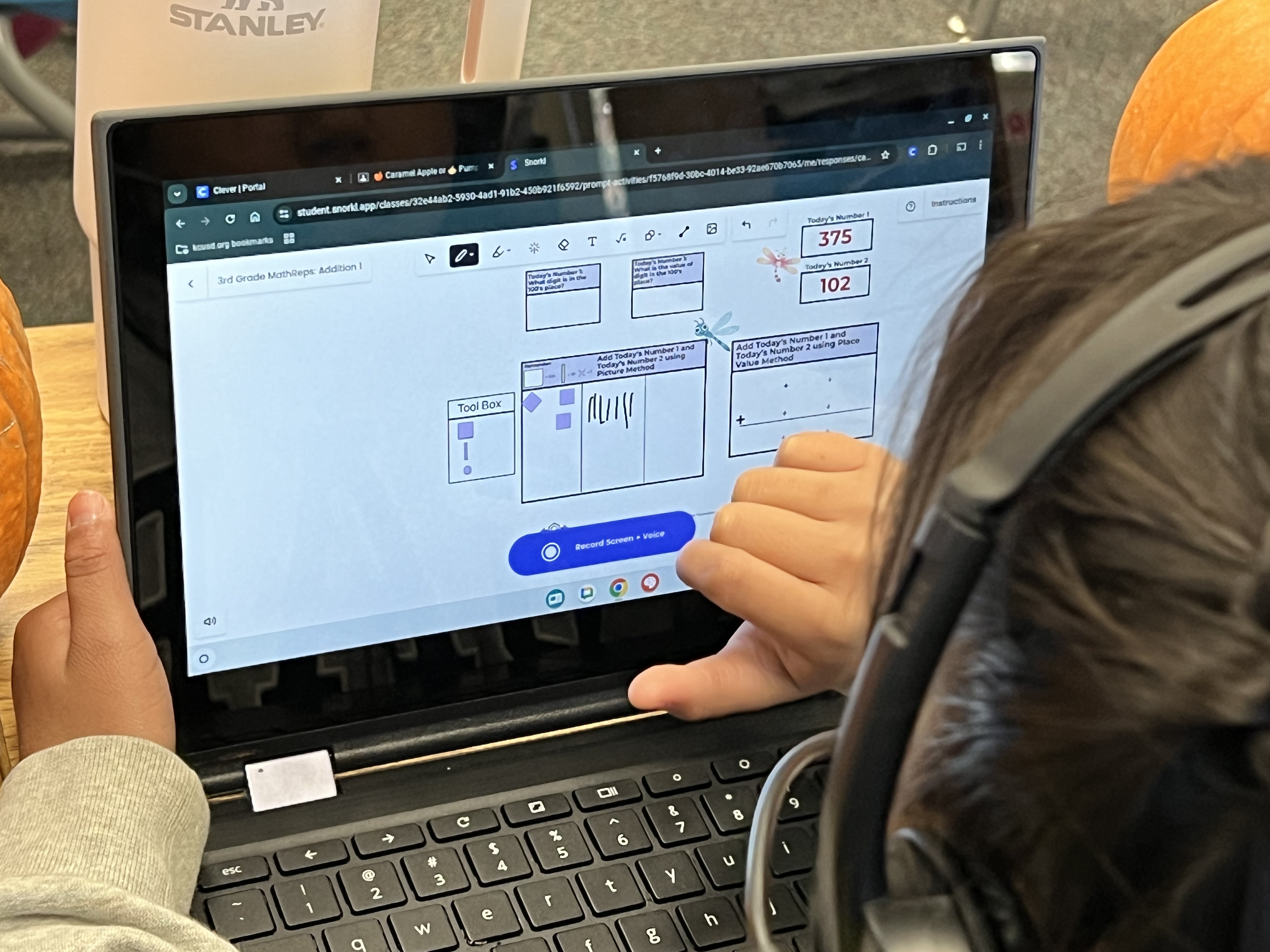
When teachers are supported in learning how and why to use tools, technology can amplify good pedagogy rather than replace it. Tools that provide immediate feedback, surface misconceptions, or help analyze student thinking, like Snorkl or Wayground, can lighten the instructional load while keeping learning active and visible. I know I keep bringing up these two tools. They are ones I have available in my district. There are other tools that achieve the same things.

But even the best tools can’t compensate for a lack of investment in teacher learning.

A Shared Responsibility

This isn’t about blame. We are where we are, and reflection is necessary.

Teachers didn’t ask for constant change without time to adapt. Administrators didn’t design systems to overwhelm. Policymakers didn’t intend to sideline pedagogy. Everyone involved is operating within constraints and doing what they feel is best.

But if we want classrooms where students think, explain, and truly understand, then professional learning can’t be an afterthought. It has to be central to how we implement change.

Teachers and students deserve better than “I have to do this.”
We’ve tried that. It doesn’t work. It’s time we try something different.

So, my question to you is, if professional development were designed around learning rather than compliance, what would change, for teachers, for students, and for the system as a whole?