The Art of Tech Integration in Education

As a Tech TOSA, I often surprise people when I come into a class where no technology is needed. We have been conditioned to think that being “Tech-Forward” means more screens and more apps, but I’ve found that true technology integration is actually about the “Edit.” It’s about having the courage to ask why we are using a tool and if it actually levels up the assignment.

I’ve always lived by one rule in my classroom: “The person who is doing the work is doing the learning”. If the technology is doing the heavy lifting, the student is just a passenger.

The Power of the “Closed Lid”

The “Edit” starts with the foundation of the Closed Lid. In many classrooms, an “open lid” can create a “stimulation tax” that pulls focus away from Priority Standards and learning. I tell teachers that the most powerful thing they can do is give their students permission to unplug so they can focus on the raw logic of the lesson.

For those who are tech-nervous, stopping at paper and pencil is a perfectly valid pedagogical choice. However, for those looking to “lighten the load,” we can build a bridge to a tool like Snorkl.

The Powerful Team:

  1. Phase 1: Students do the messy, non-linear work on paper—doodles and all!.
  2. Phase 2: They take a quick photo of that work and upload it to Snorkl.
  3. The Payoff: The teacher gets immediate feedback and a clear window into class-wide progress without having to collect a stack of 30 physical papers.

Editing the Distractions: The 3-Font Rule

Once the thinking has been captured on paper, moving to the screen brings a new set of challenges. I can’t tell you how many times I’ve watched students waste fifteen minutes finding a font, and sometimes color, instead of developing an idea.

This is why I advocate for the 3-Font Rule:

  • The Constraint: Students choose from only three fonts and one size (12pt). Think boring. There is a time and place for the ‘fun’ fonts.
  • The Logic: This isn’t about being restrictive; it’s about protecting “think-time”. When we “edit” the infinite choices of the digital world, we remove the barrier to the standard, allowing the student to focus on the content.

The “Individualized Edit” and Equity

The “Edit” mentality isn’t one-size-fits-all. We have to remember that for some students, the technology is the bridge that allows them to do the work.

  • The Equalizer: For a student with an IEP, dictating notes into a computer can be the tool that enables them to synthesize information.
  • The Success Story: I once had a student who wasn’t a strong reader. While the rest of the class read, he watched videos and took notes by hand. Because he had the right “Edit” for his needs, he was successful.

The Neuroscience “Why”

Why does the “Edit” back to paper work so well? Recent science shows that handwriting is actually a “high-performance” activity for the brain. A 2025 study published in the journal Life revealed that handwriting engages significantly wider neural networks than typing.

Final Thought

The “Edit” mentality isn’t about being anti-tech; it’s about being pro-brain. We use technology when it enhances the lesson, but we have the courage to close the lid when the technology becomes a distraction. By editing out the noise, we ensure that the students remain the ones doing the thinking.

Because at the end of the day, if they aren’t doing the work, they aren’t doing the learning.

15-Day Routine for Math Test Confidence

In the sports world, athletes don’t spend the week before a championship learning new plays. They spend it “polishing”, perfecting their form, sharpening their reaction time, and ensuring their fundamentals are second nature. However, as a lifelong Detroit Lions fan, I’m not sure this analogy is always accurate. While I love my Lions, there have been plenty of games where it looked like they just learned the plays in the huddle! But all joking aside, as educators, we are preparing our students for life skills, not just a state test.

The Problem: The “Skill Blur”

When students are sitting at a computer, facing math problems one after another, cognitive overload is a real threat. The “how and when” of the four operations can easily get jumbled with fraction rules, and suddenly, all that geometry vocabulary becomes one big ole mess in their heads. This can be frustrating for both students and teachers.

It’s not that they didn’t learn the material; it’s that the retrieval is getting blocked by the sheer volume of information and tasks that need to be completed.

The Solution: MathReps as a Tactical Warm-Up

MathReps lower the affective filter by repeatedly practicing these core skills. I remember a year when my students didn’t just “do a unit” on decimals; we consistently spiraled decimal practice into our MathReps alongside other skills.

Because it was part of their regular routine, when they eventually faced a screen with decimal problems and tasks at the end of the year, they didn’t panic. The decimal didn’t throw them because it wasn’t a “guest star” in the curriculum; it was a familiar friend. By using MathReps as a 10-minute daily “Tactical Warm-Up,” we help students:

  1. Filter out the Format: They’ve seen the area model and the number line hundreds of times. The “test screen” is just another canvas for their existing skills.
  2. Sharpen the Fundamentals: We move from “manual labor” math to automaticity.

The 15-Day “Polishing” Routine

If you have 15 days left before the test, don’t reach for a packet. Reach for a Routine or EduProtocol.

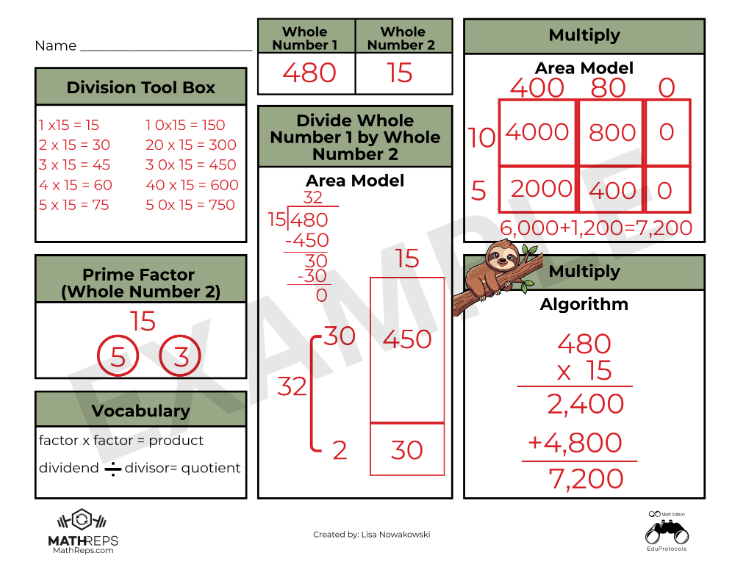
  • The Selection: Pick the MathRep that addresses the skill your students find the weakest. If they are tripping over the arithmetic, use an Operations Frame (like the giraffe example below).
  • The Routine: Use the same MathRep at the beginning of your math period for at least one week. Consistency beats variety here. On Day 1, they are reacquainting themselves with the procedures; by Day 5, they are mastering the logic.
  • The Pivot: After 5 days, if you’re feeling good, move to another high-leverage frame. Or, cycle back to a different MathRep you used earlier in the year to keep those older skills from getting lost in the sauce.

The Bottom Line

We aren’t “cramming” for a test; we are clearing the fog. When we polish these skills through MathReps, we give students the confidence to show what they actually know, rather than getting lost in the “mess” of a testing interface and the information overload that bogs them down.

The Importance of Learning Progressions in Math Education

As an instructional coach in a district that recently began Standards-Based Learning in math, I hear similar concerns across the district, especially this time of year. The pressure to have mastery of all the Priority Standards before the year ends. (It’s important to note that all the standards are being taught. There are Priority Standards and supporting standards. The supporting standards do just that: support. They are the prerequisites, if you will, to the Priority Standards.)

But there is a hidden “Instructional Debt” that makes these standards feel like an uphill battle. If we want our students to succeed at high-level problem solving, we have to talk about the one thing that has become a bit of a “taboo” word in modern math: Memorization. Okay, the act of memorization isn’t taboo; some of the old methods are no longer supported by current research. It’s a frustration for all K-12 math teachers. So let’s talk about it and how we can help students master facts using current research.

The “Cognitive RAM” Problem

Every student has a finite amount of mental energy (let’s call it “Cognitive RAM”). I can hear you all now, “So do the teachers!” When we ask a student to solve a multi-step word problem, that task requires a massive amount of RAM for reading comprehension, translation, planning, and strategic persistence.

If that student hasn’t memorized their basic addition, subtraction, or multiplication facts, they are forced to use their limited RAM for “manual labor”: counting on fingers, drawing tally marks, drawing, modeling, or skip-counting. By the time they get to the actual logic of the problem, they’ve run out of “mental memory.” The whole task seems insurmountable.

The truth is: Memorization is Creative Freedom. When the facts are automatic, the brain is finally free to be creative in the approach to solving the problem. It breaks down a barrier. Think about it. If you are trying to solve a problem and realize you need to multiply 376 by 48, but you don’t have your facts memorized, this task just became a slow, muddy drudge. However, if you know you will need to multiply 376 by 48 AND you know your facts, the hard part is behind you once you know what to do. Suddenly, things don’t feel so unattainable.

The Progression is Non-Negotiable

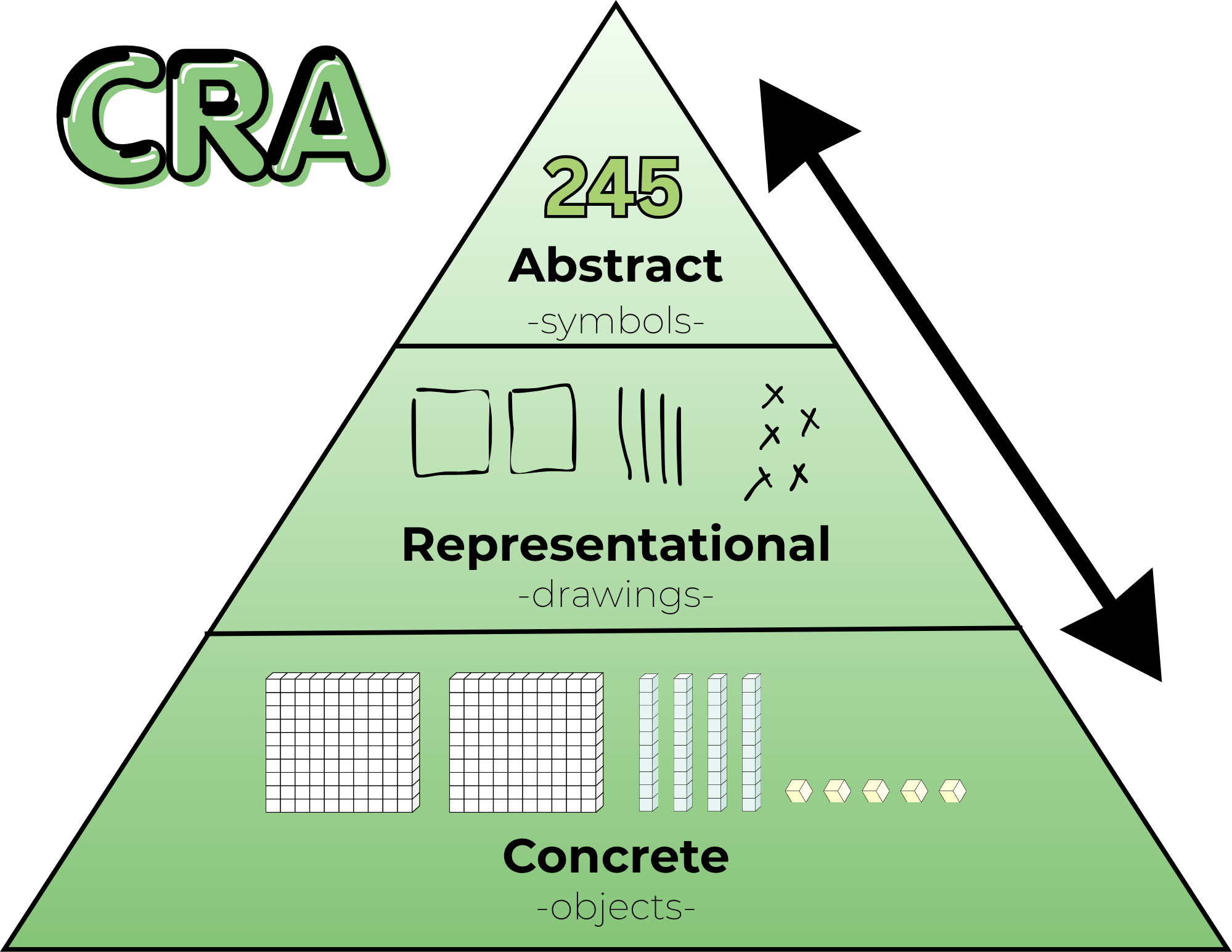
To be clear: I am not advocating for “rote memorization” without understanding. Memorization is the final step of this Learning Progression. It only works if it is built on a solid foundation:

  1. Concrete: Manipulating base ten blocks and counters.
  2. Representational: Drawing tape diagrams, number paths, and arrays.
  3. Abstract (The Goal): Automaticity, mental fluency, and algorithms.

If we jump straight to memorization, we build a house of cards. But if we stay in the “Representational” phase forever, allowing students to rely on skip-counting patterns or finger-counting, we are capping their growth. We are asking them to do “back-breaking” math every single day. We do need to nudge them to move beyond the Representational model and help them see/understand that they are ready for the abstract and that the abstract is, in fact, your friend.

The Three Gaps Holding Students Back

When I listen to teachers discuss where students are “stuck” on a standard, they usually find that there is a gap in one of these three essential progressions:

1. The Missing Floor (Addition & Subtraction Facts)
If a fourth grader is still “counting on” to solve 14 + 6, they aren’t just slow, they are overloaded. Mental math strategies like “Make a 10” are the building blocks for every standard that follows.

2. The Fluency Wall (Multiplication & Division)
Skip-counting (7, 14, 21, 28…) and arrays are beautiful ways to learn multiplication, but it’s a weight around a student’s neck during long division. We have to move them across the bridge to automaticity.

3. The Magnitude Gap (Flexible Thinking)
When a student looks at 1/4 and 5/6, do they see numbers to crunch or magnitudes to visualize? Flexible thinking means knowing that 1/4 is “a little bit” and 5/6 is “almost a whole.” If they can’t visualize this, they aren’t ready for the standard of comparing fractions.

Bridging the Gap with MathReps

This is exactly why the MathReps framework exists. We don’t just “hope” kids learn their facts or develop flexible thinking. We build consistent, high-frequency opportunities to practice these skills alongside the priority standards.

A MathRep ensures that students touch the concrete and/or representational models every single day until those skills settle into the abstract. It allows us to pay off the “Instructional Debt” in small, daily installments so that when students are expected to solve two-step word problems with multiple operations, our students have the mental capital to win.

The Bottom Line: Don’t be afraid to slow down and build the floor. You aren’t “behind” on the pacing if you are busy building the progressions that make those standards possible.

My Reflections, Balance is the Key

This series began with a simple but uncomfortable question: Is tech really the problem, or could it be something else? The teachers care, the students can learn with technology, and technology isn’t inherently bad.

However, the system moved faster than the support.

Across these past few weeks through these posts, we’ve explored how learning science favors retrieval, explanation, and production; how screen use is complex and nuanced; how professional development was often the missing bridge; and how teachers are still finding ways, quietly and creatively, to make learning meaningful within real constraints. It’s not easy, but teachers are doing it.

If there’s one thread that connects it all, it’s this: education doesn’t fail because educators fail. It falters when tools, policies, and expectations lack the support the systems need to sustain them.

Teachers were asked to learn and integrate platforms without pedagogy, manage mandates, and personalize learning without time. And yet, classrooms remain places where curiosity, care, and learning persist. We need to support this with pedagogy and giving time.

This series was never meant to argue for less technology or more technology. It was meant to argue for better use, grounded in research, shaped by pedagogy, and tempered by reality. Balance doesn’t come from extremes. It comes from thoughtful choices, small shifts, and shared responsibility.

Let me leave you with some final thoughts of hope.

Hope lives in teachers who start small.
Hope lives in students who explain their thinking.
Hope lives in leaders who listen before they buy or jump to a new mandate.

And hope lives in the understanding that change doesn’t require perfection: it requires intention.

If this series sparks conversation, reflection, or even quiet validation for someone navigating these tensions, then it has done its job.

A final question: What if we centered learning over tools, trends, or timelines? What could education become?

What Teachers Can Do Now (Without Burning Out)

Post 5 in the Teaching in a Digital Age series. See previous post.

After research, reflection, and hard truths, the question many teachers are left with is a simple one:

What can I actually do, right now, without adding more to my plate?

It’s the question we are often asking ourselves. This post isn’t about sweeping reform or perfect implementation. It’s about small, realistic shifts that rebalance technology use, protect teacher energy, and put learning back where it belongs: with students. As they say, the person doing the work is the person who is learning.

Start With Choice Boards (Without Overthinking Them)

If you’ve read my blog long enough, you know that I am a fan of choice boards. But choice boards don’t have to be complicated or beautifully designed. In fact, many teachers already use a version of them without calling them that: a “must do” and “may do” list.

A simple way to begin, and what I do:

  1. Choose the skill you want students to practice or master.
  2. List familiar ways students can show understanding (write, draw, explain, build, record).
  3. Decide how students will share—digitally or not.

That’s it. I’m a fan of having students share their work, not just turn it in.

The focus stays on skills and mastery, not the tool. Technology becomes an option, not the driver. A student might choose to draw a model, make a poster, record an explanation, design a game, or write a short reflection. Over time, these low-tech options can naturally lead to digital creation, but only when it makes sense.

Choice builds ownership. Ownership builds engagement.
And none of this requires a new platform (unless you want one).

Lean Into Student Explanation

It’s easy to feel like there’s no time for student talk. There’s content to cover. Pacing to manage. Standards to meet. It all can feel overwhelming at times.

But explanation, oral, visual, or written, isn’t extra.
It is the learning. I know it sounds simple, and the time can feel like extra, but it’s really not. Remember: start small.

Short, structured opportunities for students to explain their thinking, turn-and-talks, quick presentations, sketch-notes, and exit explanations, strengthen understanding and surface misconceptions faster than silent work ever could.

These practices also align naturally with ELD standards, but they benefit all students. Being able to explain clearly, listen actively, and respond thoughtfully is a skill worth protecting instructional time for. And when a student can explain the material clearly, you know they understand it.

Sometimes the most powerful move is simply to stop and let students talk.

Build Simple Routines That Shift the Cognitive Load

When students know:

  • where to find materials
  • what success looks like (success criteria or proficiency scales)
  • how to make choices
  • where finished work goes

…the cognitive load shifts from the teacher to the learner.

This isn’t about losing control; it’s about creating systems that run themselves. As an instructional coach, I have found that having systems in place is valuable for teachers. It lowers your stress and makes for a more peaceful classroom. Once expectations are clear and routines are established, students work more independently, collaborate more naturally, and take greater responsibility for their learning.

That shift frees you up to do what matters most: conference, observe, intervene, and support students who need it most.

You already do much of this instinctively. The key is being intentional and letting go just enough. And if you are thinking to yourself, “I already do all of this,” then you should feel validated.

Start Small (Really Small)

This might be the hardest part.

Teachers are learners. We read blogs, attend conferences, watch webinars, and leave inspired. The temptation to do all the things is real. I am one of those who want to do all of the things right away.

But change works best when it’s edited. And I get it, I have trouble editing. But here are some things I have learned and would like to share with you.

Choose one shift:

  • One new routine
  • One way students explain
  • One choice opportunity

Let students become comfortable. Let yourself adjust. Once it’s working, then layer in something new.

Doing too much too fast overwhelms students and teachers alike. Sustainable change is slow, and that’s not a flaw. It’s the point.

Where MathReps and EduProtocols Fit

Strategies like MathReps and EduProtocols fit naturally into this work, not as mandates, but as examples.

They emphasize:

  • showing thinking over choosing answers
  • explanation as learning
  • repeatable routines that reduce planning load – This is probably the biggest bonus.

Used thoughtfully, they can support production without requiring perfection or constant novelty. But they’re options, not requirements. What matters most is the principle behind them: students actively making sense of their learning.

A Final Thought

You don’t need a new platform. (And if you’re like me, you want the newest, shiniest tool)
You don’t need a complete overhaul.
You don’t need to do more.

You need permission—to start small, to focus on thinking, and to build a classroom that works for you and your students.

That’s where balance begins.

So, what is one low-lift shift you could try this week that moves students from consuming to producing, without adding to your workload?

Was Professional Development the Missing Piece?

What if the problem was never the tool, but the lack of sustained support? Or support from the onset?

For years, classrooms have been flooded with platforms, programs, and promises. New tools arrive with excitement, urgency, and often good intentions. Teachers are (sometimes) trained briefly, then sent back to their classrooms to “make it work.” Sometimes there is no training, and expected to “make it work”. When outcomes fall short, frustration follows. Fingers point in every direction.

But perhaps the most honest explanation is also the least controversial: we asked educators to transform instruction without giving them the time, space, or support to truly learn how to do so.

One-Time PD vs. Sustained Learning

Most teachers recognize this pattern immediately.

A new tool is introduced. There’s a short training – here’s what it does, here’s where to click – and then: Go use it. Sometimes there’s follow-up, but it’s often months later and/or focused narrowly on features, not instruction. Other times, PD becomes so repetitive that it feels disconnected from classroom reality.

The spacing matters, just like it matters with our students. When training sessions are too far apart, teachers naturally fill in the gaps themselves. They figure out what works (and what doesn’t) through trial, error, and time; often without a shared pedagogical vision guiding those decisions.

Add to that the reality that many schools roll out multiple new tools or curriculum adoptions at once, sometimes with little dedicated time at the start of the year to learn them deeply. And sometimes there’s too much information coming at the beginning of the school year. The result isn’t resistance, it’s overload.

There has to be a better way.

Pedagogy Must Come First: We Can’t Pretend the Clock Rewinds

In theory, most educators agree: pedagogy should come before platforms, curricula, and pacing.

In practice, that train has already left the station long ago.

Teachers are knee-deep in platforms that were adopted years ago. Pedagogy often became secondary, not because educators didn’t care, but because survival required learning to manage the tool with students in the classroom in real time before reflecting on how it shaped instruction.

So the question isn’t Should pedagogy come first?
It’s How do we re-center pedagogy now, given where we are?

One possible answer isn’t adding more tools, but pressing pause. Limiting new adoptions. Creating space for a pedagogical reset using the platforms already in place. Asking not What else do we need? But how can we use what we have better? Or how can I use what is already available? How will it help me/my students?

This isn’t easy. It can feel overwhelming. But if the goal is student thinking, understanding, and transfer, not just task completion or student compliance, then the work is necessary.

What Meaningful Tech PD Actually Looks Like

I know, this is a loaded question. We want it, we know we need it, but are often loath to attend, myself included. This is especially true when it’s district-provided. Why is that? (That was more of a question to myself, no sarcasm, just a real thought/question)

If professional development is meant to change classroom practice, it must be manageable, relevant, and immediately useful.

That starts with focus. If a district introduces three new tools, meaningful PD might center on just one—and even then, on one or two high-leverage instructional uses, not every feature. Depth matters more than breadth. I’m a fan of showing how it is relevant to you, right now.

PD also needs to be differentiated. Some teachers are ready to explore advanced applications. Others need a strong foundation. Meeting teachers where they are isn’t a luxury; it’s how learning works. The trick is to do this well. I’m not sure what the answer is, but I know it should be a goal.

And perhaps most importantly: teachers need to be able to use what they learn immediately. I am passionate about this point. If something isn’t implemented within a week, it often never will. This isn’t a failure of commitment; it’s the reality of teaching in a system filled with mandates, assessments, and competing priorities.

Ongoing support matters too. Not once a semester. Not when schedules allow. Consistent coaching, collaboration, and feedback help teachers refine their practice at a pace that feels sustainable rather than rushed.

Teachers invest in what moves their students forward. When the impact is visible, the motivation follows.

The Cost of Not Investing in Teacher Learning

When professional learning is shallow or fragmented, classrooms tend to drift toward extremes. Again, this isn’t a criticism of teachers; it’s a reality.

In some cases, technology becomes a digital babysitter, students consume, click, and complete without deep thinking. That’s the compliance factor. In others, technology is avoided altogether. Of the two, opting out may be the more responsible choice, but it still leaves potential untapped.

A middle ground exists.

When teachers are supported in learning how and why to use tools, technology can amplify good pedagogy rather than replace it. Tools that provide immediate feedback, surface misconceptions, or help analyze student thinking, like Snorkl or Wayground, can lighten the instructional load while keeping learning active and visible. I know I keep bringing up these two tools. They are ones I have available in my district. There are other tools that achieve the same things.

But even the best tools can’t compensate for a lack of investment in teacher learning.

A Shared Responsibility

This isn’t about blame. We are where we are, and reflection is necessary.

Teachers didn’t ask for constant change without time to adapt. Administrators didn’t design systems to overwhelm. Policymakers didn’t intend to sideline pedagogy. Everyone involved is operating within constraints and doing what they feel is best.

But if we want classrooms where students think, explain, and truly understand, then professional learning can’t be an afterthought. It has to be central to how we implement change.

Teachers and students deserve better than “I have to do this.”
We’ve tried that. It doesn’t work. It’s time we try something different.

So, my question to you is, if professional development were designed around learning rather than compliance, what would change, for teachers, for students, and for the system as a whole?

Consumption vs. Production: What Do We Actually Mean?


When conversations about technology in classrooms come up, they often sound like this:
“Kids are on screens too much.”
“Students don’t think like they used to.”
“Technology has ruined learning.”

These statements reflect genuine concern, but they don’t dig deep enough. The problem is not technology itself. The problem is how students are asked to engage with learning when technology is involved.

To move this conversation forward, especially with the general public, we need a shared language. One of the most important distinctions we can make is between consumption and production.

What Is Consumption?

When I talk about consumption, I’m referring primarily to passive learning experiences. These are activities where students receive information or interact with content in limited ways, often without having to explain or construct their thinking.

Examples include:

  • Watching a video and answering surface-level questions
  • Clicking through digital practice or assessments
  • Playing educational games that reward speed or completion
  • Navigating programs where the main task is selecting answers

Consumption isn’t inherently bad. Students need exposure, modeling, and opportunities to practice skills. The issue arises when consumption becomes the default – especially because technology makes it easy to assign, track, and justify. And with the load on teachers’ plates, it is understandable.

Students can look busy. They can even look engaged. But that doesn’t always mean learning is happening.

Engagement Is Not the Same as Learning

A student can be entertained, compliant, or focused on a screen without deeply understanding the content. Learning requires effort. It requires retrieval, reasoning, explanation, and sometimes productive struggle.

This is where production matters and why it’s crucial.

What Is Production?

Production-based learning asks students to create something that makes their thinking visible.

That “something” might be:

  • A written explanation
  • A visual model or representation
  • A verbal explanation
  • A collaborative document
  • A screencast or short video

For example:

  • A student creates a short video explaining how to add two-digit numbers using expanded form
  • Students read, collaborate on shared notes, and write synthesized paragraphs (such as in a Cyber Sandwich)
  • Students explain why a strategy works, not just apply it

These tasks require more than clicking through DOK 1-type questions. Students must organize ideas, make decisions, and communicate clearly.

And contrary to popular belief, production does not always require more time.

Production Doesn’t Mean More Work

Many teachers already build production into their classrooms, often without labeling it that way:

  • Asking students to explain answers to a partner
  • Requiring written justification
  • Having students represent ideas visually

These are small shifts, not massive overhauls.

Technology can support this work, but only when it’s used intentionally. Which leads to a critical question educators must constantly ask:

How is this technology enhancing the learning goal?

Not:

“I have this tool, now how can I use it?”

That distinction is subtle but powerful. I admit, there were times when I asked myself, “How can I use this tool?”

Revisiting an Old Idea: SAMR

Years ago, many educators used the SAMR model (Substitution, Augmentation, Modification, Redefinition) to think about technology integration. Over time, I’ve noticed it has faded from conversation, but its central idea still matters: technology should enhance or transform learning, not simply digitize existing tasks.

But frameworks alone don’t change practice.

For many teachers, there is little time or support to deeply learn new pedagogy alongside new tools. Professional learning is often brief, optional, or disconnected from classroom realities. Teachers are expected to “innovate” while managing full classrooms, mandates, and shifting expectations.

As in the early Chromebook rollout, teachers are once again left to figure it out on their own.

The Reality Teachers Are Working In

This conversation cannot happen without acknowledging the conditions teachers work under.

Teachers navigate:

  • District-adopted programs and initiatives
  • Pacing guides and curriculum mandates
  • State testing and accountability pressures
  • Constant shifts in platforms and expectations

At the same time, teachers are frequently blamed for:

  • Low student motivation
  • Declining reading levels
  • Weak math fluency
  • Poor reasoning skills

Teachers have students for six to seven hours a day. They do not control screen time outside of school. They cannot undo every societal influence within a single classroom.

Yet they are often expected to do precisely that.

Understanding consumption versus production is not about criticizing teachers’ choices. It’s about recognizing that many of those choices are/were made within tight constraints, often without the time or support needed to explore better alternatives.

Technology as an Enhancer, Not a Requirement

Production does not require technology. In many cases, paper and pencil work beautifully. Research consistently supports the cognitive benefits of writing and drawing by hand.

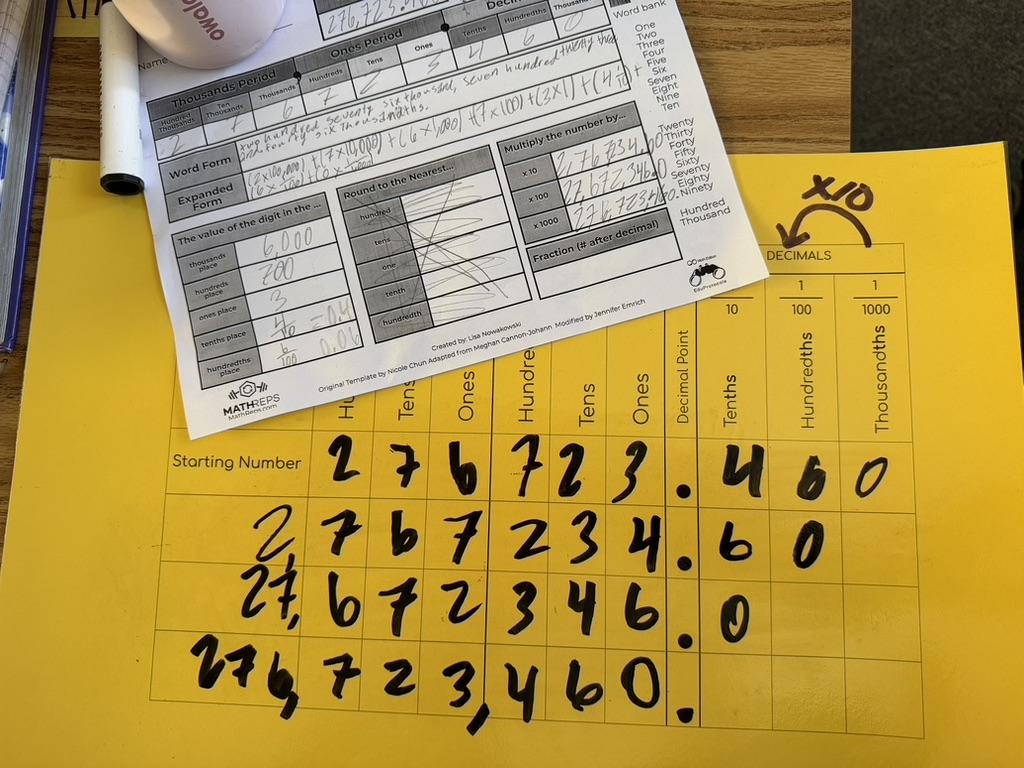
Take MathReps as an example. I often prefer students to write their thinking on paper or use plastic sleeves with whiteboard markers. Writing, revising, and representing ideas physically supports understanding.

Once students are familiar with the routine, technology can enhance the experience.

Tools like Snorkl allow students to demonstrate and explain their thinking while receiving immediate feedback. Used intentionally, perhaps a few times a week, it can amplify learning rather than replace it.

The goal still remains the same:

  • Show your thinking
  • Explain your reasoning
  • Make understanding visible

Technology is one pathway, not the destination.

Starting With the Right Question

Whether using technology or not, the most important question is always:

What is the learning goal?

Only then should we ask:

  • Can technology enhance this?
  • Does it deepen thinking or just speed things up?
  • Are students producing, or merely responding?

Consumption and production are not enemies. Both have a place. But when consumption dominates, we risk mistaking activity for understanding.

As we continue navigating teaching in a digital age, the challenge is not choosing between technology and tradition. It’s choosing practices that can meld the two.

I leave you with this question:

When you think about the learning experiences students spend the most time on, inside or outside the classroom, would you describe them as primarily consumptive or productive? And what slight shift might move the balance? If you see balance already, what does it look like?

When Technology Entered the Classroom, What Did We Lose Along the Way?

Technology was introduced into classrooms with the promise of innovation, access, and equity. Chromebooks became commonplace, and suddenly every student had a screen. On paper, it looked like progress.

What rarely came with those devices, however, was a shared vision for how technology should support learning.

Years later, many educators and families are noticing something unsettling. Teachers are detecting declines in certain skills: critical thinking, problem-solving, perseverance, a sense of wonder, and even basic fluency, such as memorizing math facts or understanding procedures deeply.

This is not a claim rooted in blame or panic.
It’s a reflection grounded in lived classroom experience.

And it’s critical to say this clearly: teachers did not cause this shift.

Teachers Were Put in a No-Win Situation

When Chromebooks were first rolled out, many teachers were handed powerful tools with minimal training, limited pedagogical guidance, and enormous expectations. The message was often implicit: Use the technology. Figure it out.

What followed was predictable.

Most available tools at the time were consumption-based:

  • Students practiced skills through programs
  • Computer-generated assessments
  • “Learning” games
  • Watch videos and click through content

These tools promised efficiency, and in some ways, they delivered. Teachers could quickly gather data, assign differentiated work, and manage classrooms stretched thin by increasing demands and limited time.

For many teachers, this wasn’t laziness or lack of creativity.
It was survival, as they were told to use technology, follow pacing guides, differentiate, improve test scores, etc.

When Consumption Became the Default

Photo by Ryutaro Tsukata on Pexels.com

Over time, consumption-based technology became mainstream. Students spent more time interacting with screens and less time explaining their thinking, constructing arguments, or grappling productively with struggle.

This matters because consumption alone does not build deep understanding.

Selecting an answer is not the same as defending one.
Completing digital practice is not the same as reasoning.
Engagement is not the same as learning.

Still, teachers used these tools because they were what districts purchased, what schedules allowed, what was expected, and what, if any, professional development supported.

Arguments for the Opposite Can Be Made

Some teachers pushed against this trend. I was one of them. This was a luxury and an interest for me.

Technology has always interested me, and I had the time, energy, and inclination to learn how pedagogy and technology could work together. I gravitated toward production-based uses of technology: students explaining, creating, representing, and discussing their thinking.

When tools like Prodigy became popular, many teachers saw motivation and engagement. I saw more game than practice and chose not to use it. Instead, I decided to use programs like Fog Stone Isle to help build capacity with fractions. That doesn’t make one choice morally superior; it highlights how context, interests, and capacity shape decisions.

Many teachers did see value in those tools for their students. And for those teachers, it made complete sense. There are times when consumption-based technology is appropriate and works. As teachers, we do what we feel works best for our students.

The Larger Systemic Issue

The deeper issue isn’t about individual tools. It’s about a system that often invests in products instead of practices.

Districts and lawmakers frequently purchase or mandate programs, platforms, and devices without funding the time and training teachers need to use them well. Pedagogies like HyperDocs and EduProtocols emphasize student production and thinking, but learning them is often left entirely to individual teachers.

And teachers already carry an impossible load.

Technology changes yearly. Research evolves. Expectations increase. Teachers are asked to adapt constantly, often without sustained professional learning or structural support.

When systems fail to lead with pedagogy, companies fill the gap. Many tools genuinely aim to help, but convenience can quietly override cognitive demand if we aren’t careful.

What Research Actually Tells Us (And What It Doesn’t)

To be clear: there is no definitive research proving that technology has caused a universal decline in student skills. What we do have is:

  • Research showing that active learning and retrieval are more effective than passive consumption
  • Cognitive science emphasizing the importance of productive struggle, explanation, and practice
  • Multimedia learning research (like Richard Mayer’s work) demonstrating that technology must be intentionally designed to support learning, not overload it
  • Large-scale assessments (such as PISA and NAEP) showing stagnation or uneven growth, which educators interpret through classroom experience

What teachers are reporting should not be dismissed, but it should be understood as contextual, nuanced, and systemically influenced, not a simple cause-and-effect story.

Moving Forward: Balance, Not Backlash

This is not a call to remove technology from classrooms.

It’s a call to use it differently.

Production-based strategies don’t have to be complex. They can start small:

  • Choice boards instead of one-size-fits-all programs
  • Students explaining their thinking orally or visually
  • Simple routines that prioritize reasoning over speed

These changes can be technology-based or not technology-based. For example, explaining thinking can be done in a class setting, in groups, or with the use of tools like Snorkl.

Frameworks like MathReps and EduProtocols offer powerful examples, but they are not mandates. They are models. Entry points. Proof that technology can amplify thinking when pedagogy leads the way.

A Message to the Public and to Decision Makers

Teaching today is not the same as “when you were in school.”
Technology has changed. Research has evolved. Students’ needs are different.

Educators are not resisting change; they are navigating it in real time.

If we want technology to improve learning, then teachers need more than devices. They need time, training, and trust. Districts and lawmakers must invest not just in tools, but in the pedagogy that makes those tools meaningful. And all of this needs to be done without adding more to teachers’ plates.

The goal isn’t balance sheets or dashboards. It’s thinking.

And the question we should all be asking is not whether technology belongs in classrooms, but whether we are brave enough to demand that it truly serves learning and teachers are put in a position of power, not left scrambling to figure it all out.

This has been a subject that has been weighing on me heavily lately. I think this will be the beginning of a series. I would love to hear your thoughts. I am not here to persuade anyone one way or another, but rather have open discussions on where, as a community, educators, parents, districts, and policymakers, we can do better.

Snorkl + MathReps = Powerful Learning Moments

I’m sure I’ve mentioned Snorkl before, but it’s worth sharing again, especially because MathReps are part of the platform!

If you haven’t explored it yet, Snorkl is an AI-powered feedback tool that provides students with meaningful and personalized responses to their work. Teachers can create their own assignments or choose from Snorkl’s library of ready-to-go activities. These activities span all grade levels and subject areas – from kindergarten through high school – and include math, ELD, science, history, and language arts.

When a student completes an assignment, Snorkl analyzes their work based on the rubric (which it can even create for you!) and provides feedback and a score. It doesn’t provide answers, but instead encourages students to think deeper and revise their work.

A few reasons I ❤️ Snorkl:

  • It’s simple (not loaded with bells and whistles) and intuitive for both teachers and students.
  • Teachers can start from scratch or choose from a library of quality tasks.
  • Feedback can be provided in multiple languages, but teachers always see it in English.
  • Directions and feedback can be read aloud, making them perfect for young learners or multilingual students. (And it doesn’t sound robotic!)

Snorkl in Action: A Classroom Story

Recently, I had the opportunity to visit a 3rd-grade class to help them get started with Snorkl. (Total aside, but the teacher—Erin Daines—is one of the most naturally gifted educators I’ve ever met. I always learn something new in her classroom!)

On the first visit, we started simple with a fun activity from the Snorkl Library: “Introduce yourself and draw a picture of something you like.”

It was a low-stakes way for students to explore some of the whiteboard tools—pen, highlighter, shapes, and lines and get comfortable with the platform. We set it up so they could view and comment on one another’s work, and the engagement was instant. The room was buzzing with creativity and laughter.

When I returned the next week, we took things a step further. We made the next assignment collaborative, which meant students appeared under playful names, such as Zany Zebra or Curious Coyote. This anonymity helped students focus on ideas instead of popularity, something I really appreciate.

We started with a Would You Rather prompt: “Would you rather have a caramel apple or a slice of pumpkin pie?”

Students had to choose one and explain why. One student chose “neither” and explained his reasoning. Snorkl acknowledged his logic but scored it lower and challenged him to pick one, since the task was to make a choice, an excellent learning moment in a safe environment.

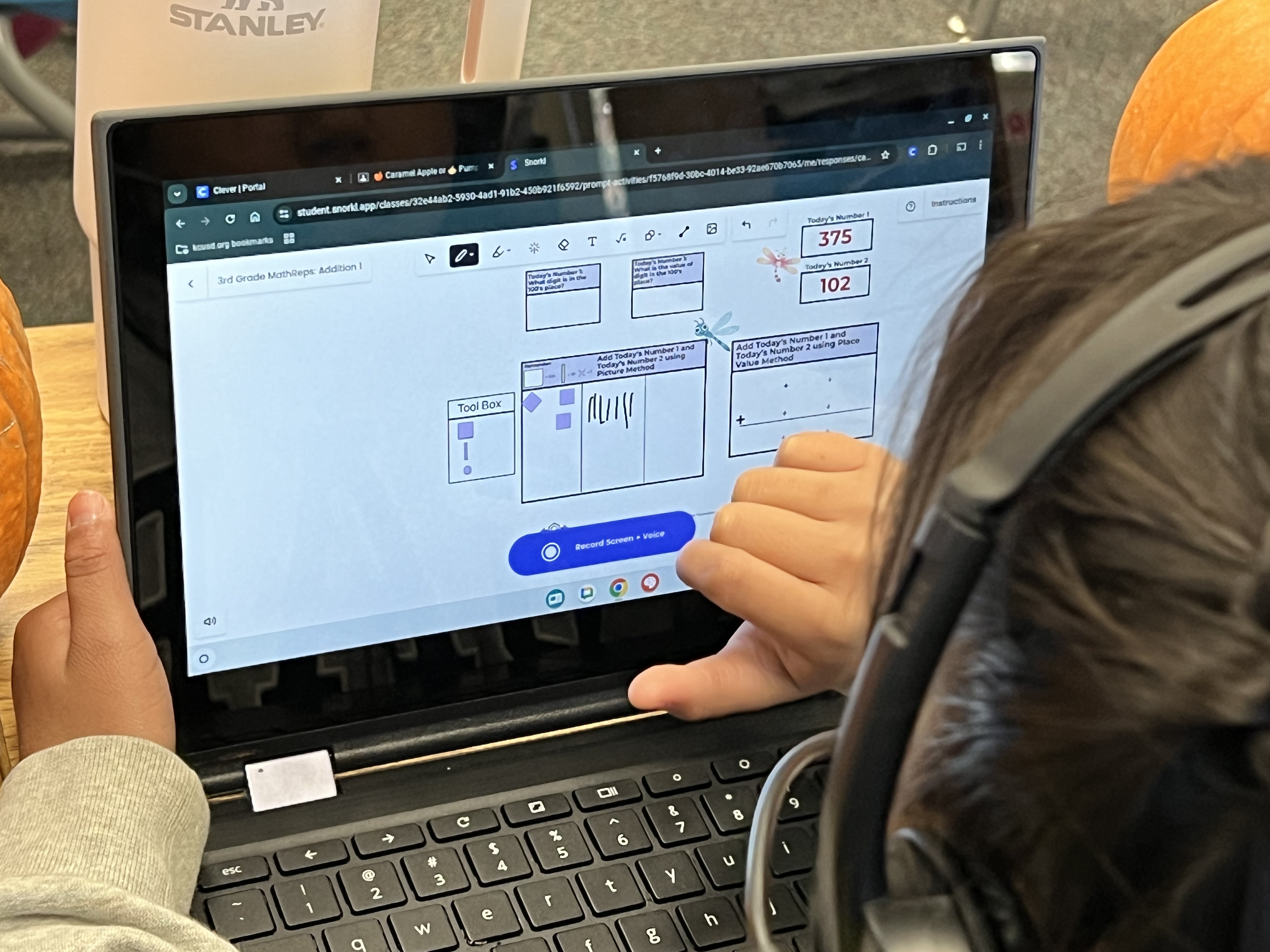
Then came the highlight: a 3rd Grade MathReps addition activity in Snorkl!

Students completed the task, then recorded their explanations to show their thinking. We know that when students can explain a process, their understanding deepens. Snorkl provided instant, helpful feedback that supported this reflection.

The best part? When students didn’t earn a 4/4, they wanted to improve. They read or listened to the feedback and tried again: some two or three times! The combination of MathReps and Snorkl fostered perseverance, reflection, and a sense of pride in learning. It was so exciting to witness.

Try MathReps in Snorkl!

Yes, MathReps are live in Snorkl—you’ll find them under the EduProtocols section. Currently, activities are available for grades K–4, with additional 4th-grade content and upper-grade levels forthcoming.

If you’d like to beta test upcoming MathReps in Snorkl, I’d love to have you join in! Just reach out and let me know.

So go ahead—try a MathRep in Snorkl. Let your students explore, explain, and shine.

Celebrating Creative Teaching Techniques in Classrooms

One of the things I love most about my role as an instructional coach/tech TOSA (Teacher on Special Assignment) is the opportunity to visit all the elementary sites in our district. Each school has its own rhythm and energy, and every teacher brings something special to the table. I get to see it all – the creative ideas, the quiet moments of connection, and the unique ways teachers make their classrooms feel like home for their students.

For example, at one school, a teacher sets out a small chalkboard outside her classroom each day. On it, she writes a Joke of the Day – something silly and lighthearted, but always guaranteed to get a few smiles and spark conversation. (Today’s joke: “What do you call rotten eggs, rotten fruit, and spoiled milk in a bag? Gross-eries!”) I love how she’s zhuzhed up the board, complete with a festive skeleton and a splash of color. It’s such a small thing, but it builds community and connection.

Another teacher has found a meaningful way to help students express themselves through emoji writing. I’m still learning exactly how she structures it, but I know students get the chance to write about their thoughts and feelings, and share them if they choose. It’s such a beautiful example of using something familiar and fun to help students build emotional awareness and voice.

Then there’s a teacher at another site who’s rethinking her approach to reading. She’s diving into novel studies, aligning them to the standards while keeping student engagement and learning front and center. It’s exciting to see teachers continually reflect, innovate, and take risks for the sake of their students.

Every week I’m reminded that innovation in education doesn’t always come from big changes—it’s often found in the small, thoughtful touches teachers bring to their classrooms.

The teachers in our district are doing amazing things every single day. I feel incredibly lucky to have a front-row seat to their creativity and care. One of my favorite parts of my job is being able to share these ideas, anonymously, of course, across the district. When I visit another site and a teacher says, “I’ve been wanting to try something new; any ideas?” I get to say, “Actually, I saw someone doing something really neat…”

I love this perk of my job. I love celebrating great teaching and helping ideas spread from one classroom to another. Because when we share, we all grow, and our students benefit most of all. And if you know me, you know that I’m a chronic over-sharer!

Your turn: What’s something small but meaningful you’ve seen or done in a classroom that builds connection or joy? Share it in the comments or with a colleague—it might just spark an idea that makes someone else’s classroom shine a little brighter.