Essential Steps to Prepare Your Google Classroom for August

As the school year winds down in June, the last thing anyone wants to think about is August. However, spending just a little bit of time setting up your digital environment now is the ultimate gift to your future self. By organizing your space before you leave for summer, you can walk away completely disconnected, knowing you are ready to roll on day one.

When we talk about setting up for success, it’s not just about teacher sanity; it’s about the student experience. A messy, disorganized digital space creates unnecessary clutter that can quickly overwhelm students before the year even starts.

1. Archive This Year’s Classrooms (Not Just the Work)

Don’t just delete assignments or leave your current classes sitting active on your dashboard. Go to your Google Classroom homepage, click the three dots on your current classes, and then click Archive.

  • Why it matters: Archiving completely removes the class from your and your students’ active dashboards, preserving the data and work without cluttering up the new school year.
  • The Golden Benefit: Archiving keeps all your past assignments safe in the cloud. This means you can easily use the “Reuse post” feature next year to pull forward your best materials without having to recreate them from scratch.

How to Archive Your Google Classroom

Archiving your completed classes is the best way to clear the dashboard for both you and your students while completely preserving your assignments, materials, and student work for future reference.

  1. Navigate to the Classroom Homepage: Go to classroom.google.com or open the app.
  2. Locate the Class Card: Find the specific class you want to archive on your main dashboard.
  3. Open the Menu: Click the three vertical dots (More options) in the top right corner of that class card.
  4. Select Archive: Click Archive from the dropdown menu.
  5. Confirm: A pop-up will appear letting you know that you and your students won’t be able to make changes to the class unless it’s restored. Click Archive again to confirm.

Tip: You can always view, restore, or permanently delete these files by clicking the three horizontal lines (Main Menu) in the top left of your screen and selecting Archived classes.

How to Reuse a Post in Your New Classroom

Instead of recreating assignments from scratch every term, you can pull proven, high-quality assignments from any of your archived classes directly into your active dashboard.

  1. Open Your Active Class: Navigate to the new Google Classroom where you want to publish the assignment.
  2. Go to Classwork: Click on the Classwork tab at the top of the page.
  3. Click Create: Click the + Create button.
  4. Select Reuse post: From the dropdown menu, choose Reuse post (indicated by an icon with two spinning arrows).
  5. Choose the Source Class: A window will pop up showing all your classes. You can scroll or use the search bar to find the archived class that holds the assignment you want. Click on it.
  6. Select the Specific Post: Browse the list of assignments, questions, or materials from that class. Click on the one you want to bring over.
  7. Manage Attachments (Crucial Step): Look at the bottom of the window for the checkbox that says “Create new copies of all attachments.”
    • Check this box if you want fresh, clean templates for your new roster.
    • Leave it unchecked if you are linking to a view-only resource or a public webpage.
  8. Click Reuse: Click the Reuse button in the bottom right.
  9. Edit and Assign: Google Classroom will open the post as a draft. Here, you can adjust the instructions, update the due date, modify your emoji-coded topic headers, and click Assign or schedule it for later.

2. Pre-Load Your Subjects with Emoji-Coded Topics

When you build your new shell for August, set up your organizational structure right away using Topics.

  • Group by Subject or Unit: Create clear, predictable categories to help your students navigate.
  • Add Emoji Coding: Use relevant emojis at the beginning of your Topic titles (e.g., 🔢 MathReps, 📚 Reading). Emojis aren’t just decorative; they serve as powerful visual anchors that help students scan, locate, and navigate their assignments instantly, reducing cognitive load.

3. Queue Up the “Welcome Advice” (Leveraging Student Voices)

One of the best resources you have right now is your current crop of students. Before they leave, have them create quick advice videos or tips for next year’s incoming class. Try using Padlet‘s video feature for this. Even if you don’t have welcome advice for your students, queuing up rules, procedures, and expectations can save you time and stress in August.

  • Go into your new August classroom shell.
  • Use the “Reuse post” feature to pull forward that student-created advice video assignment from your archived class.
  • Change the settings to Save as Draft or Schedule it for the first week of school. Hearing tips directly from peers is an amazing hook for day one.

4. Harness the Power of Drafts and Scheduled Posts

The secret to a calm start to the school year is controlling the flow of information.

  • Avoid the Information Dump: When students log into Google Classroom on the first day and see twenty active assignments, they immediately shut down.
  • The Strategy: Build your first week’s templates, resources, and baseline routines now. Instead of hitting “Post,” use “Save as Draft” or “Schedule.” This allows you to drip-feed the content to your students right when they need it, keeping their digital workspace clean, focused, and approachable.

By archiving the old, structuring the new with visual cues, and queuing up your first week as drafts, you can officially shut your laptop for the summer and truly relax. Your August self will thank you!

Making Your August Self Thankful for Your June Self

We are all there. The countdown calendar is taped to the whiteboard, and we are practically crawling across the finish line. The kids are completely checked out and ready for summer, and we are buried under an avalanche of cumulative records, final grades, report cards, and the physical chaos of packing up a classroom.

Let’s be honest: June me is completely over it. When I’m packing up my room at the end of the year, I don’t care where I throw things. I just want to shove the boxes in the closet, slam the door, and walk out because I am done.

But experience has taught me a hard truth: August me will absolutely despise June me if I just walk away.

No one wants to start a brand-new school year drowned in stress. So, to protect my future sanity, I’ve developed a transition routine that bridges the gap between June exhaustion and August peace of mind.

When the final bell rings, I don’t immediately dive into lesson planning. First, I take a few days entirely off to recharge and decompress from the school year that just wrapped up. For me, that means lounging around the house, sipping hot tea, and getting creative with Zen Doodles out on my patio. I let my brain completely reset.

But before that school-work brain completely disappears for the summer, I lean into just one or two days of light lifting. I take a few essential materials home, ignore them during my doodle-and-tea phase, and then sit down to do some simple, high-yield organizing.

The goal isn’t to plan out the whole year or tax myself during my break. It’s simply to get our most powerful, repeatable classroom routines ready to run on autopilot. If I can get the foundational pieces of our daily MathReps protocol set up now, I won’t have to scramble or think about it during the August rush. It feels a little daunting right now in the thick of June exhaustion, but I know that a few intentional choices today are a massive gift to my future self.

Designing Your Setup: Low-Tech, High-Tech, and the Power of Routine

I know firsthand how transformative MathReps are for students. I’ve seen it in my own work and heard it from teachers across the nation: this protocol is one of the most powerful tools we have for bridging conceptual gaps and actively combating the forgetting curve. Because it is such a high-leverage routine, my goal each June isn’t just to keep it in place, but to reflect on how I can refine and improve it for the upcoming year.

When you sit down to start MathReps, the very first step is a moment of reflection. Ask yourself: What do I want my students to start with?

To ease students into the routine without overwhelming them, my best bet is usually to start with content from the previous grade level. This lowers the initial barrier, allowing students to master the routine’s format using math they already feel confident in.

As you map this out, you also have to consider your incoming class and choose the right media blend for your launch. I highly recommend a tiered progression that moves from low-tech to high-tech as the class builds confidence:

  1. The Paper-and-Pencil Launch: Start the first few days with traditional paper-and-pencil. This allows you to establish a clear, physical baseline and creates a paper trail of exactly what your new students know right out of the gate.
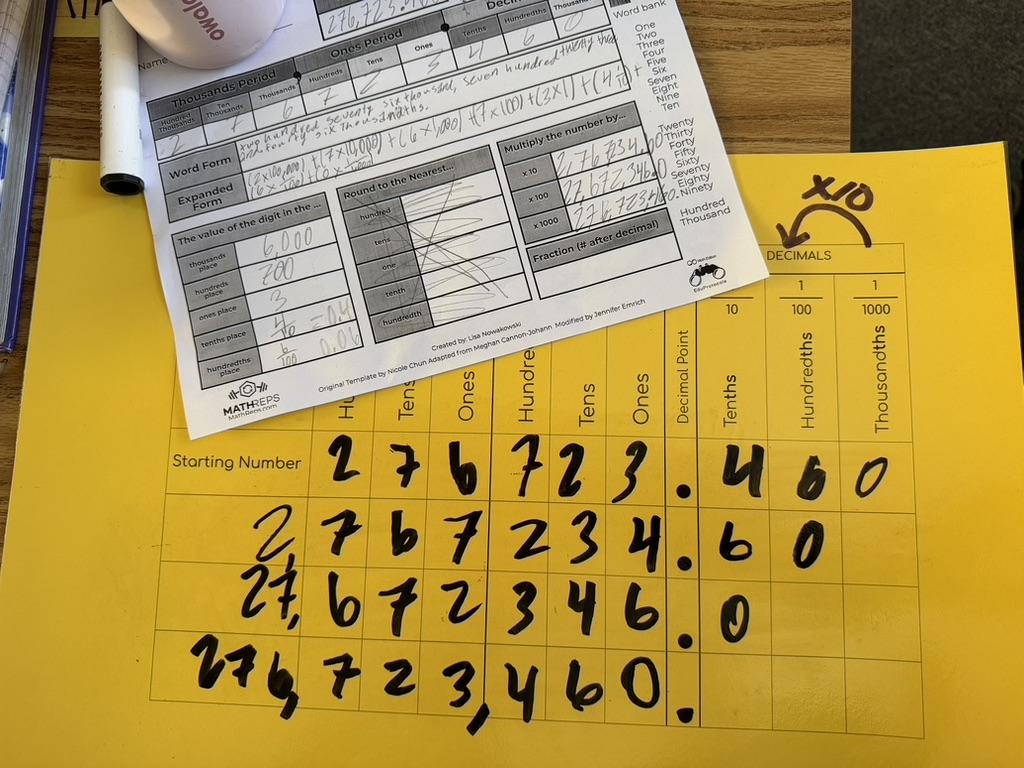
  2. The Plastic Sleeve Transition: Once the baseline is set, transition to the reusable, cost-effective method. Slide your preferred MathRep templates into heavy-duty plastic sheet protectors. Students love dry-erase markers because they lower anxiety, and mistakes can be wiped away in a second. For you, it provides a quick, physical pulse-check as you scan a room full of raised boards.
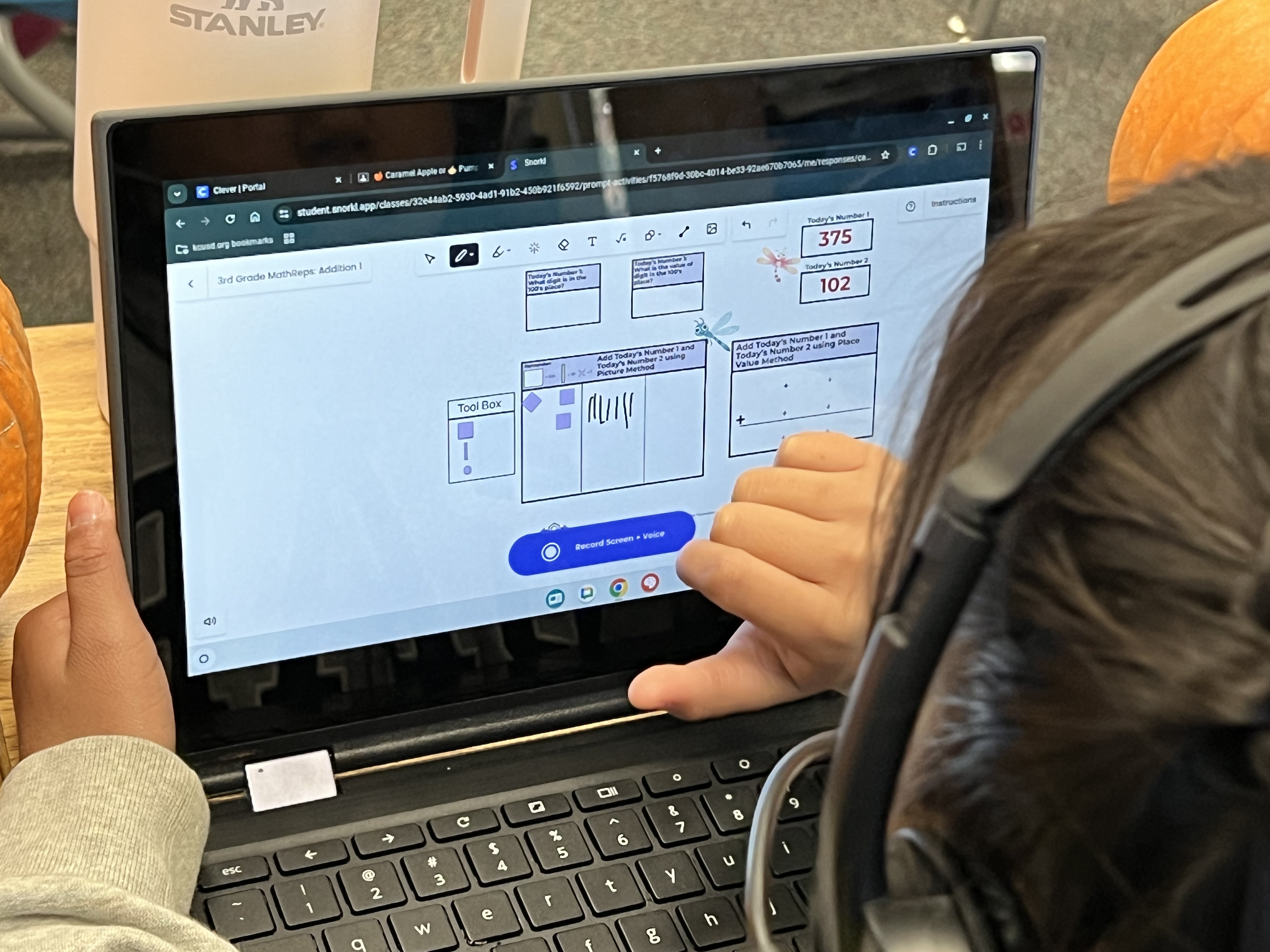
  3. The Snorkl Digital Integration: While you are prepping your physical sleeves, you can simultaneously prep your digital bridge. Take a look through Snorkl’s pre-built MathReps library to find the exact matching MathRep for your grade level. Grab those digital links now and drop them straight into your summer notes, digital planner, or lesson plans.

By taking the time in June to select your templates, print your initial packs, and organize your digital links, you’ve already won half the battle. When August arrives, you won’t be scrambling to figure out your math block. Your materials will be on your desk, ready to protect both your sanity and your students’.

The Transition, the Tech, and the Ultimate Goal

Once you have completed your June tasks and have your materials ready, you have a blueprint for August. But as you look at those plastic sleeves and digital links, you might wonder: How do I actually roll this out?

You don’t have to do everything at once. My best bet is always to start with that 1–2-week low-tech buffer using the plastic sleeves. This allows students to build the raw muscle memory of the MathRep routine without the added variable of a digital screen. They learn the layout, get comfortable with the pacing, and enjoy the process.

Once that routine is completely locked in, you can choose to introduce the tech. Because you are using the exact same MathRep templates they mastered in the sleeves, the cognitive load is low. The math is identical; only the medium changes.

Now, depending on your class, you might choose to start right on Snorkl for new MathRep later in the year, because the routine’s structure is already second nature. For younger grades, you might choose to stay non-digital much longer.

And honestly? As a coach, I will tell you that whatever you choose, make it consistent and manageable for you.

Tech or no tech is not the point. Is tech necessary? No. What matters is the pedagogy: Are your students getting immediate feedback, and is the routine sustainable for you? Each teacher needs to make it work for them and their students.

While plastic sleeves are incredible for a quick physical pulse-check as you scan the room, we are only human. We can’t catch every misconception in a room of thirty kids. That’s why I love to show teachers how a tool like Snorkl can take a routine we already love to the next level. The digital dashboard doesn’t replace you; it multiplies you. It captures and highlights the student audio explanations, making it easier to see exactly who needs your help. It can make a teacher’s life easier, but you are the driver.

The Last Gift to Yourself

When you walk out of your classroom this June, slam that door, and head out to the patio for some tea and doodles, you can do so with a clear head. You don’t need to plan the whole year. Just pick your template, set up your progression, and organize your links. Your August self will thank you for the boundaries you set, the rest you took, and the simple routines you put on autopilot.

Mastery Loops in Math: Redefining Learning with MathReps

On paper, a MathRep might look exactly like a worksheet. I don’t fight that semantic battle with adult critics because the magic isn’t in the photocopy: it’s in the underlying pedagogy.

Traditional math curricula are inherently topical. They are designed as a fast-paced sprint, checking off one complex skill before immediately jumping to the next. This structure puts students at a massive disadvantage. It forces them to constantly use finite cognitive energy to decode new layouts, instructions, and isolated procedures, leaving little bandwidth to actually master the skills, spot the patterns, and make deep mathematical connections.

If we want students to truly own the math, we have to activate the Mastery Loop. And one of the most powerful ways to do that is by looking at the deliberate design, frontloading strategies, and classroom culture that drive true mathematical fluency.

The Anatomy of a Rep: Moving from Silos to Connections

Traditional worksheets treat math concepts like isolated islands. A student might practice “decimals on a number line” on Monday, but if they don’t see a visual area model or a place value chart alongside it, that knowledge stays siloed. When the format inevitably changes, the student gets stuck because the conceptual bridge was never built.

A MathRep completely flips this dynamic by grouping several interconnected standards onto a single page. By keeping multiple formats of a concept alive simultaneously, you shift the cognitive environment from rote memorization to relational thinking.

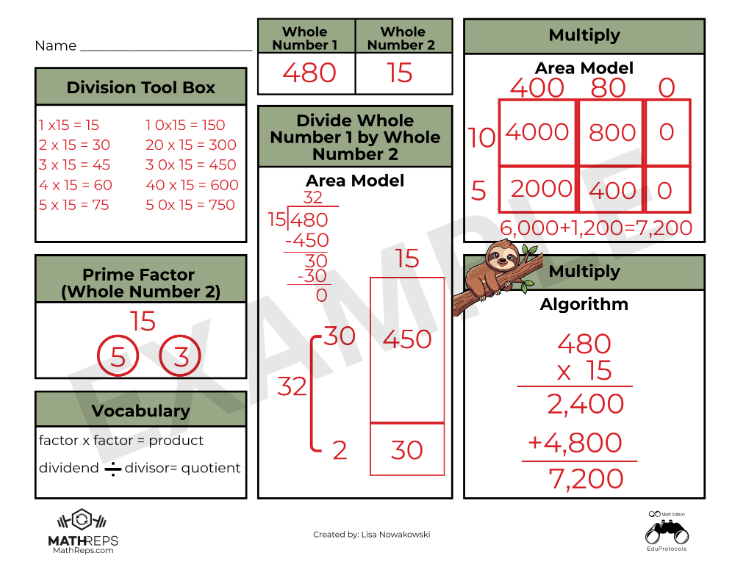
This design acts as a real-time diagnostic tool for teachers. Because concrete, pictoral, and abstract representations exist side-by-side, you can immediately spot where a student’s understanding breaks down: Can they partition the area model perfectly, but lose the logic when converting it to the abstract numbers of a standard algorithm? The layout reveals the gap instantly, allowing for precision intervention right in the moment.

The Prior-Grade On-Ramp (Frontloading)

This interconnected design makes MathReps the ultimate engine for frontloading upcoming units. Think about what happens when a fourth-grade teacher hits multi-digit multiplication and more complex division. If students don’t firmly grasp the core meaning of those operations, they get entirely lost in the steps.

Instead of diving straight into a frustrating textbook lesson, you can spend one to two weeks activating their prior knowledge with a past-grade protocol to jog the brain:

  1. The Reminders (3rd Grade): Before opening the current grade-level curriculum, pull a basic third-grade MathRep. For ten minutes a day, students interact with a single, simple equation—mapping out fact families, creating equal groups visually, and skip-counting on a number line. It gently reinforces the core foundation: division is sharing, and multiplication is grouping.
  2. The Transition (4th Grade): Once that foundation is secure, you introduce the fourth-grade MathReps. Because the heavy cognitive lifting of understanding “sharing and grouping” was already handled, their working memory is entirely free to tackle the next layer of complexity: the area model, the distributive property, or tape diagrams.

By utilizing a past-grade protocol, you prove to students that they aren’t starting at zero. You lower their anxiety and provide an active, scaffolded on-ramp to novel standards.

The In-Class Daily Glue vs. The Homework Silo

For this strategy to work, it is critical to note a fundamental rule: MathReps must be done in class. Sending them home for traditional homework completely defeats the purpose.

Traditional math homework is sent home into a feedback vacuum, often forcing students back into the “silo trap” of practicing a single procedure 30 times over. If they have a misconception, they spend half an hour reinforcing a bad habit before an adult can catch it.

MathReps acts as the daily glue because it thrives on a live classroom ecosystem built around immediate feedback. When you establish this routine as a daily norm from day one of the school year, you completely re-engineer the classroom culture:

  • Week 1 (The On-Ramp): On Day 1, the routine might take up to 45 minutes because you are teaching the layout and reducing the extraneous cognitive load together. By Days 2–4, the time drops dramatically (down to 12–15 minutes) as the format becomes predictable. Day 5 serves as a low-stakes baseline assessment.
  • Weeks 2–6 (The Sustainable Machine): Days 1–4 become a predictable rhythm: a set time to work, followed by an immediate check. By Day 5, the weekly assessment is just a natural, stress-free extension of what they’ve already mastered.

Starting every math block with this routine sets a predictable, accessible tone. It warms up their “math brain,” lowers anxiety, and allows them to see the big picture.

Of course, when you move daily practice entirely into the classroom, the inevitable pushback arises: “Then what do teachers give for homework?” The answer lies in moving away from compliance-driven worksheets and toward non-traditional, meaningful alternatives like choice boards. Homework shouldn’t copy what happens in the room; it should extend a student’s vision outward. Instead of solving identical equations at a kitchen table, let them apply their mathematical flexibility to the real world, tracking geometric shapes in local architecture, finding the volume of buildings, or calculating the dimensions of a swimming pool.

Shifting the Ownership Loop

When the daily in-class routine is predictable and the layout never surprises them, you can finally pass the wheel to the students.

If a teacher doesn’t want to spend time curating a “Today’s Number” or “Today’s Equation,” you don’t have to. Assign a different student to choose the mathematical focus each day. When you hand over that marker, the routine stops being an exercise dictated by an adult and becomes a space owned entirely by the kids. They track the patterns, they navigate the constraints, and they build the schemas.

I have watched students actively use a visual representation they completely understand, like an area model in multiplication, to independently check their own work and guide themselves through a complex standard algorithm. They didn’t need a teacher telling them they were right or wrong; the interconnected page allowed them to be guided on their own.

Every time we step back and allow them to navigate the page independently, we honor the core truth of the learning process: The person who is doing the work is the one doing the learning.

The Art of Tech Integration in Education

As a Tech TOSA, I often surprise people when I come into a class where no technology is needed. We have been conditioned to think that being “Tech-Forward” means more screens and more apps, but I’ve found that true technology integration is actually about the “Edit.” It’s about having the courage to ask why we are using a tool and if it actually levels up the assignment.

I’ve always lived by one rule in my classroom: “The person who is doing the work is doing the learning”. If the technology is doing the heavy lifting, the student is just a passenger.

The Power of the “Closed Lid”

The “Edit” starts with the foundation of the Closed Lid. In many classrooms, an “open lid” can create a “stimulation tax” that pulls focus away from Priority Standards and learning. I tell teachers that the most powerful thing they can do is give their students permission to unplug so they can focus on the raw logic of the lesson.

For those who are tech-nervous, stopping at paper and pencil is a perfectly valid pedagogical choice. However, for those looking to “lighten the load,” we can build a bridge to a tool like Snorkl.

The Powerful Team:

  1. Phase 1: Students do the messy, non-linear work on paper—doodles and all!.
  2. Phase 2: They take a quick photo of that work and upload it to Snorkl.
  3. The Payoff: The teacher gets immediate feedback and a clear window into class-wide progress without having to collect a stack of 30 physical papers.

Editing the Distractions: The 3-Font Rule

Once the thinking has been captured on paper, moving to the screen brings a new set of challenges. I can’t tell you how many times I’ve watched students waste fifteen minutes finding a font, and sometimes color, instead of developing an idea.

This is why I advocate for the 3-Font Rule:

  • The Constraint: Students choose from only three fonts and one size (12pt). Think boring. There is a time and place for the ‘fun’ fonts.
  • The Logic: This isn’t about being restrictive; it’s about protecting “think-time”. When we “edit” the infinite choices of the digital world, we remove the barrier to the standard, allowing the student to focus on the content.

The “Individualized Edit” and Equity

The “Edit” mentality isn’t one-size-fits-all. We have to remember that for some students, the technology is the bridge that allows them to do the work.

  • The Equalizer: For a student with an IEP, dictating notes into a computer can be the tool that enables them to synthesize information.
  • The Success Story: I once had a student who wasn’t a strong reader. While the rest of the class read, he watched videos and took notes by hand. Because he had the right “Edit” for his needs, he was successful.

The Neuroscience “Why”

Why does the “Edit” back to paper work so well? Recent science shows that handwriting is actually a “high-performance” activity for the brain. A 2025 study published in the journal Life revealed that handwriting engages significantly wider neural networks than typing.

Final Thought

The “Edit” mentality isn’t about being anti-tech; it’s about being pro-brain. We use technology when it enhances the lesson, but we have the courage to close the lid when the technology becomes a distraction. By editing out the noise, we ensure that the students remain the ones doing the thinking.

Because at the end of the day, if they aren’t doing the work, they aren’t doing the learning.

15-Day Routine for Math Test Confidence

In the sports world, athletes don’t spend the week before a championship learning new plays. They spend it “polishing”, perfecting their form, sharpening their reaction time, and ensuring their fundamentals are second nature. However, as a lifelong Detroit Lions fan, I’m not sure this analogy is always accurate. While I love my Lions, there have been plenty of games where it looked like they just learned the plays in the huddle! But all joking aside, as educators, we are preparing our students for life skills, not just a state test.

The Problem: The “Skill Blur”

When students are sitting at a computer, facing math problems one after another, cognitive overload is a real threat. The “how and when” of the four operations can easily get jumbled with fraction rules, and suddenly, all that geometry vocabulary becomes one big ole mess in their heads. This can be frustrating for both students and teachers.

It’s not that they didn’t learn the material; it’s that the retrieval is getting blocked by the sheer volume of information and tasks that need to be completed.

The Solution: MathReps as a Tactical Warm-Up

MathReps lower the affective filter by repeatedly practicing these core skills. I remember a year when my students didn’t just “do a unit” on decimals; we consistently spiraled decimal practice into our MathReps alongside other skills.

Because it was part of their regular routine, when they eventually faced a screen with decimal problems and tasks at the end of the year, they didn’t panic. The decimal didn’t throw them because it wasn’t a “guest star” in the curriculum; it was a familiar friend. By using MathReps as a 10-minute daily “Tactical Warm-Up,” we help students:

  1. Filter out the Format: They’ve seen the area model and the number line hundreds of times. The “test screen” is just another canvas for their existing skills.
  2. Sharpen the Fundamentals: We move from “manual labor” math to automaticity.

The 15-Day “Polishing” Routine

If you have 15 days left before the test, don’t reach for a packet. Reach for a Routine or EduProtocol.

  • The Selection: Pick the MathRep that addresses the skill your students find the weakest. If they are tripping over the arithmetic, use an Operations Frame (like the giraffe example below).
  • The Routine: Use the same MathRep at the beginning of your math period for at least one week. Consistency beats variety here. On Day 1, they are reacquainting themselves with the procedures; by Day 5, they are mastering the logic.
  • The Pivot: After 5 days, if you’re feeling good, move to another high-leverage frame. Or, cycle back to a different MathRep you used earlier in the year to keep those older skills from getting lost in the sauce.

The Bottom Line

We aren’t “cramming” for a test; we are clearing the fog. When we polish these skills through MathReps, we give students the confidence to show what they actually know, rather than getting lost in the “mess” of a testing interface and the information overload that bogs them down.

The Importance of Learning Progressions in Math Education

As an instructional coach in a district that recently began Standards-Based Learning in math, I hear similar concerns across the district, especially this time of year. The pressure to have mastery of all the Priority Standards before the year ends. (It’s important to note that all the standards are being taught. There are Priority Standards and supporting standards. The supporting standards do just that: support. They are the prerequisites, if you will, to the Priority Standards.)

But there is a hidden “Instructional Debt” that makes these standards feel like an uphill battle. If we want our students to succeed at high-level problem solving, we have to talk about the one thing that has become a bit of a “taboo” word in modern math: Memorization. Okay, the act of memorization isn’t taboo; some of the old methods are no longer supported by current research. It’s a frustration for all K-12 math teachers. So let’s talk about it and how we can help students master facts using current research.

The “Cognitive RAM” Problem

Every student has a finite amount of mental energy (let’s call it “Cognitive RAM”). I can hear you all now, “So do the teachers!” When we ask a student to solve a multi-step word problem, that task requires a massive amount of RAM for reading comprehension, translation, planning, and strategic persistence.

If that student hasn’t memorized their basic addition, subtraction, or multiplication facts, they are forced to use their limited RAM for “manual labor”: counting on fingers, drawing tally marks, drawing, modeling, or skip-counting. By the time they get to the actual logic of the problem, they’ve run out of “mental memory.” The whole task seems insurmountable.

The truth is: Memorization is Creative Freedom. When the facts are automatic, the brain is finally free to be creative in the approach to solving the problem. It breaks down a barrier. Think about it. If you are trying to solve a problem and realize you need to multiply 376 by 48, but you don’t have your facts memorized, this task just became a slow, muddy drudge. However, if you know you will need to multiply 376 by 48 AND you know your facts, the hard part is behind you once you know what to do. Suddenly, things don’t feel so unattainable.

The Progression is Non-Negotiable

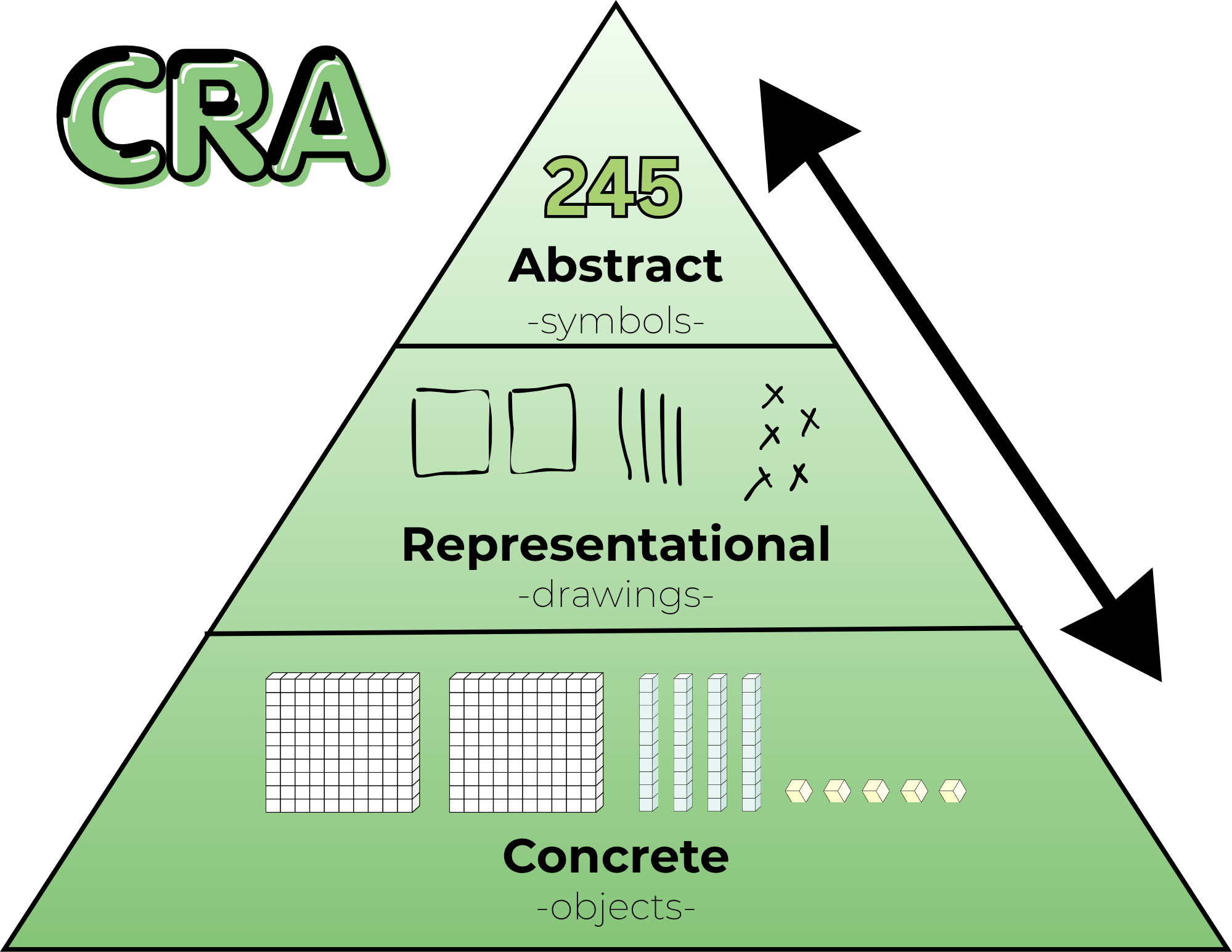
To be clear: I am not advocating for “rote memorization” without understanding. Memorization is the final step of this Learning Progression. It only works if it is built on a solid foundation:

  1. Concrete: Manipulating base ten blocks and counters.
  2. Representational: Drawing tape diagrams, number paths, and arrays.
  3. Abstract (The Goal): Automaticity, mental fluency, and algorithms.

If we jump straight to memorization, we build a house of cards. But if we stay in the “Representational” phase forever, allowing students to rely on skip-counting patterns or finger-counting, we are capping their growth. We are asking them to do “back-breaking” math every single day. We do need to nudge them to move beyond the Representational model and help them see/understand that they are ready for the abstract and that the abstract is, in fact, your friend.

The Three Gaps Holding Students Back

When I listen to teachers discuss where students are “stuck” on a standard, they usually find that there is a gap in one of these three essential progressions:

1. The Missing Floor (Addition & Subtraction Facts)
If a fourth grader is still “counting on” to solve 14 + 6, they aren’t just slow, they are overloaded. Mental math strategies like “Make a 10” are the building blocks for every standard that follows.

2. The Fluency Wall (Multiplication & Division)
Skip-counting (7, 14, 21, 28…) and arrays are beautiful ways to learn multiplication, but it’s a weight around a student’s neck during long division. We have to move them across the bridge to automaticity.

3. The Magnitude Gap (Flexible Thinking)
When a student looks at 1/4 and 5/6, do they see numbers to crunch or magnitudes to visualize? Flexible thinking means knowing that 1/4 is “a little bit” and 5/6 is “almost a whole.” If they can’t visualize this, they aren’t ready for the standard of comparing fractions.

Bridging the Gap with MathReps

This is exactly why the MathReps framework exists. We don’t just “hope” kids learn their facts or develop flexible thinking. We build consistent, high-frequency opportunities to practice these skills alongside the priority standards.

A MathRep ensures that students touch the concrete and/or representational models every single day until those skills settle into the abstract. It allows us to pay off the “Instructional Debt” in small, daily installments so that when students are expected to solve two-step word problems with multiple operations, our students have the mental capital to win.

The Bottom Line: Don’t be afraid to slow down and build the floor. You aren’t “behind” on the pacing if you are busy building the progressions that make those standards possible.

My Reflections, Balance is the Key

This series began with a simple but uncomfortable question: Is tech really the problem, or could it be something else? The teachers care, the students can learn with technology, and technology isn’t inherently bad.

However, the system moved faster than the support.

Across these past few weeks through these posts, we’ve explored how learning science favors retrieval, explanation, and production; how screen use is complex and nuanced; how professional development was often the missing bridge; and how teachers are still finding ways, quietly and creatively, to make learning meaningful within real constraints. It’s not easy, but teachers are doing it.

If there’s one thread that connects it all, it’s this: education doesn’t fail because educators fail. It falters when tools, policies, and expectations lack the support the systems need to sustain them.

Teachers were asked to learn and integrate platforms without pedagogy, manage mandates, and personalize learning without time. And yet, classrooms remain places where curiosity, care, and learning persist. We need to support this with pedagogy and giving time.

This series was never meant to argue for less technology or more technology. It was meant to argue for better use, grounded in research, shaped by pedagogy, and tempered by reality. Balance doesn’t come from extremes. It comes from thoughtful choices, small shifts, and shared responsibility.

Let me leave you with some final thoughts of hope.

Hope lives in teachers who start small.
Hope lives in students who explain their thinking.
Hope lives in leaders who listen before they buy or jump to a new mandate.

And hope lives in the understanding that change doesn’t require perfection: it requires intention.

If this series sparks conversation, reflection, or even quiet validation for someone navigating these tensions, then it has done its job.

A final question: What if we centered learning over tools, trends, or timelines? What could education become?

What Teachers Can Do Now (Without Burning Out)

Post 5 in the Teaching in a Digital Age series. See previous post.

After research, reflection, and hard truths, the question many teachers are left with is a simple one:

What can I actually do, right now, without adding more to my plate?

It’s the question we are often asking ourselves. This post isn’t about sweeping reform or perfect implementation. It’s about small, realistic shifts that rebalance technology use, protect teacher energy, and put learning back where it belongs: with students. As they say, the person doing the work is the person who is learning.

Start With Choice Boards (Without Overthinking Them)

If you’ve read my blog long enough, you know that I am a fan of choice boards. But choice boards don’t have to be complicated or beautifully designed. In fact, many teachers already use a version of them without calling them that: a “must do” and “may do” list.

A simple way to begin, and what I do:

  1. Choose the skill you want students to practice or master.
  2. List familiar ways students can show understanding (write, draw, explain, build, record).
  3. Decide how students will share—digitally or not.

That’s it. I’m a fan of having students share their work, not just turn it in.

The focus stays on skills and mastery, not the tool. Technology becomes an option, not the driver. A student might choose to draw a model, make a poster, record an explanation, design a game, or write a short reflection. Over time, these low-tech options can naturally lead to digital creation, but only when it makes sense.

Choice builds ownership. Ownership builds engagement.
And none of this requires a new platform (unless you want one).

Lean Into Student Explanation

It’s easy to feel like there’s no time for student talk. There’s content to cover. Pacing to manage. Standards to meet. It all can feel overwhelming at times.

But explanation, oral, visual, or written, isn’t extra.
It is the learning. I know it sounds simple, and the time can feel like extra, but it’s really not. Remember: start small.

Short, structured opportunities for students to explain their thinking, turn-and-talks, quick presentations, sketch-notes, and exit explanations, strengthen understanding and surface misconceptions faster than silent work ever could.

These practices also align naturally with ELD standards, but they benefit all students. Being able to explain clearly, listen actively, and respond thoughtfully is a skill worth protecting instructional time for. And when a student can explain the material clearly, you know they understand it.

Sometimes the most powerful move is simply to stop and let students talk.

Build Simple Routines That Shift the Cognitive Load

When students know:

  • where to find materials
  • what success looks like (success criteria or proficiency scales)
  • how to make choices
  • where finished work goes

…the cognitive load shifts from the teacher to the learner.

This isn’t about losing control; it’s about creating systems that run themselves. As an instructional coach, I have found that having systems in place is valuable for teachers. It lowers your stress and makes for a more peaceful classroom. Once expectations are clear and routines are established, students work more independently, collaborate more naturally, and take greater responsibility for their learning.

That shift frees you up to do what matters most: conference, observe, intervene, and support students who need it most.

You already do much of this instinctively. The key is being intentional and letting go just enough. And if you are thinking to yourself, “I already do all of this,” then you should feel validated.

Start Small (Really Small)

This might be the hardest part.

Teachers are learners. We read blogs, attend conferences, watch webinars, and leave inspired. The temptation to do all the things is real. I am one of those who want to do all of the things right away.

But change works best when it’s edited. And I get it, I have trouble editing. But here are some things I have learned and would like to share with you.

Choose one shift:

  • One new routine
  • One way students explain
  • One choice opportunity

Let students become comfortable. Let yourself adjust. Once it’s working, then layer in something new.

Doing too much too fast overwhelms students and teachers alike. Sustainable change is slow, and that’s not a flaw. It’s the point.

Where MathReps and EduProtocols Fit

Strategies like MathReps and EduProtocols fit naturally into this work, not as mandates, but as examples.

They emphasize:

  • showing thinking over choosing answers
  • explanation as learning
  • repeatable routines that reduce planning load – This is probably the biggest bonus.

Used thoughtfully, they can support production without requiring perfection or constant novelty. But they’re options, not requirements. What matters most is the principle behind them: students actively making sense of their learning.

A Final Thought

You don’t need a new platform. (And if you’re like me, you want the newest, shiniest tool)
You don’t need a complete overhaul.
You don’t need to do more.

You need permission—to start small, to focus on thinking, and to build a classroom that works for you and your students.

That’s where balance begins.

So, what is one low-lift shift you could try this week that moves students from consuming to producing, without adding to your workload?

Was Professional Development the Missing Piece?

What if the problem was never the tool, but the lack of sustained support? Or support from the onset?

For years, classrooms have been flooded with platforms, programs, and promises. New tools arrive with excitement, urgency, and often good intentions. Teachers are (sometimes) trained briefly, then sent back to their classrooms to “make it work.” Sometimes there is no training, and expected to “make it work”. When outcomes fall short, frustration follows. Fingers point in every direction.

But perhaps the most honest explanation is also the least controversial: we asked educators to transform instruction without giving them the time, space, or support to truly learn how to do so.

One-Time PD vs. Sustained Learning

Most teachers recognize this pattern immediately.

A new tool is introduced. There’s a short training – here’s what it does, here’s where to click – and then: Go use it. Sometimes there’s follow-up, but it’s often months later and/or focused narrowly on features, not instruction. Other times, PD becomes so repetitive that it feels disconnected from classroom reality.

The spacing matters, just like it matters with our students. When training sessions are too far apart, teachers naturally fill in the gaps themselves. They figure out what works (and what doesn’t) through trial, error, and time; often without a shared pedagogical vision guiding those decisions.

Add to that the reality that many schools roll out multiple new tools or curriculum adoptions at once, sometimes with little dedicated time at the start of the year to learn them deeply. And sometimes there’s too much information coming at the beginning of the school year. The result isn’t resistance, it’s overload.

There has to be a better way.

Pedagogy Must Come First: We Can’t Pretend the Clock Rewinds

In theory, most educators agree: pedagogy should come before platforms, curricula, and pacing.

In practice, that train has already left the station long ago.

Teachers are knee-deep in platforms that were adopted years ago. Pedagogy often became secondary, not because educators didn’t care, but because survival required learning to manage the tool with students in the classroom in real time before reflecting on how it shaped instruction.

So the question isn’t Should pedagogy come first?
It’s How do we re-center pedagogy now, given where we are?

One possible answer isn’t adding more tools, but pressing pause. Limiting new adoptions. Creating space for a pedagogical reset using the platforms already in place. Asking not What else do we need? But how can we use what we have better? Or how can I use what is already available? How will it help me/my students?

This isn’t easy. It can feel overwhelming. But if the goal is student thinking, understanding, and transfer, not just task completion or student compliance, then the work is necessary.

What Meaningful Tech PD Actually Looks Like

I know, this is a loaded question. We want it, we know we need it, but are often loath to attend, myself included. This is especially true when it’s district-provided. Why is that? (That was more of a question to myself, no sarcasm, just a real thought/question)

If professional development is meant to change classroom practice, it must be manageable, relevant, and immediately useful.

That starts with focus. If a district introduces three new tools, meaningful PD might center on just one—and even then, on one or two high-leverage instructional uses, not every feature. Depth matters more than breadth. I’m a fan of showing how it is relevant to you, right now.

PD also needs to be differentiated. Some teachers are ready to explore advanced applications. Others need a strong foundation. Meeting teachers where they are isn’t a luxury; it’s how learning works. The trick is to do this well. I’m not sure what the answer is, but I know it should be a goal.

And perhaps most importantly: teachers need to be able to use what they learn immediately. I am passionate about this point. If something isn’t implemented within a week, it often never will. This isn’t a failure of commitment; it’s the reality of teaching in a system filled with mandates, assessments, and competing priorities.

Ongoing support matters too. Not once a semester. Not when schedules allow. Consistent coaching, collaboration, and feedback help teachers refine their practice at a pace that feels sustainable rather than rushed.

Teachers invest in what moves their students forward. When the impact is visible, the motivation follows.

The Cost of Not Investing in Teacher Learning

When professional learning is shallow or fragmented, classrooms tend to drift toward extremes. Again, this isn’t a criticism of teachers; it’s a reality.

In some cases, technology becomes a digital babysitter, students consume, click, and complete without deep thinking. That’s the compliance factor. In others, technology is avoided altogether. Of the two, opting out may be the more responsible choice, but it still leaves potential untapped.

A middle ground exists.

When teachers are supported in learning how and why to use tools, technology can amplify good pedagogy rather than replace it. Tools that provide immediate feedback, surface misconceptions, or help analyze student thinking, like Snorkl or Wayground, can lighten the instructional load while keeping learning active and visible. I know I keep bringing up these two tools. They are ones I have available in my district. There are other tools that achieve the same things.

But even the best tools can’t compensate for a lack of investment in teacher learning.

A Shared Responsibility

This isn’t about blame. We are where we are, and reflection is necessary.

Teachers didn’t ask for constant change without time to adapt. Administrators didn’t design systems to overwhelm. Policymakers didn’t intend to sideline pedagogy. Everyone involved is operating within constraints and doing what they feel is best.

But if we want classrooms where students think, explain, and truly understand, then professional learning can’t be an afterthought. It has to be central to how we implement change.

Teachers and students deserve better than “I have to do this.”
We’ve tried that. It doesn’t work. It’s time we try something different.

So, my question to you is, if professional development were designed around learning rather than compliance, what would change, for teachers, for students, and for the system as a whole?

Consumption vs. Production: What Do We Actually Mean?


When conversations about technology in classrooms come up, they often sound like this:
“Kids are on screens too much.”
“Students don’t think like they used to.”
“Technology has ruined learning.”

These statements reflect genuine concern, but they don’t dig deep enough. The problem is not technology itself. The problem is how students are asked to engage with learning when technology is involved.

To move this conversation forward, especially with the general public, we need a shared language. One of the most important distinctions we can make is between consumption and production.

What Is Consumption?

When I talk about consumption, I’m referring primarily to passive learning experiences. These are activities where students receive information or interact with content in limited ways, often without having to explain or construct their thinking.

Examples include:

  • Watching a video and answering surface-level questions
  • Clicking through digital practice or assessments
  • Playing educational games that reward speed or completion
  • Navigating programs where the main task is selecting answers

Consumption isn’t inherently bad. Students need exposure, modeling, and opportunities to practice skills. The issue arises when consumption becomes the default – especially because technology makes it easy to assign, track, and justify. And with the load on teachers’ plates, it is understandable.

Students can look busy. They can even look engaged. But that doesn’t always mean learning is happening.

Engagement Is Not the Same as Learning

A student can be entertained, compliant, or focused on a screen without deeply understanding the content. Learning requires effort. It requires retrieval, reasoning, explanation, and sometimes productive struggle.

This is where production matters and why it’s crucial.

What Is Production?

Production-based learning asks students to create something that makes their thinking visible.

That “something” might be:

  • A written explanation
  • A visual model or representation
  • A verbal explanation
  • A collaborative document
  • A screencast or short video

For example:

  • A student creates a short video explaining how to add two-digit numbers using expanded form
  • Students read, collaborate on shared notes, and write synthesized paragraphs (such as in a Cyber Sandwich)
  • Students explain why a strategy works, not just apply it

These tasks require more than clicking through DOK 1-type questions. Students must organize ideas, make decisions, and communicate clearly.

And contrary to popular belief, production does not always require more time.

Production Doesn’t Mean More Work

Many teachers already build production into their classrooms, often without labeling it that way:

  • Asking students to explain answers to a partner
  • Requiring written justification
  • Having students represent ideas visually

These are small shifts, not massive overhauls.

Technology can support this work, but only when it’s used intentionally. Which leads to a critical question educators must constantly ask:

How is this technology enhancing the learning goal?

Not:

“I have this tool, now how can I use it?”

That distinction is subtle but powerful. I admit, there were times when I asked myself, “How can I use this tool?”

Revisiting an Old Idea: SAMR

Years ago, many educators used the SAMR model (Substitution, Augmentation, Modification, Redefinition) to think about technology integration. Over time, I’ve noticed it has faded from conversation, but its central idea still matters: technology should enhance or transform learning, not simply digitize existing tasks.

But frameworks alone don’t change practice.

For many teachers, there is little time or support to deeply learn new pedagogy alongside new tools. Professional learning is often brief, optional, or disconnected from classroom realities. Teachers are expected to “innovate” while managing full classrooms, mandates, and shifting expectations.

As in the early Chromebook rollout, teachers are once again left to figure it out on their own.

The Reality Teachers Are Working In

This conversation cannot happen without acknowledging the conditions teachers work under.

Teachers navigate:

  • District-adopted programs and initiatives
  • Pacing guides and curriculum mandates
  • State testing and accountability pressures
  • Constant shifts in platforms and expectations

At the same time, teachers are frequently blamed for:

  • Low student motivation
  • Declining reading levels
  • Weak math fluency
  • Poor reasoning skills

Teachers have students for six to seven hours a day. They do not control screen time outside of school. They cannot undo every societal influence within a single classroom.

Yet they are often expected to do precisely that.

Understanding consumption versus production is not about criticizing teachers’ choices. It’s about recognizing that many of those choices are/were made within tight constraints, often without the time or support needed to explore better alternatives.

Technology as an Enhancer, Not a Requirement

Production does not require technology. In many cases, paper and pencil work beautifully. Research consistently supports the cognitive benefits of writing and drawing by hand.

Take MathReps as an example. I often prefer students to write their thinking on paper or use plastic sleeves with whiteboard markers. Writing, revising, and representing ideas physically supports understanding.

Once students are familiar with the routine, technology can enhance the experience.

Tools like Snorkl allow students to demonstrate and explain their thinking while receiving immediate feedback. Used intentionally, perhaps a few times a week, it can amplify learning rather than replace it.

The goal still remains the same:

  • Show your thinking
  • Explain your reasoning
  • Make understanding visible

Technology is one pathway, not the destination.

Starting With the Right Question

Whether using technology or not, the most important question is always:

What is the learning goal?

Only then should we ask:

  • Can technology enhance this?
  • Does it deepen thinking or just speed things up?
  • Are students producing, or merely responding?

Consumption and production are not enemies. Both have a place. But when consumption dominates, we risk mistaking activity for understanding.

As we continue navigating teaching in a digital age, the challenge is not choosing between technology and tradition. It’s choosing practices that can meld the two.

I leave you with this question:

When you think about the learning experiences students spend the most time on, inside or outside the classroom, would you describe them as primarily consumptive or productive? And what slight shift might move the balance? If you see balance already, what does it look like?