Online Homework

Don’t shoot! I know, I said the dreaded ‘H’ word… Homework. So yes, I give homework: read 20 pages and write a summary, 2 math problems (review of previously taught material), Mangahigh, and play outside for 30 minutes.

At first I thought I was pretty slick assigning homework online (I have a paper option for students without Internet access. Most come in early to complete the Mangahigh portion). I would routinely check their work online and in class together. Then it became apparent (okay, I was a little slow on this one) that I was missing the feedback step.

In order to change this, I use a combination of steps to allow students access to their work, with my feedback included. First, I set up a Google Form that I use for the entire week. This way, I just need to change the 2 math questions daily. However, I can’t just ‘edit’ the problems I have to ‘duplicate’ then ‘delete’ the original. Otherwise, I delete the original problem, and that sort of defeats the purpose of giving feedback if they don’t know what the problem was.

It’s not perfect and I’ll probably change it in a few months with a better system, but for now it works. I also set it up at the beginning of the week so that each time there is a response it auto updates. (Note: I turn row-call off when I’m responding.)

Google Classroom: Mute a Student

Last night I was fortunate enough to share the awesomeness that is Google Classroom with the IEC (Innovative Educators Certification) class – put on by CUE and Fresno Pacific University. One of the more convenient features is the ‘Mute a Student’ choice. Generally I allow my students the ability to post and respond in the Stream. However, there have been a few cases in which I needed to Mute a student. In the past, I located the student on the ‘Student’ page and muted them from here.

Mute 1

However during last night’s class, we discovered that a student can be muted from the Stream. If a student posts a comment on an Announcement, Assignment, or questions, there is now the option to Mute the student from here. In addition, if a student creates a post the teacher can Mute the student from here.

On the post or comment from the student 3 vertical dots appear. Choosing that will bring up the option to either Delete the comment or Mute the student. Choosing to Mute a student then brings up a pop-out window to which allow the teacher to also delete the comment if necessary. This will prevent the student from commenting or posting throughout the classroom until the teacher ‘Unmutes’ the student.

Mute 2

Mute 3

Google Classroom: Create Question

In Google Classroom, I like to ‘Create a Question’ for quick checks or exit tickets. They are easy to create and manage. Students can read each other’s posts, comment, and have quality discussions with ‘Questions’. This is an underused tool by many who use Google Classroom. It truly is a hidden gem in this tool.

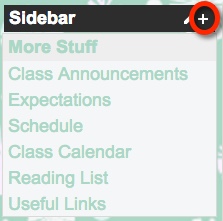
In order to create a Question, choose the + located in the bottom right corner of the ‘Stream’ section of your classroom.

Question 1

Now I can create my question. I can insert a file, something from my Google Drive, a YouTube video, and/or a link to a website. I can insert as many items as needed. Since I teach 2 classes of Social Studies, I can assign the question to both classes, with files and links, at the same time. I can even set a due date. When I have my preferences set, I choose the blue ‘ASK’ button.

Question 2

Next a pop-out window appears where I can allow students to view each other’s responses, or not. I can also allow students to edit their own responses. I like to allow students to comment on each other’s. This allows for discussion and opportunity for students to defend their positions. When I’m ready, I click the blue ‘ASK’ button.

Question 3

My question now appears at the top of the stream.

Question 4

Here’s an example we did early this year. Once the students respond, I can then grade their answers if I choose to. On this particular example, I gave the students some material to review before answering. In order to encourage open dialog, I also asked them to comment on each other’s responses.

Question 5

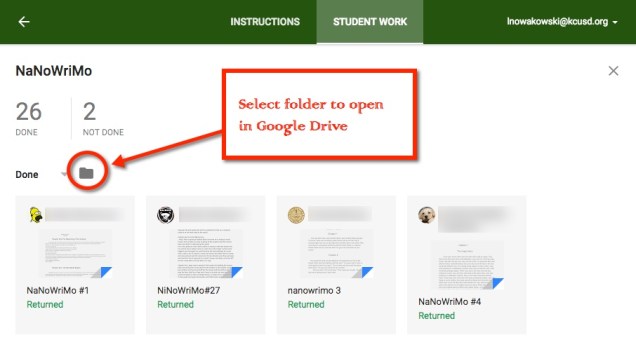
When I’m ready to view, I can click on ‘Done’ in the Question. This takes me to the Student Response page. All of their responses are listed along with the option to grade, comment, and return work.

Question 6

When I click on an individual student, I can see his/her answer and the classmates’ responses.

Question 7


20% Time PD

Recently I wrote about how PD is run in my district. That got me thinking about how can we change that? What do other successful businesses do? What are other districts doing?

man-479670_1920.jpg

I began to wonder what PD would look like if we used Google’s 20% time model? What amazing lessons, innovations, and/or projects would teachers come up with? What exciting experiences would the students be getting? More importantly, how can we begin implementing this?

What it might look like

  • Research our passions
  • Set timelines for projects/lessons/etc.
  • Have a way to showcase our findings
  • Inspire others
  • Enjoy true collaboration with others who share similar interests
  • Happy, respected teachers
  • A district that can document their successes
  • An innovative district

The possibilities are truly endless.


Google Sites: Insert a Form

I love using Google Forms for my homework. It allows me to manage the results in a Sheet. I have it all organized on my website for my students. The advantage of this is that my students don’t need to login to Google – like they would have to do for Google Classroom. With some of my students, Sites is the better option. Here’s how I do it:

Too Much PD?

Is there such a thing as too much PD?

This is something that I have been contemplating. The past few years my district has had teachers participate in weekly PD. In the beginning, this was welcome as not only did we want it, we felt that we needed it. However this current year, I am beginning to ask if there really is too much of a good thing.

How much is too much?

Each week I am asked to participate in 90 minutes ‘collaboration’ time. To me, collaboration is organic, exciting, desired, and teacher-driven. However, when teachers are told what to do, what to discuss, and have someone watching/listening it begins to feel less like collaboration and more like a mandatory meeting. And no one likes long meetings. Then there are the 2.5-hour meetings/PD each month, plus 1.5-hours meetings/PD each month, AND 1/2 hour meetings/PD TWICE per month. This makes a grand total of 12.5 hours of meeting/PD per month. No wait, I forgot the 1.5 hours per month of math PD. So that makes 14 hours of meeting/PD per month. And none of it is teacher-driven.

So what’s the result?

Before I sat down to figure all this out, I had no idea I was getting this much each month. Some of this comes at the expense of face-time with students – a grand total of 8 hours during the regular school day. Times that by the 9 months this occurs, that’s 72 HOURS of lost face-time with my students. Wow!

In addition to the lost face-time, I fear that we are beginning to experience overload. I fear that many teachers have begun tuning out some of the good messages and practices that are being shared. I know I have. Many teachers have begun to dread the monthly 2.5-hour meeting/PD. I don’t find the math PD useful. In fact, watching an hour lesson in which the students FINALLY get to talk after 33 minutes is a bit much, even for me (I love math!). And their actual interaction with other students lasts less than 8 min in that hour.

When can I put it into practice?

If I am missing 8 hours with my students – this doesn’t include the 3 hours that my class must attend First Tee each month – when can I put what I’m learning into practice? I’m honestly not sure. I sure hope I get to do so soon.

What to do?

Honestly, I’m not sure. In and of themselves, each item is worthy. Combined, it’s proving to be a deadly combination. I am hoping that my district reevaluates some of this. Honestly, I think the monthly 2.5-hour meeting/PD needs to go. Remember sitting in those 3-hour classes in college and you were done after about an hour. Yeah, these give you that same feeling. I’m also hoping that the district asks the teachers which ones they find most valuable. Sticking with the top 2 will result in better teaching practices.


They Asked The Questions

Recently I wrote about jazzing up Math class. I was going to have them use real world situations to make the learning more relevant. After writing Ugh, Math, John Stevens suggested having the students come up with the questions. The idea being that they will come up with better questions than I could.

candy We looked at different candies. Here were some of their questions:

  • How many of each candy are there?
  • How much protein in each candy?
  • How much calcium in all the candies?
  • How much does the bag weigh?

There were some pretty great questions that would require a lot of math. We started working out how much the entire bag weighs. We are basing it on the weight of the candy.

John was right, the questions were better and I had instant buy-in to boot! I will definitely be doing more of this.