Well, I’ve applied again. This time I had several people look over my application questions and video and give me feedback. Many thanks to all those who helped. It was all due last week and I felt good sending it off. So, here is the video portion of the application. It was rather difficult to put in all the cool things that happen in the classroom in one minute. Hope you enjoy it. We had fun creating it.
Cool Teaching Moment
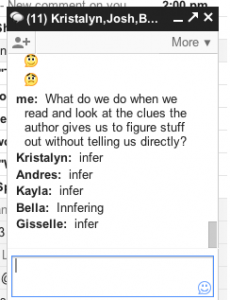
Today while working on our Google Apps (Gmail), the students discovered (Kristalyn to be specific) that they could have a group chat. So using our Google Chromebooks we had a giant group chat. This then turned into a vocabulary review. I joined in the discussion and began asking them questions. What a great impromptu learning opportunity! I have never seen a group of students so motivated to work. I’m still buzzing with the excitement that was generated. It’s days like this that make teaching the best profession!
Google Calendar
Google Calendar is a wonderful tool with many features. This is just a basic overview. We will go over creating a calendar, adding events, and adding your calendar to your email page — makes it super easy to see what’s coming up.
First, log into your account and go to Calendar. You can do this by going to the top bar or Calendar when you first log in.


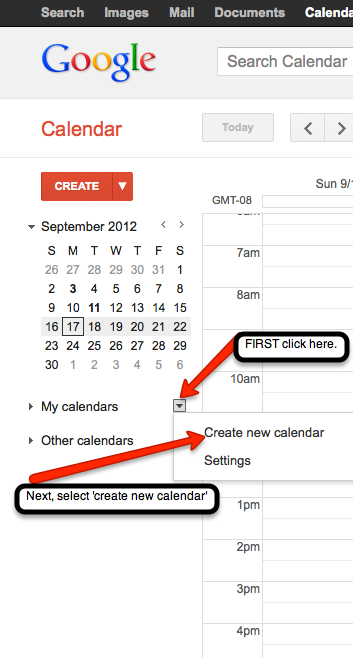 You will now create your own calendar. Find the ‘My Calendars’ section. Just to the right of that, there is a small arrow. Click on the arrow to create a new calendar.
 Next, fill out the information for your calendar. If you would like to add this calendar to your website, be sure to check the ‘public’ option. You also have the choice to share your calendar with a few. Simply input their email addresses. When all information has been added click the ‘Create Calendar’ button located at the bottom of the page. This will then take you back to your calendar.
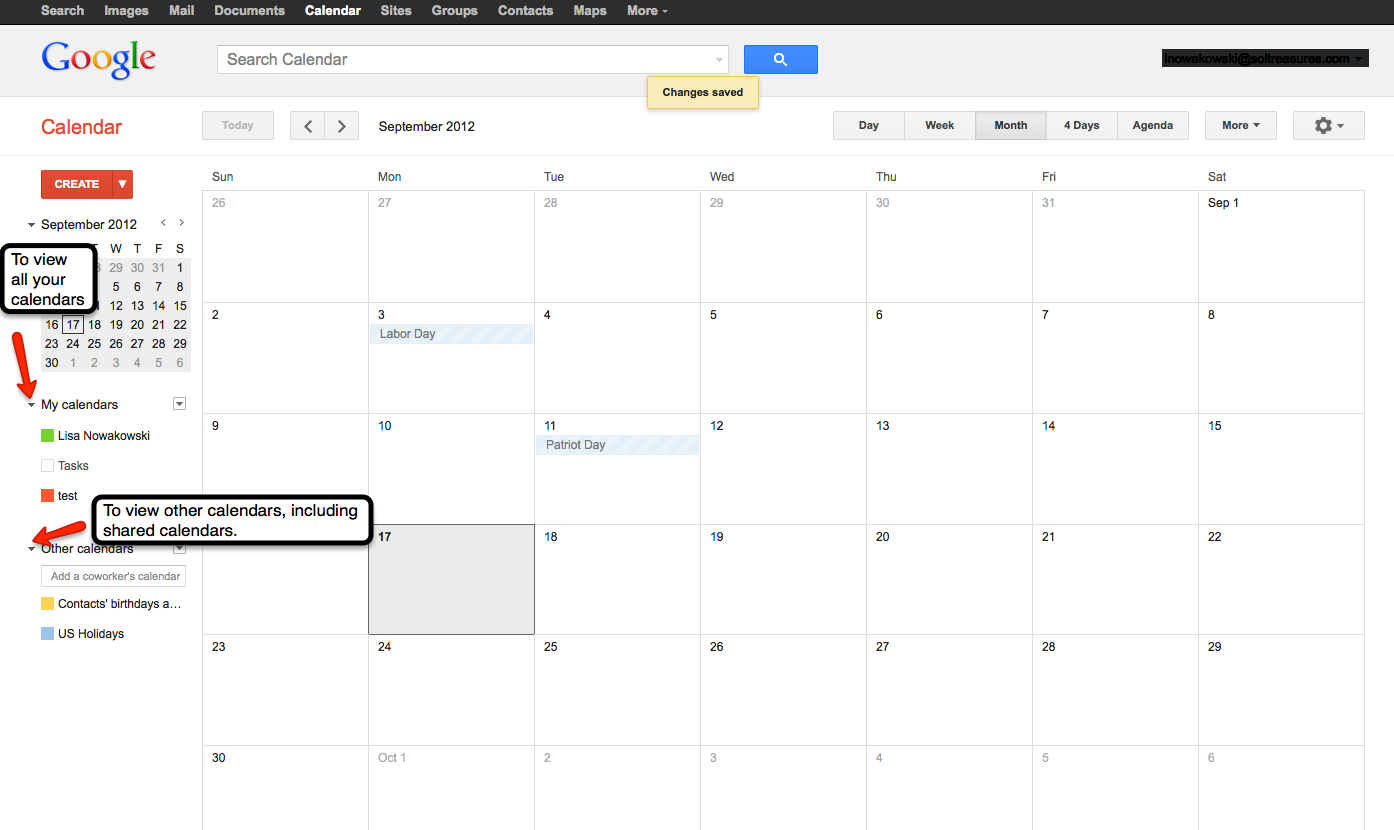
To view your calendar(s) click the small arrow to the left of ‘My Calendars’. Yours will be listed with separate colors for each calendar. To view other calendars, click the small arrow to the left of ‘Other Calendars’. You can add a variety of calendars, including friends. To view, and add, other calendars click on the small arrow to the right of ‘Other Calendars’ — the small arrow with a box around it. Holidays & Moon Phases calendars can be found under ‘Browse interesting calendars’. Once you find one that you like, you can ‘subscribe’ to it.
Add an Event:

The quick option is to click on the date of choice and fill in the information.
 The other option is to ‘double click’ on the desired date and fill in the information. Remember, if you want the information to be posted on your webpage calendar, choose the ‘Public’ option. Save all information when you are done.
Joining Other Calendars:
You will receive an email notification that you have been added to a Calendar — by say your lovely secretary, to view the school’s Calendar. The Calendar will automatically be added to your Calendar page under ‘Other Calendars’.
View Calendar on Your email Page:
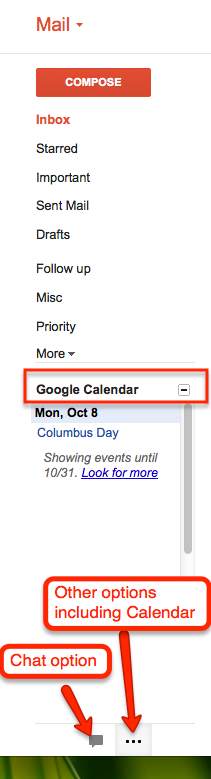
 Going back to your email page, you will click on the ‘Gear’ on the right and choose ‘Settings’
 From the ‘Settings’ page, you will go to the ‘Labs’ tab. Scroll down until you find ‘Google Calendar’. Once you have located it, be sure to ‘Enable’ the lab. Finally, ‘Save all changes’. This button can be found at the top or bottom of the page.

You can now easily switch between the ‘Chat’ option and the ‘Calendar’ by clicking on the icons at the bottom of the left column.
Soon, I will discuss how to add an attachment and ‘event flair’ to an event!
Sharing in Google
The easiest way to collaborate is by ‘sharing’ Documents in your Drive. We have talked about how to create Docs and folders. Now, just take it one step further and ‘share’ those to have dynamic, cross-grade, cross-district PLCs. It’s quite easy.
Sharing a Document (or presentation, form, spreadsheet, drawing):
Once you have created your desired document, click the blue share button.

Type the names of those you wish to share with. You can allow others to edit or view. The default setting is ‘edit’. If you would like to retain control over who is allowed to have access to your document, click on the ‘change’ link on the bottom right. Change the ‘share settings’ to ‘Only the owner can change the permissions’. When finished, click ‘Done’.

Sharing a Folder:
Now there are many times when you will want/need to have ‘shared folders’, with your PLCs. That is the same process as sharing a document. The advantage with sharing a folder is that whatever is placed in that folder, it is automatically shared with everyone.
First find the folder you would like to share with others, select it. Then click the ‘share’ icon at the top of the page.
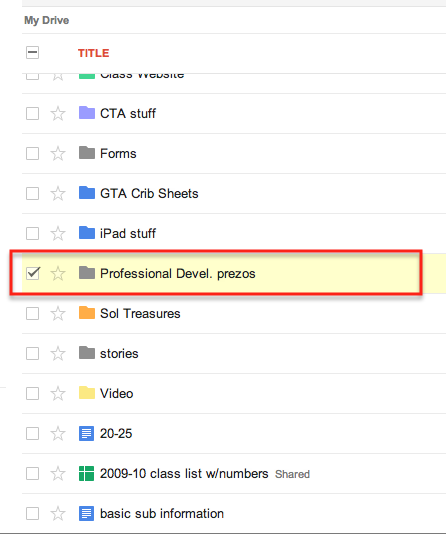

You will then be taken to the ‘Share Settings’ to select others to share the folder with.
I currently have several shared folders. I share an ELD folder with prezos and documents with several teachers in my district. I also share a Math folder with homework forms.
I have shared documents with 10 other teachers to create one OUTSTANDING document. One document was created within 12 hours by teachers in a 50 mile radius. Several of us were creating, sharing, and editing at the same time. It was an amazing experience. This type of sharing makes our lessons better, makes us better teachers, and allows the creativity to seamlessly flow.
Student Video Tutorials
As we all know, one of the large pushes for Common Core is that students will have a deeper understanding of the standards. One way in which this can be accomplished is through peer tutoring. Add in a video camera and you have 21st Century tutoring. The focus of the videos/projects should be the content, not the quality of the videos. The following video is a student explaining the process of multiplying 3 – single digit numbers. Viewing this video, I immediately know that the student has a firm grasp on multiplication. The focus was on the process. Admittedly, my one suggestion to the student would be more details for clarity (i.e. first explain that in order to obtain the final answer, one needs to multiply 2 of the numbers then multiply that product by the third digit).
Multiplying with 3 numbers from Lisa Nowakowski on Vimeo.
This particular video was filmed with an iPod by a 3rd grader. The video was then uploaded to Vimeo.com (Vimeo is a great alternative if your district blocks Youtube & Youtube Education). I then put the video on my classroom website for all to view. You will also notice that nowhere in my description did I mention editing. The videos can be done in one take. Again, the focus is on the content of the material.
Videos are also a great way to assess student understanding. The videos can then be placed into a digital portfolio.
Some parameters could be:
- Giving time limits
- Telling students where to stand in the video
- Specific topics
Have fun with it! Your students most definitely will.
Create a Folder In ‘Drive’
In order to help you stay organized it is highly recommended that you create folders in your Google Drive. This is a very easy process.
From Chrome
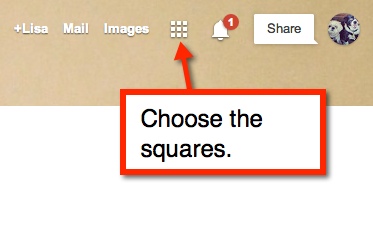

Once there, you will see a red ‘Create’ rectangle. Click on that and you will see your options. Choose ‘Folder’.

You will then name your folder
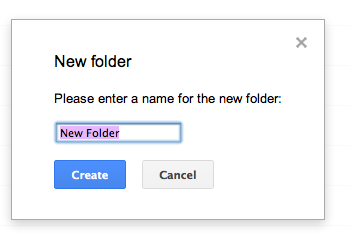
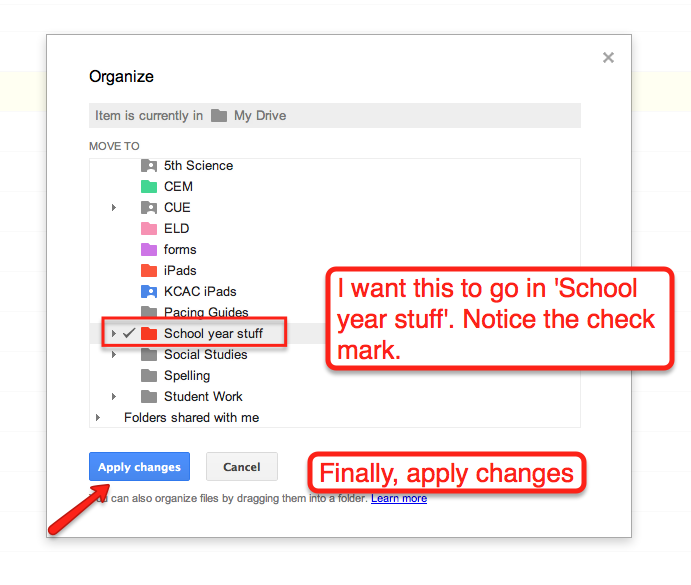
This folder will appear in your ‘Drive’ in the list located to the right. Once you have your folder created you can then place items into that folder. To do so, locate the file you wish to move. check the box to the left. This method allows you to choose as many files as you’d like to move at once. Then at the top of this window you will see a folder icon. Click on the icon and check the folder you would like to place your item. Remember to ‘Apply changes’ and you’re done. Yup, it’s that simple!

Google Teacher Academy
Well, I have just submitted my application for Google Teacher Academy New York 2012. As I was filling out the application and working on the 1 minute video I was nervous. However, that is nothing as to what I feel now…Super nervous! Then some self doubt entered. That was so not nice or welcomed! That silly little voice that says, “Google wants someone who can reach large crowds. You don’t.”
To that voice I say, “QUIET! I did more with 3rd graders than most teachers do with middle school kids 😛 I am an amazing teacher!”
Then that silly little voice says, “Good point.”
So all that aside, I’m nervous, but hopeful. I am a tech savvy teacher. I do amazing things in technology with 3rd graders. Now that I am going to 5th grade, the possibilities seem endless! My brain is spinning with all the project based learning that will happen.
Oh, and here is that video…
Internet Safety
There are some basic rules to keep in mind when you are on the Internet:
- NEVER put pictures of yourself online.
- NEVER use your last name.
- NEVER say where you live (street, city, area).
- NEVER enter a chat room.
- NEVER respond to threatening email or messages.
- ALWAYS tell an adult (parent or teacher) about scary messages, chats, emails,or other communications.
- TELL your parents about any ‘new’ friends you meet online.
Parents, there are some simple things you can do to help keep kids safe:
- Monitor what your child is doing online. Keep your computer in a ‘high traffic’ area.
- Have your child show you what they like to do online.
- Sit with your child as they play games, chat, email, etc.
- TALK constantly about online safety.
- Install child safety software on computers, phones, iPads, iPods, tablets, etc.
- Open communication at all times.
Great Resources:
CUE 2012
I will be blogging soon about all the great tech ideas that are happening out there in the world of teaching. In case you were wondering CUE stands for Computer Using Educators.
Inspiration
I love it when I am in the middle of a lesson and I get a ‘brainstorm’. My students are so used to it at this point in the year. Today was another ‘brainstorm’ kind of day. We were just beginning a lesson on Geometry. Today was the review of 3-D shapes — sphere, cone, rectangular prism, pyramid, cube, and cylinder. So there I am ‘blah, blah, blahing’ away, when it hits me… Have the kids make ’em… Out of pipe cleaners and paper and whatever else! Brilliant! And of course I stop the lesson to write it down. Wouldn’t want to forget my own brillance!
When I am finally finished, sounding much like Charlie Brown’s teacher I’m sure, I share my idea with the students. Together — because most of my great ideas are just a base, and not fully formed — we worked out the specifics. So in the end, groups worked together on how to make the shape assigned, find out how many vertices, edges, and faces AND then make a short video. They did a great job. Here is a sample video.
And tomorrow I will try that whole flip the classroom thing again. Hope it goes better than last time.

