Not sure how to get started? This is a quick tutorial that will get you on your way.
Author: Admin
The Literacy Shed, ELD, and ELA
 For a few years now I have been using The Literacy Shed, based in the UK, as a jumping off point for ELD lessons. These lessons blend seamlessly into ELA and writing. I was first introduced to the site by ELD specialist, Ana Alvarez. Unlike Ana, I was not consistent with its usage until this year.
The Literacy Shed is an amazing resource full of teaching ideas, videos, and in some cases, examples. What makes it so powerful for the ELL, is the simple fact that the videos are all non-verbal. This allows all students access to the idea, theme, and/or concept. The videos are of a high quality and visually pleasing. The site is broken up into ‘sheds’. The ‘sheds’ are “broadly thematic”. Some ‘sheds’ include: Inventor’s Shed, Thinking Shed, and Inspiration Shed.
 As I’ve stated, it wasn’t until this year that I began using this site consistently. My partner teacher and I have been planning weekly lessons around one video or another. This week, we were in the ‘Inspiration Shed‘ and doing a lesson based on ‘The Windmill Farmer’ (second video on the page). We decided to have the students write a first person narrative based on the video. Before we let them loose on the writing, we did a lot of talking first. We viewed the video through once in its entirety, then talked about what we noticed. I was impressed when students noticed the music had changed with the seasons. We viewed it again stopping to talk at key points. We paid attention to the mood – based on music, visuals, and body language of the farmer. After viewing it one more time, without interruption, they split into groups of 2 to 3 students. They were to tell their story. As I circulated around, I was struck by how many had difficulty giving a first person perspective. We had discussed the pronouns to be used: I, me, and myself. While they were using the correct pronouns, they still weren’t putting themselves in the role of the farmer. I heard stories beginning with, “If I were the farmer and my windmills were destroyed…” With these groups I then began modeling what a first person narrative looked, and sounded, like.
When I was satisfied that the majority of the students had an understanding of what was expected, I invited students to share their stories with the class – thus further reinforcing what a first person narrative looks, and sounds, like. Their stories were rich with details. One student noted that the ‘chicken thing’ on top of the house “was going crazy”. At this point I did stop him to give a quick mini-lesson on weathervanes. I had front loaded vocabulary, but as it was a minor detail in the video, I didn’t pay much attention to it and failed to front load ‘weathervane’.
It was only after several periods that I allowed the students to begin their writing. This was such a successful lesson, that I am eager to see the results. They will finish their writings this week. Not only am I inspired to continue using The Literacy Shed, but I know that I WILL consistently use this resource for the rest of the year – and probably the rest of my career.
The lessons are not only inspiring, but align perfectly with the new ELD standards (California) and ELA Standards (CCSS). Even if you don’t teach ELL’s, this is a great resource.
Newsela + GDrive = Success!
 Last week, Richard Byrne of Free Technology for Teachers wrote about using Newsela and Google Docs for differentiated collaborative reading. The idea was so brilliant, yet simplistic, that I had to try it.
Newsela is a free collection of current event articles. It contains relevant, non-fiction writings starting at grade 3. One of the options I like about Newsela is the feature to adjust the same article for varying reading levels. Another nice feature is ‘Quiz’. The Quiz questions are aligned to CCSS – according to the grade the selection is set to.
So taking this idea and running with it, I decided to use Doctopus to make workflow that much easier. I found an article of interest – What moves these big rocks across the desert floor? Hint: It isn’t UFOs – set the reading level to 4th grade (next time I’ll adjust it to each student’s level), copied and pasted the article in a doc, grabbed a few of the questions – requiring students to locate evidence by highlighting the text, and ran Doctopus. Before we began, I reminded the students how to comment (to annotate the text), highlight text, and use the favorite ‘undo’ button. We used ‘undo’ a lot today! As I gave each student ‘editing’ rights on the document, several accidentally erased or moved text when trying to highlight. 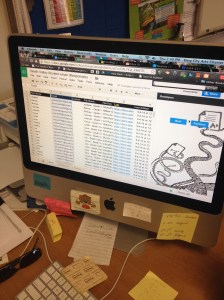
The process was simple, and the outcome was #AwesomeSauce! Each question asked was highlighted in a particular color. For example, question 1 was highlighted in yellow. So question 1 evidence was highlighted in yellow in the text by the student. Question 2 was highlighted with a bright green. This was done so that I could ensure that the student could accurately match up the question with the evidence. And there is the added bonus that when I go to check their work, it’s super easy for me to find the evidence for each question. Makes checking a breeze.
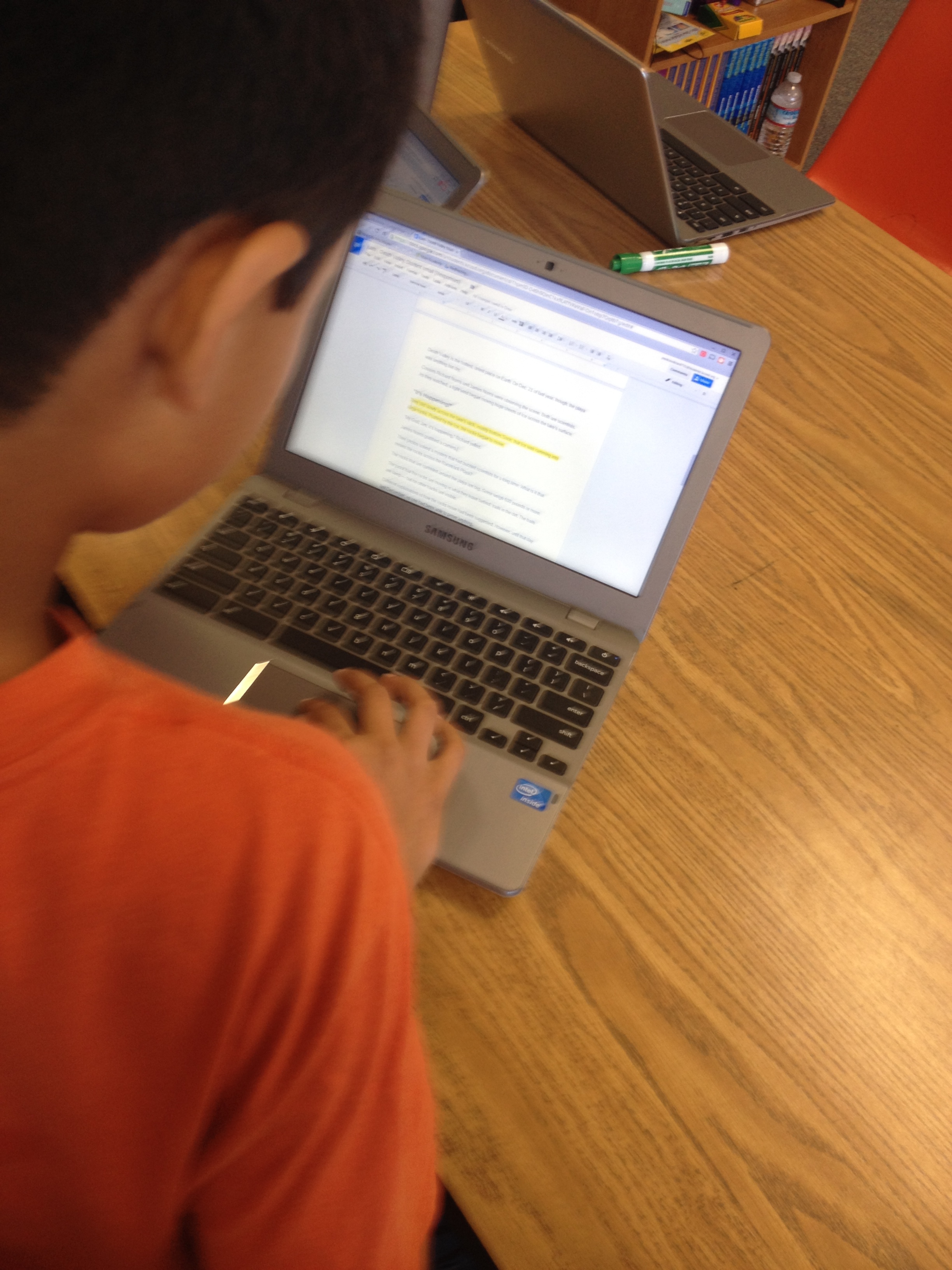
The students were engaged, and actively reading! I loved this so much, I’m definitely going to do more of this.
Another great resource I plan to use is Dogo News. It too has relevant non-fiction text for students.
Jazzing Up Your Chrome
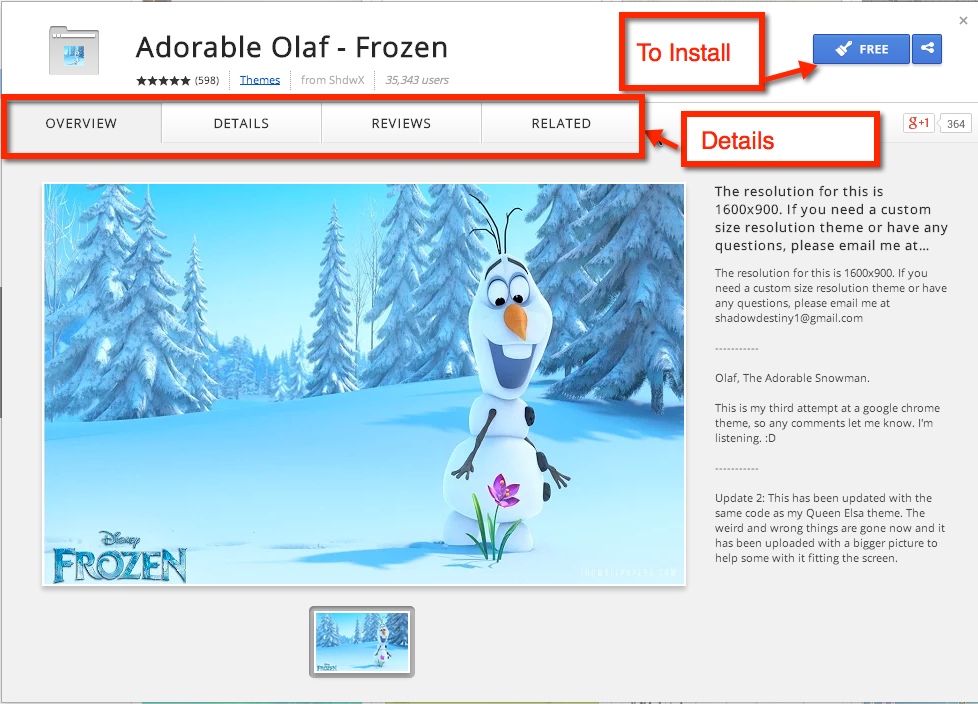
One way to personalize your Google Chrome is through Themes. Themes can be found in the Chrome Web Store. Themes are browser skins that are fun to use and can change the look and feel of the browser. The full image of the theme will appear on a new tab.
It’s easy to change: Navigate to the Chrome Web Store. The default is set to Apps. Following the list to the end, you will see Themes.
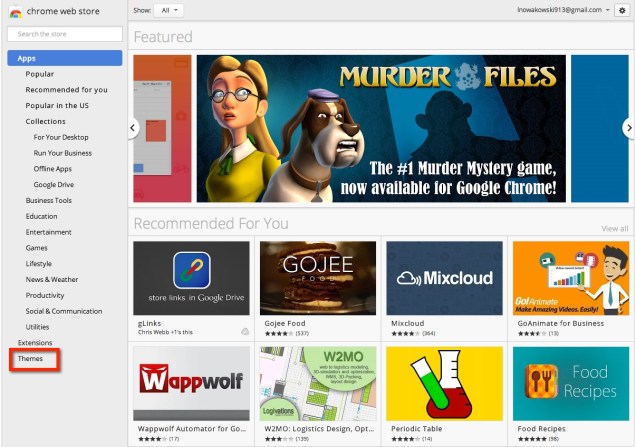 While in Themes, you can choose to navigate by artist, those by Google, or just peruse the available Themes.
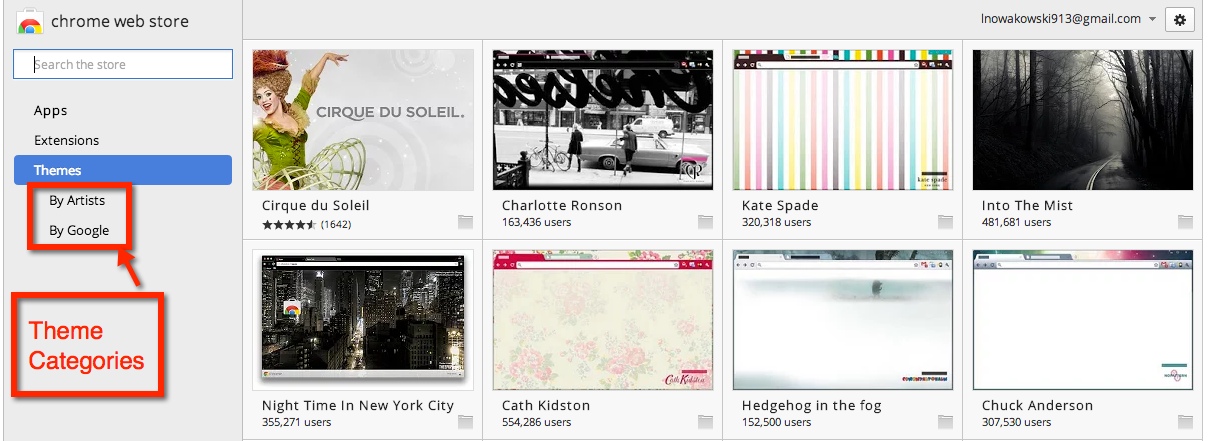 Once you find a theme you like, click on it. You can see an overview, details, and reviews. If you choose to use the theme, simply click on the blue button, in this case the theme was Free.
First Genius Hour of Year
Holy cow! Our 5th Graders really blew me away this week with their first ever Genius Hour! There was baking, Minecraft, Eiffel Tower, Goo Making, Robot researching, and much more. This year’s class not only looked forward to Genius Hour, but they really took it seriously.
What’s Different?
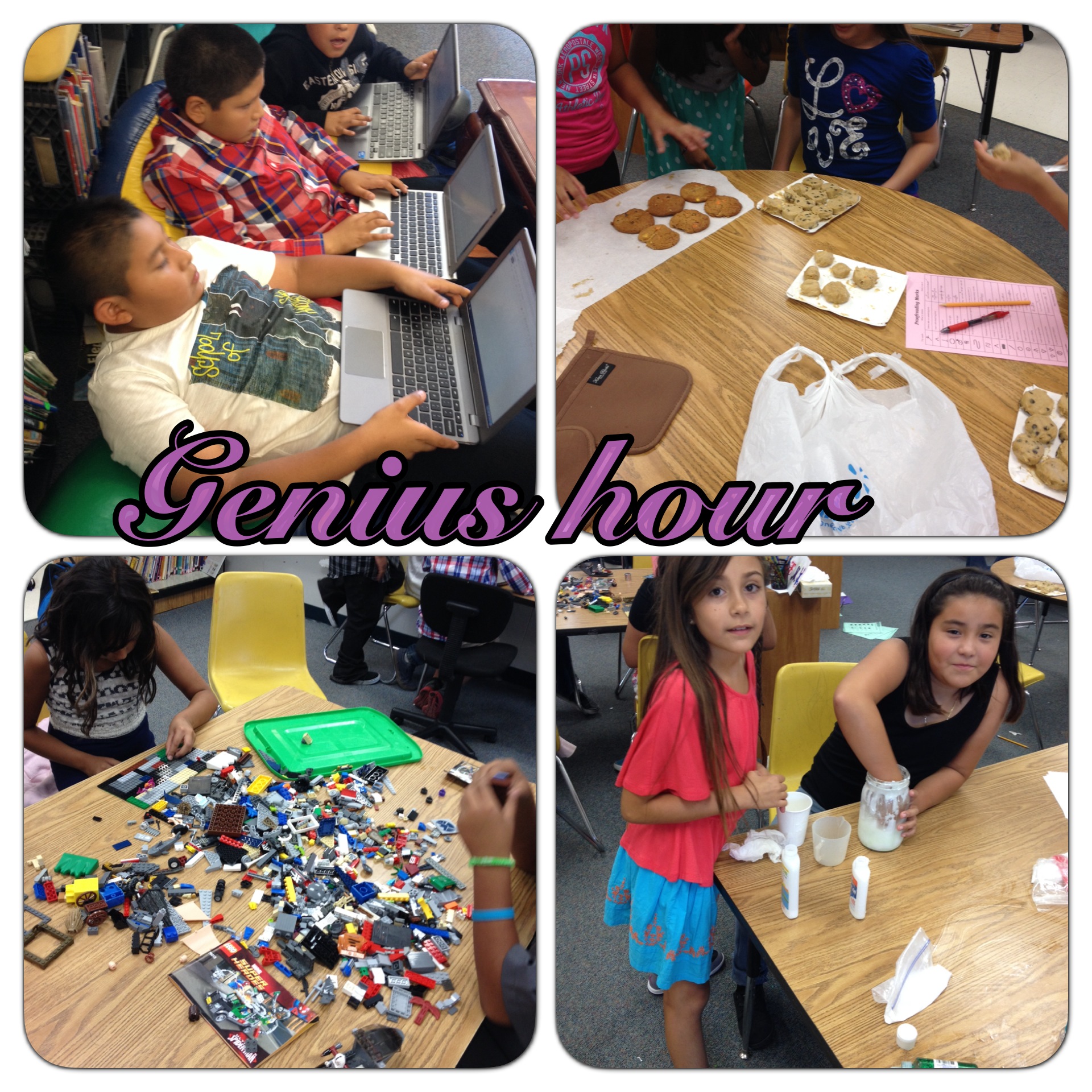 I saw the good in Genius Hour right away last year. The students were engaged, prepared on their own time, and organized themselves. It was great to see. So upon reflection, I wanted to make this year even more successful. So like any good teacher, I asked myself what I could do better/differently. The other 5th Grade teacher and I agreed; the students needed to do more research and have a plan in place before the actual day of. Our plan worked. The first week we had a group of students researching The Great Wall of China. They wanted to make a model of it. They soon changed their minds and switched to the Eiffel Tower. They created a document – and shared it with everyone in their group – took notes and saved pictures. One student was concerned about using a picture that was Free to Use or Creative Commons. How cool is that? Actively being responsible digital citizens!
Another advantage we had this year, is that this year’s 5th graders watched the previous year as last year’s class participated in Genius Hour. This group of students has been anticipating Genius Hour for almost a year. While they may not have totally understood everything that it entailed, they knew that they would get to learn things that were of interest to them.

What’s Ahead?
I have no idea where this is all going, but if they continue down this path Genius Hour will be an even bigger success than it was last year. I can’t wait to see the model of Paris and the Eiffel Tower, the robot that one student was researching how to build, and all the other various creations!
Move It – In the Classroom
 Over the summer, Alice Keeler, wrote about the fabulousness that is Move It – a Chrome Extension. In short, you can set a timer for regular intervals at which time a screen appears prompting you to exercise. The activities are quick and vary from rubbing your left arm with your right hand to 10 jumping jacks to taking deep breaths (and so many more). I began using it, as I have a tendency to sit at my computer and work for hours on end. I found it to be refreshing and really enjoyed the breaks.
I have always liked the idea of ‘Brain Breaks’ and often tried to incorporate them into my classroom. The problem was that I often forgot and got sucked up into whatever lesson we were doing. Now, the beauty of this extension is that the suggested activity is on a timer, and takes over your whole screen. I CAN’T ignore it!
So starting on the first day of school, I set the intervals at 15 minutes, turned on the projector, and Moved! Now being the first day of school, we were in our ‘Honeymoon’ period. You know that time when everyone is on their best behavior. So the first time it appeared, the students weren’t sure what to make of it. I read it aloud, and told them to stand up and do the activity (touch right hand to bottom of left foot, then left hand to bottom of right foot 10 times). Most thought it was fun, a few were still a little shy. However, as the day progressed, they were all more than eager to do the activities.
There are so many benefits to this: movement gets the blood flowing, blood brings oxygen to the brain, oxygen is good, it breaks up the monotony of the day, and…It’s fun! I HIGHLY recommend this for ALL classrooms.
Best First Day EVER
Yup, I said it. Today was the best first day I’ve ever had!
First Thing:
All the students showed up, excited about their first day of 5th Grade. We started the day with a class selfie!
 Team Building/Collaboration

Who says we can’t begin collaborating on Day 1? In the name of collaboration and team work, each table group (4 groups of 6 students) was challenged with building the tallest structure they could. I explained the challenge and gave the students 5 minutes to draw, discuss, and plan their towers. At the end of the 5 minutes, each group was given the materials: spaghetti and marshmallows.  The teams quickly worked together – and discovered – that their original ideas didn’t work so well. The teams quickly modified their plans, talked, and regroup. Some teams repeated this process more than 6 times. After a class reflection – discussion – they realized that they needed a solid base. Now I could have gone into some metaphor here, but I figured it WAS the first day, thought I’d give them a break.
The winning team constructed a tower that approximately 15 inches tall. It was such a hit, we will do this again, maybe building a castle or some sort of Roller Coaster.
Then There Were the Vokis
Voki – Animated Avatars! Now, I could have had students tell me about themselves on a  piece of paper. They could have written about themselves and drawn a picture, but come on, let’s face it – using a Web Tool is way more fun. And totally cool! So I showed them how to create one using the different characters, embellishments, and voices. And then, I let them go – free to create.
Oh my goodness, they made me laugh so hard. One boy figured out that if he wrote, “ha ha ha …” It made the character laugh. Then a few others joined in and we quickly had a chorus of animated laughter. That led to more real laughter.
In the end, we had a shark in the fire, monsters, people with purple hair, happy faces, and a whole host of other crazy avatars.
That was one AWESOME first day!
A Blessing In Disguise
 Say What?
With the school year fast approaching, it was quite a shock to find out that the district was rekeying ALL locks in the district. I’m not sure how many locks that consists of, but seeing as there are 4 schools in our district, each with classrooms, offices, gates, cafeterias, etc, it’s safe to say that it’s a lot of locks – and keys. It was a bigger shock to find out that we, the teachers, would not be given our school keys until (as of right now) the first day teachers are mandated to report – the day before students arrive. We have access to our classrooms, via the lead custodian at our respective sites who will gladly open our classrooms when they are there. Many had the same reaction as I did…What? What if I need to come after the custodial staff is gone? How will I ever get my room ready? Why?
How Will It Work Out?
It will. It always works out. Most teachers went in and began setting up their classrooms within the confines of the times set by the custodial staff – who have worked hard and done a great job getting us cleaned and ready for the new school year.
How Is This a Blessing?
We, teachers, work way to hard. We give up much of our time during summer, weekends, and other school breaks. It’s high time we start enjoying our lives OUTSIDE of work. By having some of our control stripped, we have been forced to stay away. For some it is spent with family, others crossed off some items on their ‘to do’ list, still others spent time with friends enjoying their company, while some took advantage of the time and had a mini getaway vacation. The blessing lies in the district forcing us to be selfish and step away from our classroom.
A Pretty Classroom
So who is really impressed by that pretty classroom most of us spend preparing at the beginning of the school year? Who really appreciates all those pretty bulletin boards? What about the perfectly themed classroom? You, the teacher, that’s who. Oh sure, on the surface the kids and parents are in awe, but digging a little deeper they appreciate other aspects of our work. The parents are more impressed when you push their child, when you get them help, food, clothing; they appreciate the more meaningful aspect of our jobs. And the kids? Well, they appreciate a great lesson. You know, the ones that you spent hours preparing for. The ones that you are excited about. The ones appear like a game, are fun, and engaging.
This Blessing
So instead of being filled with anxiety and complaining, I welcome this. I have my lessons ready for the first week – I didn’t need to be in my class for that. Those lessons are fun, build team unity, and set a foundation for routines. The first week is filled with THEM creating the rules, creating Voki‘s, and problem solving with spaghetti and marshmallows. Doesn’t that sound way better than being wowed by a ladybug themed classroom and boring dittos (that is not to say that if you have a themed classroom, you have dittos)? Now if you are one of those amazing teachers who have awesome lessons and a cutesy themed classroom, hats off to you! I however, will enjoy my last weekend of summer vacation. Embrace those small blessings in disguise!
To My District
I say Thank You! You have forced me to look at things differently and enjoy life!
Manhattan Beach RockStar
Day 1:
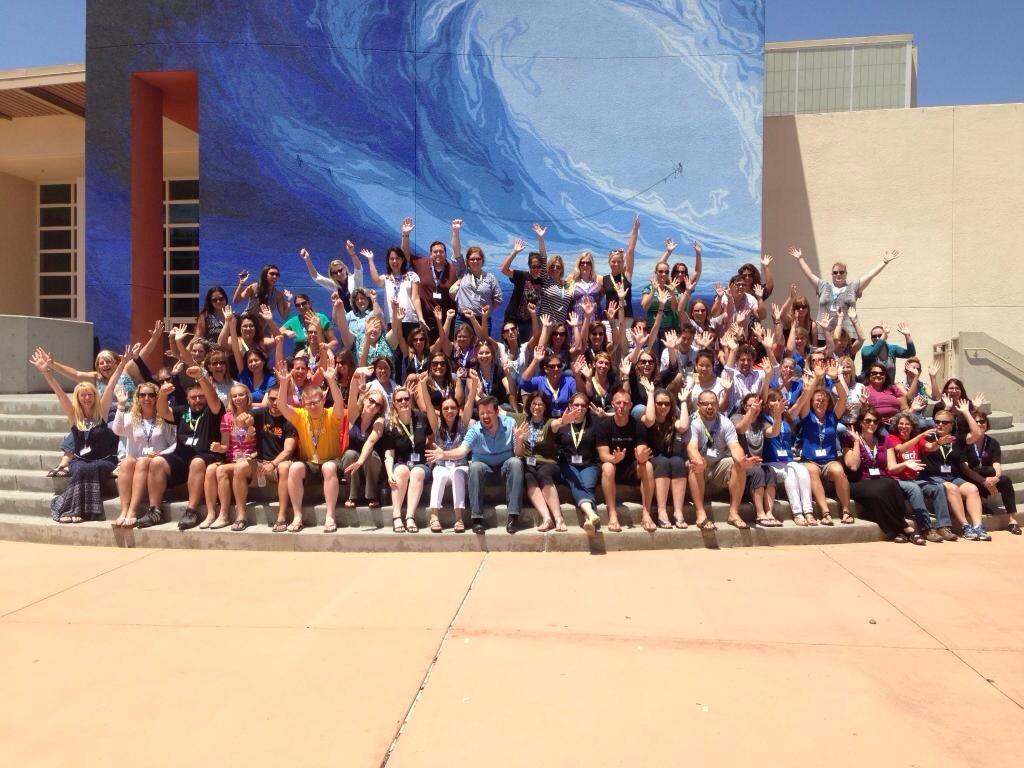 What can we say? It was super awesome! The day began with many walking to Manhattan Beach Middle School. Upon arrival we were greeted with enthusiasm, eagerness, and an energy that was akin to that of a six year old. The room was abuzz with excitement for what the day had in store.
After all introductions – including that of CUE’s CEO, Mike Lawrence, the Shred Sessions began. If I hadn’t been a part of the faculty, I would have had a hard time deciding which to choose. Although, creating a website using Google Sites would have been a top choice.
I was so inspired by those creating their Sites. A few were not impressed with the templates they had chosen and wanted to customize their Site. Many went online to find patterns and palettes using ColourLovers, while others searched for Digital Scrapbook Paper. The result? Unique and beautiful sites. The participants were excited and lost in creation – we almost worked through lunch!
As with all RockStars, we enjoyed a 2 hour – catered – lunch in the sun. Oh, and ice cream! Everyone LOVES ice cream – or fruit pops in some cases.
After the day had ended, the connections continued at dinner. We went to a local restaurant, discussed, learned, and had a great time.
Yes, all in all, Day 1 was a HUGE success!
Day 2:
The day began with energized educators ready to learn more! Personally, I was inspired by the teachers I got to hang out with. We were creating movies to use in classrooms using Lego Movie Maker (iOS) and iMovie (iOS). The creativity was flowing! One participant needed to tweak her Gene movie she made in Lego Movie Maker. So I challenged her to import it into iMovie and do more editing. It was totally mean of me. She was a novice with both programs. She not only figured out how to create the movie she wanted, but taught me a thing or two about iMovie! I love when that happens. Other participants created a welcome video for 6th graders using the Trailer feature in iMovie.
That night we gathered at Dockweiler State Beach for music, S’mores, and a bon(d)fire – Thank you Jeanne Reed! It was so relaxing sitting by the ocean and getting to know those that gathered with us. It was also refreshing having many bring their families with them.
Day 3
Again I was inspired by all participants. There was one that was admittedly behind the times when it came to technology. We discussed Web Tools and how they can be used in the classroom – Animoto and Voki. Being a novice to all of this, I thought Animoto would be her choice. She surprised me by creating a Voki. It’s not that Voki’s (animated avatars) are that hard to make, Animoto is a simple and very easy video (trailer style) creation tool. Animoto is often referred to as the ‘Gateway tool’ for video creation. I asked why she chose Voki and her explanation warmed my heart and inspired me. She said that Voki would be the one her kids would really like. She was learning it for them – Special Day Class students. How awesome is she? Putting aside her inexperience, and putting the needs of her students first and just going for it!
Another participant, Paula Torres, and I sat back and fired off ideas on how each could be used in the classroom. She was a high school math teacher. Her ideas were amazing (Voki) – taking a snapshot of ones her students create and make them into trading cards to creating famous mathematician Vokis to an creating examples AND non-examples! If you’re not following her on twitter, you need to! Here is her Voki:

CUE RockStar Saugatuck

MACUL (Michigan Association of Computer Users in Learning) and CUE (California’s MACUL counterpart) came together to bring an amazing Professional Development opportunity for educators from 5 states. Andy Losik, from MI, and Jon Corippo, CUE RockStar Baby Daddy, have been talking about bringing the wildly popular RockStar Camp to Michigan for a while now. Finally the stars and planets aligned, and over 100 educators gathered in Saugatuck, MI for three outstanding days of learning, connecting, and fun.
For those not familiar with RockStar Camps, it’s three days of hands-on learning and creating, with a TWO hour lunch. Yes, you read that right, teachers actually get a TWO hour lunch – with ice cream! Each day participants learn and create in small learning groups (10 people or less), and really dig into concepts and tools for 2 hours. There are only 2 sessions in a day.
This Professional Development is like no other. It is/has:
- Affordable – ridiculously so
- Has catered TWO hour lunches
- Small group instruction
- All hands-on, and creation based
- Outstanding faculty and participants
- Unique ‘After Party’ activities
- Connections, connections, connections
The three days in Saugatuck were jam packed with joking, laughs, learning, and connecting. Drew Minock showed off the awesomeness of Augment Reality, Tammy Lind showed off the capabilities of Google Maps, and Jon Corippo, well he just brought it! To see all the sessions and notes, check out CUE RockStar Saugatuck.
The Connections Continue:
 After days 1 and 2, Andy planned some unique experiences for everyone. Day 1 included Dune Rides. The Dunes in Saugatuck aren’t like the dunes you are used to. They are unique in that they were brought about by cutting down trees long ago. As a result, the top soil eroded leaving the sand, found underneath the top soil, exposed. When the winds kick in, sand gathers around trees and buildings. There is an actual town that was buried as a result. The views are breathtaking. At the highest point, you stand 300 feet above sea level and are surrounded by trees (actually it’s just the tops of 3 trees), grass, and sand.
 The west coast of Michigan has wineries – who knew? We were able to get a tour of Fenn Valley Winery in Fennville, MI. The evening was perfect. Not too hot, not too cool, and low humidity with a slight breeze. We were taken out to the vineyard where we sampled white wines and learned about the types of grapes that grew well in the area. For tasting reds, we went into the barrel room. We were truly treated like Rock Stars!
In The End
It is safe to say that everyone who was in attendance, learned a few things, made lasting connections, and had a great time. I truly hope that these RockStar Camps continue to grow in popularity throughout the country. They are just the jumpstart that I, and others, need to rethink, redesign, and challenge us as educators. As a teacher – and a RockStar Faculty Member – I crave this type of PD. Without this type of PD, I would very easily slip into being a complacent teacher: one that is never challenged. It has been through discussions with other educators at these events, that has helped to transform my teaching and educational philosophy.
NOTE: The first picture is that of a screen cleaner made by Andy Losik’s daughter. She is raising money in order to buy a dirt bike. And yes, that is the one I bought.

