Comment in Google

Another feature that allows for easy collaboration in Google Documents is the ‘Comment Feature’. This feature allows me to highlight a particular text and comment on it, for clarification or questions. It’s really very easy.

First, highlight the desired text (can be a word, phrase, sentence).

pic 0

Now you can add your comment. There are 4 ways in which to access the ‘Comment Feature’:

1.  From the Tool Bar iconPic 1


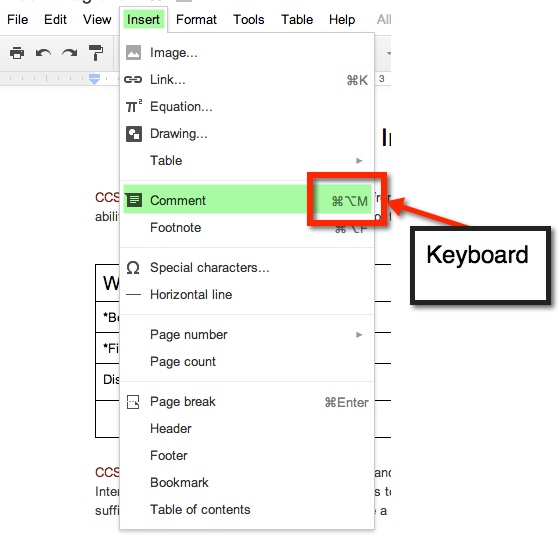
2. ‘Insert’ option on Tool Bar

3. Keyboard Shortcut


Pic 2


4. Gray Comments button next to Share button on top right.

pic 5


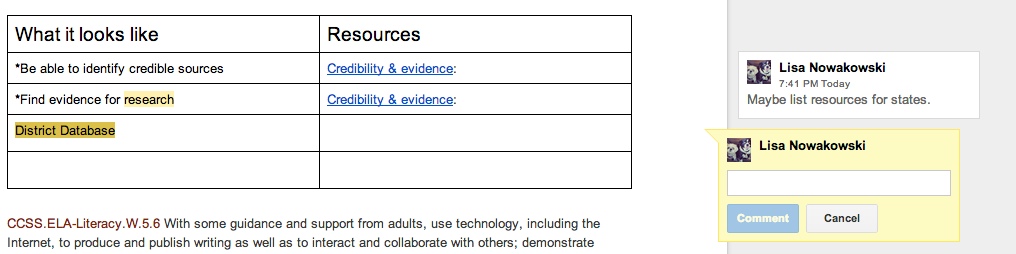
A yellow comment box will appear to the  right of the document. This is where you will type your comment.

pic 6


If more than one comment is on the document, and you are unsure of which comment goes to which highlight, simply click on either the comment or the highlighted section. If the highlighted text is chosen, then the comment will ‘pop up’ and show in the yellow box. If the comment is chosen, the highlighted text will become a darker yellow.

When you have finished making your comment, be sure to chose the blue comment button.

Screen Shot 2014-01-29 at 8.02.48 PM

Pen Pals

Basque Country

Last year a friend of mine, who teaches in Spain (Basque Country), contacted me with the idea about our students becoming pen pals. There were several issues that needed to be worked out before we could begin. Her students spoke very limited English, their 1st language varied from Spanish to Basque to Arabic. A group of her students were Gypsies and had little interest in school, and her school has VERY strict Internet policies for students.


Problems Solved:

Of course my initial response was to have my students use Google to communicate, but with her school’s policies, that wasn’t possible. Our next best idea was to use Dropbox. She had her students type letters on her computer which she then uploaded into a shared file in Dropbox. When all the files were ready, I passed them out to my students. The initial reaction was that of excitement. My students loved that they had a connection to a student in another country, on another continent.

Student Response:

While they were excited with the new activity, they were also intrigued to see that many of those in Spain were just like them. The boys (in Spain) that had written that they enjoyed soccer were the Pen Pals that my boys fought over. One student (Spain) wrote that her brother plays soccer, but she didn’t like it and went on to describe all the things that she liked to do. Of course, my girls all wanted to write back to her. Then there was one special student. My friend had told me about her. I chose a student who would be sensitive and write a quality letter back. This particular student was having a hard time assimilating to her new home in the Basque Country. She was from the Middle East and bullied at school. The student I chose to pair her up with was an outgoing and kind girl. When my student wrote her response, the bullied girl was envied because her Pen Pal had written so much. It also helped her to gain confidence.

All in all it was a success. The Spanish students were able to practice their English, and even the most reluctant student was completely engaged. My friend reported seeing a change in those students who had little interest in school. Some of her students asked to write. It was a first for many of them to want to do something school related.

So Now What?

Well, today I was pleasantly surprised with an email from my friend. It seems that her current group of students are aware of the Pen Pal program we had going and asked her when they get to do it! So here we go, our second go-around with this. We are even thinking of doing videos this year. There are still the same strict policies that she must adhere to, but we think we can work it out. We will be using Dropbox again. Today I shared with my class what we will be doing. They seem eager and on board.

Clean Up Your Bookmark Bar

I love having my Bookmark Bar. It has many websites ready to go at the click of a mouse. However, I hate that it also provides the name of the site. Sites like Twitter and Facebook have recognizable favicons (those handy little pictures that appear on tabs and in the Bookmark Bar).

I recently learned that I could get rid of the names and just leave the favicons on Chrome. Here’s how…

pic 1


pic 2


pic 3


pic 4


pic 5

Shop ‘Til You Drop

Recently I have begun to incorporate projects more and more into my classroom. The latest was ‘Shop ‘Til You Drop’. This activity gave students real-world experience adding and subtracting decimals (This is a 5th grade Common Core Standard – NBT.7). It also incorporates 4 other Common Core Standards. It was a project that my partner teacher found online. And like any good teacher, I have had time to reflect on the project; take note of what went well, and what I will do differently next time.

Schöne Geschenke
Photo by geschenkhamster.de via wiki commons


What went well:

  • Students begged to work on the project.
  • Students took the assignment seriously.
  • Students asked for help with subtracting across zeros – I need to go back and reteach.
  • Students helped one another solve problems and find gifts.
  • Many quality presentations were made.
  • Many students viewed their project on the TV, seeking feedback.
  • Students took feedback and made adjustments – even after their presentation was given.
  • Templates were used and modified.

Things that need improving:

  • Work space on paper (just to make sure they’re not using a calculator).
  • Rubric/Scale that fits my needs – Marzano based.
  • Give more time. Took longer than I anticipated.
  • Ask what student would do with left over money. While some volunteered this information, many did not. It wasn’t something that I thought about until one student shared her thoughts – she wanted to donate the rest to a charity.

And because I am a firm believer in sharing, here is the lesson – templates included. I have included the NETS-S as well. Feel free to share, modify, and use.


New Year, New ‘Challenge’

Last Sunday – 12/29/13 – I joined in on a Twitter Chat #Caedchat (California Education Chat). If you haven’t stopped by to check it out, you should. Every Sunday at 8 PST. Anyway, the topic was looking back at the past year. One question asked for us to share out our ‘Reflection’ blog for 2013. A surprising number of us didn’t have anything to share. Not that we don’t blog, we just hadn’t written our reflections for the year. Which then led to Karl Lindgren-Streicher (@LS_Karl aka #MrBeanBagHoggerPants), stating that there needs to be more educators blogging. He was right!

Photo Credit: Thomas Hawk via Compfight cc

Which leads me to my new ‘challenge’. Again on Twitter, I noticed that Karl supported a new blogger, Trisha Sanchez (@techishtrish), by tweeting out her first blog post. I went to her post and began reading. It was a great reflection of her year – and what a wonderful year it was! I then Tweeted out to her, and began following her on Twitter. And through the power of Twitter, Donnie Piercey (@MrPiercey) got in on the action. His simple comment of needing to blog began an avalanche of comments and our ‘challenge’ – who can blog the most (#TeacherBlogContest).

Game on! The four of us are fairly competitive, so be on the lookout for our posts and tweets. You can follow our hashtag, yes we decided on a hashtag, #TeacherBlogContest. We’re figuring it all out as we go, and it’s sure to be great fun. AND if you want to join us, we welcome it! No matter what, we encourage everyone to blog more in 2014.

#TeacherBlogContest:

  • Begins January 1, 2014
  • Ends January 31, 2014
  • If successful, may go into the next month
  • Most posts wins (Posts need to be meaningful, helpful, or informational)
  • This post is an example of one that will count
  • This is a post that would NOT count, Thanks Mr. Piercey for the example 😉
  • Winner gets bragging rights
  • Winner may get a badge if one is made
  • Tutorial Videos count

Blog on!

Paper Minecraft

Earlier this year, I instituted Genius Hour. It has become the students’ favorite time of the week. I blogged about it recently, and you can read it in Why Genius Hour.

One of the biggest successes has come from Isaac. He is a creator by nature – tape and paper are his mediums of choice. In the past (I taught Isaac a few years ago) he would cut, tape, and draw on his creations. Well, he has since discovered Minecraft and Papercraft – the paper version of Minecraft. At first, he would have me print out Papercraft creations he found online. Much like this:

papercraft earth

Photo Credit: niksin via Compfight cc

Those are pretty cool and all, but then I showed Isaac Google Draw. That was it for him. His creativity kicked in and he hasn’t asked me to print out a prefab one in a while. Why? Because he now creates his own! At first they were pretty basic as he was getting to know the program. I showed him some simple tricks, like copy and paste, so that he could have congruent figures.

minecraft 1

Okay, so the sword is pretty cool, and not so basic. Since this one, he has started putting faces on his creations, and becoming a bit more precise.

snow golem

I can’t tell you how to put them together, but then again, I’m not into Papercraft. Isaac, however, is thrilled to have his creations brought to life. When I asked him about putting tabs on them and writing instructions for those like me; he says that it’s easier for him without the tabs and never really answered me about directions – I’ll take that as a ‘Not going to happen’.

It has been more than thrilling to watch Isaac’s progress. When I asked him if I could write about him on my blog, and share a few of his creations, his eyes sparkled and a HUGE grin spread across his face. I told him that he would get full credit for all of his work. He then told me that I had to put his full name on his creations. Yeah, after reminding him about Internet safety he was okay with just his first name and my name – so that no other Isaac could take credit.

I can’t wait to see what creations he will have for us in the new year!