So it’s 2015, Happy New Year, and everyone is making resolutions. I, for one, do not make any resolutions. It’s not that I’m perfect, rather I’m not a fan of setting myself up for failure. Most people treat the resolutions like a sprint – start strong and end quickly. I view changes more like a marathon – slow and steady – for better results.
All the talk about resolutions got me thinking about changes we, as educators, make. We change our approaches year after year; we change lessons (even if we’ve been teaching the same grade for 10+ years); we change our outlooks; we are constantly changing. That’s what keeps us fresh, invigorated, and excited.
And how do these changes occur? Well, some are organic – as times change, so does our approach. Some, more often than not, come through challenges. Those challenges can come from a failed lesson, a problem student, varied ideas from colleagues and administrators. My most significant challenges have led to my most significant changes.
Look, I’m like any other teacher. I would love to have a class full of students that did what I asked the first time around, hung on my every word, and told me that everything I said was great. Fact of the matter is, that kind of class would probably scare me, then I’d get soft – as a teacher.
I’ve learned to be humble and listen to students’ ideas. It’s those students who say, “Can we … instead?” who inspire me and make a lesson better! Recently, I wrote about a student who made my life easier. Frankie suggested a better way for groups to individually turn in assignments on Google Classroom (post). If I did have that class that never questioned me, it would have taken me a lot longer to realize there was an easier way.
Which Led To This Thought…
Does everyone prefer a challenge (not the ones that make you go home and cry)? Or are there those that would rather be surrounded by the ‘yes class’? Upon reflection, I sadly came to the conclusion that there are those who would rather be surrounded by the ‘yes class’ (aka yes people) than face challenges. I have been in one organization or another since childhood. I have been a part of the ‘yes class’ – mainly out of fear of retribution – and I have also been a part of the ‘can we…instead?’ class. Without a doubt, I can say the ‘can we…instead?’ class is not only more enjoyable, but it’s also a more safe and productive environment.
My Point To All This?
Ditch the New Year’s Resolution and challenge yourself. Surround yourself around those that will make you a better person and/or teacher. Seek out others with opposing viewpoints, you can learn a thing or two from them. Even if it’s as simple as ‘that’s NOT what/how I want to be, do, or teach’. Have conversations and accept other’s ideas. Challenges can be good; it’s where we learn and grow.
And have a GREAT 2015 – even if we don’t have those hoverboards just yet.
Recently, my students learned about Jamestown and Pocahontas. The adopted textbook told the story through the eyes of the United States. This was interesting, but I wondered how England viewed those events. As a result, we researched what the UK had to say about those subjects.
How’d We Do That?
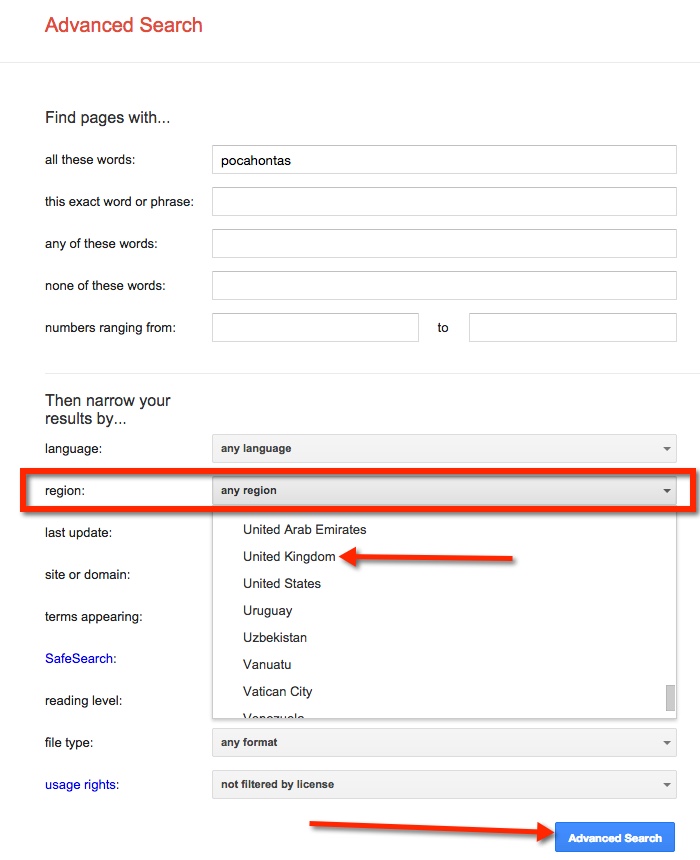
We refined our search to find only items that were from the UK. We started with our basic search, ‘Pocahontas’. Then went to the ‘Gear’ for an Advanced Search.
This takes us to a new page filled with search options. For this post, we will focus on searching by Region. Finding the ‘Region’ choice, select the down arrow located on the right side of the gray bar that reads ‘any region’. This then allows the drop down menu to appear. Then select the desired region. We chose ‘United Kingdom’. Finally, select the blue ‘Advanced Search’ button located on the lower right side of the screen.
Notice the Web Addresses of the refined search. They all are from the United Kingdom. Incidentally, we found a game on the BBC website that had some interesting facts.
As of recent, this feature is no longer available.
Too Much Information
There IS such a thing as ‘Too Much Information’! When students begin ‘researching’ on a particular topic, they all too often type in the topic and choose the first link in the list. We need to help guide these students to better resources that they are able to access. One quick way is to teach students how to search by reading level on Google.
Conduct a Search By Reading Level
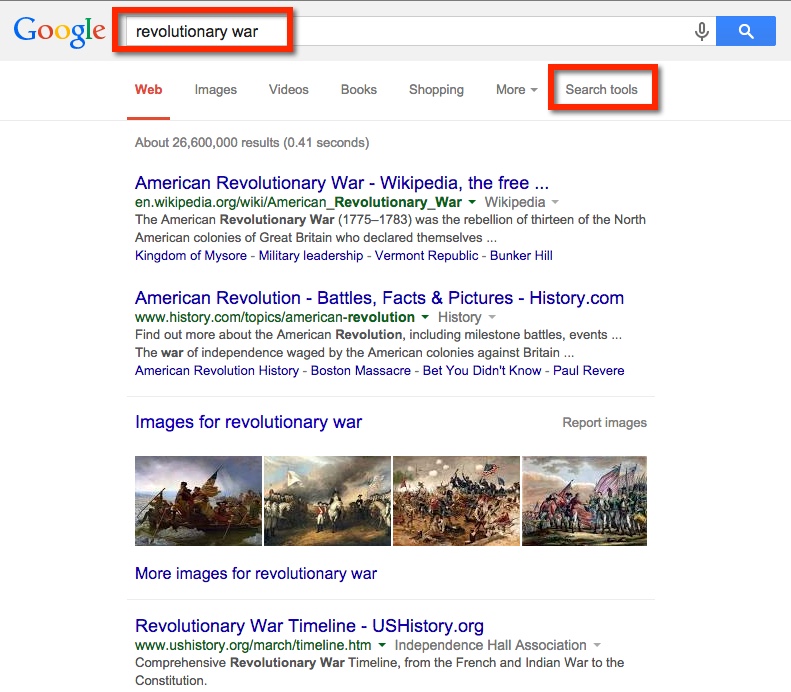
My students will soon begin learning about the Revolutionary War. When I ‘Googled it’ I was given a long list of websites and images. This is NOT what I want my students doing. They will inevitably go to wikipedia, ‘read’ information, become overwhelmed, and ultimately copy sentences. Thus driving me nuts. As I would like to avoid the whole frustrating process – for both our sakes – I am teaching them some basic search skills.
So here’s what I got when I typed ‘Revolutionary War’. Notice that along with images and videos along the top bar (below the search box) there are ‘Search Tools’. This is what I want!
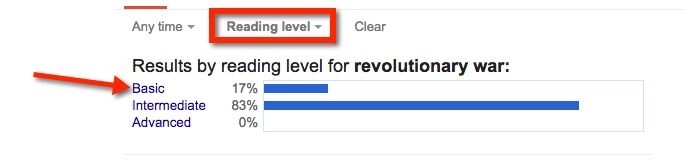
When I choose ‘Search Tools’ a secondary ‘bar’ appears on the next line. Choose ‘Reading Level’.
Doing this will result in the ability to choose ‘Basic’, ‘Intermediate’, or ‘Advanced’. For my 5th graders, I encourage them to choose ‘Basic’. Explaining that the items that will be displayed will be closer to their reading level.
It’s as easy as that to find information my students can access on the Internet. There is a lot of information out there, we need to arm ourselves and our students with the necessary tools to wade through it.
Google Classroom has made my workflow seamless. Recently I had a teacher ask how to have students, who are not document (or slides) owners, ‘submit’ work. I’ll admit, my workflow made my life a little harder. Then, one of my students – Frankie (I told him that he would get a shout out) – simply suggested having the non-owners submit the link for the assignments. So being the collaborative classroom, we gave Frankie a Class Dojo point for helpfulness, and celebrated his brilliance.
How Do Students Submit a Link?
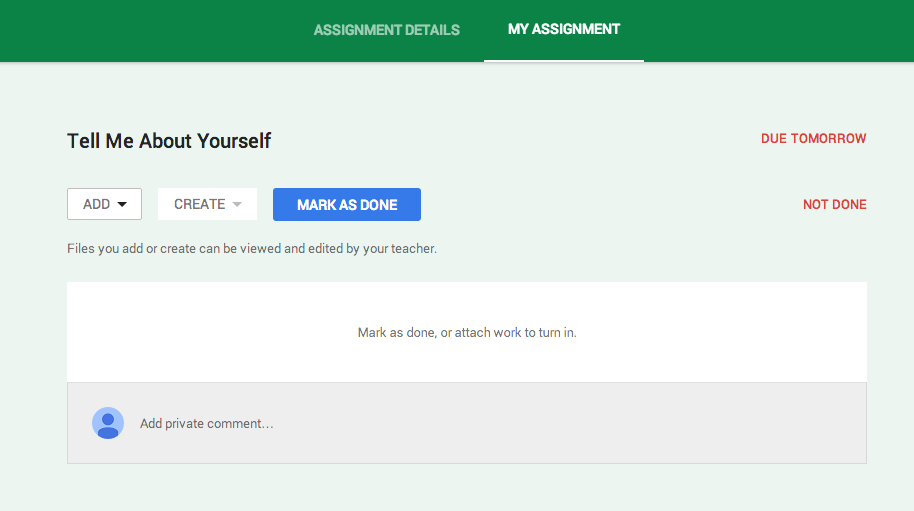
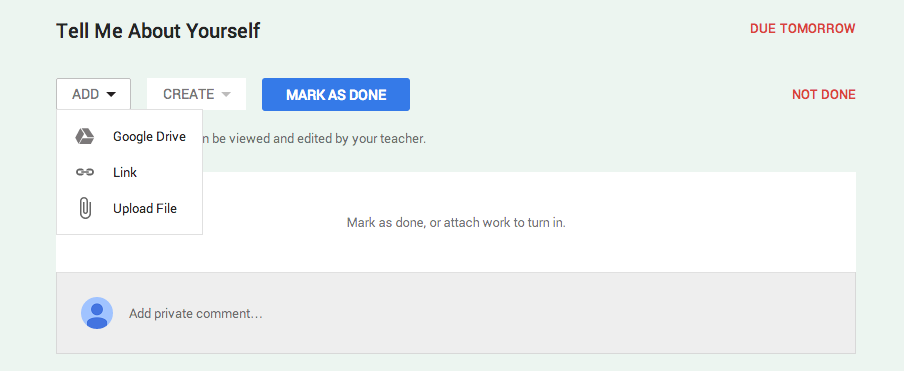
While the students are in their Assignment, they have the option to ‘Add’, ‘Create’, or ‘Mark as Done’.
If your students have been working collaboratively on a project, they most likely have created it within their Drive and shared with others. Now, the owner is the only person who has rights to submit the document. They will do this by choosing ‘ADD’ then ‘Google Drive’ and proceed to find the project.
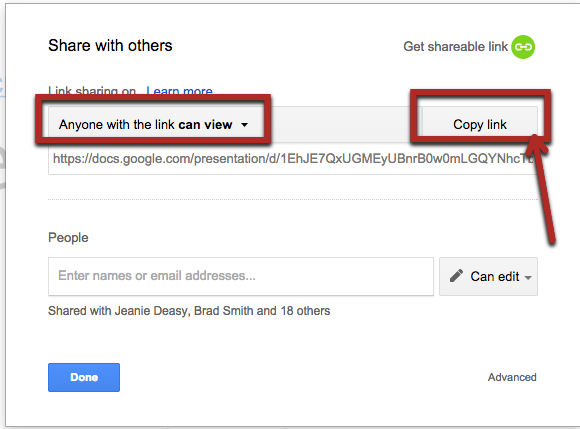
The non-owners, will need to locate the documents link, and be sure that ‘anyone with the link can view’.
They will then Copy this link in the assignment. However, they will choose ‘Link’ and paste the code there.
Okay, well I haven’t gamified ALL my homework, really just the Math.
I’m not a fan of homework to begin with. Study after study has shown that it does no good. Those who can do it, don’t need the extra work while those who can’t, rarely have someone to help them. So what’s the point? I speculate that it comes down to the fact that, ‘it’s the way we’ve always done things’. But I’m not here to talk about the Pros and Cons of homework, I’m here to talk about a small success I’ve had with it this year.
As my district has a homework policy – I have to give it – I have strived to make it meaningful. Years ago, I assigned 20-30 math problems nightly. I know, what was I thinking? Then I scaled it back to around 8 problems and until recently it was closer to 3 or 4 per night. I tried making those problems easy enough to complete at home, yet incorporate some higher order thinking skills.
The problem? The students rushed; it was all meaningless for them. And I was frustrated with some of the half-hearted answers I was getting.
The solution? Gamify! Oxford Dictionaries defines Gamification as, “The application of typical elements of game playing (e.g., point scoring, competition with others, rules of play) to other areas of activity”. In other words, making it a game. There are several application that can do this. I could have chosen to do it on my own, or use one of the programs available. I chose the latter. Since my homework is done online, it was only natural to find a program that worked for me. I chose Mangahigh. While there is a paid version that allows me to track the students’ progress in great depth, I opted for the free version.
I have talked with parents and students about this shift. Everyone is in agreement that it is better than the problems. Parents have commented that their child begs, “One more game Mommy, I’m trying to beat ____.” Students are working towards goals. In this particular program, they earn bronze, silver, or gold badges. While the students are striving to obtain the badges, what’s really driving them is their competitive nature. They are trying to beat their friends, and me. I also signed up as a student and take all the challenges. The students LOVE coming to me and bragging how they’ve beaten me. Several have commented, “It’s way more fun [than the problems]!”
What I’ve noticed is that students are spending more time on math. I no longer get emails from students complaining that they don’t understand. I now receive emails telling me how many challenges they have passed and how many badges they have earned. I received an email from a student this evening. She was proud of herself for passing a challenge, beating me, and earning more badges. I told her how proud I was of her, and she responded:
“Thank you, I love Manghigh. It is super cool!”
In short, we are all happier. I am no longer frustrated that students aren’t taking their homework seriously. I am happy that they are spending time ‘playing’. They are happier, as are the parents. There are no more tears from students complaining that they don’t understand what to do (let’s face it, we’ve all been there. We can do it in class then when we get home, we forget how to do the problems), and no more frustrated parents.
Today I assigned an article for my 5th graders to read from Newsela. They were to read and annotate the text,using the comment feature, in Google Docs (the original assignment was given in Google Classroom). I allowed them to work in groups in order to discuss and collaborate – we’ll talk about that in a minute.
In the middle of the assignment, I hear an electronic voice say ‘Ecuador’ in the back of the classroom. I asked my students who was doing that, and what were they doing. A group of three girls raise their hands. They explained that they didn’t know how to say a word so they wanted to hear it. Upon further questioning, they explained they went into Google Translate, typed the word, and pressed the speaker button. They simply ‘translated’ it into English. Yup, English to English! Brilliant!
Collaboration
As these three girls continued working together, I listened in on their discussion. After reading the article, they had a few questions to answer. One of the girls tried to assign each one a question to answer – with the intent of copying the answers from each other. Now, they know this is NOT collaboration. As I continued to listen, one of the girls pointed out that that wasn’t right, and they all needed to do the questions together. And that’s exactly what they did, answered the questions together! Smart kiddos!
Common Core simply refers to a group of standards. Standards are NOT new to education; they have been around for a long time. However in the past, each state had their own set of standards. So what one student learned in 5th grade in California was different than what another 5th grader was learning in Michigan. Independent state standards made more sense back when we, as a society, didn’t move around quite as much; and before we had a Global Economy and technology bringing us – not just states, but countries – together. As times have changed, so have our needs.
Here is a quality 3 minute video to explain it.
What Are the Common Core Standards?
Standards are goals that a child needs to meet at each grade level. Standards are NOT methods, curriculum (textbooks purchased by districts), or tests.
For example, one 3rd grade English Language Arts Standard states:
CCSS.ELA-LITERACY.RI.3.7
Use information gained from illustrations (e.g., maps, photographs) and the words in a text to demonstrate understanding of the text (e.g., where, when, why, and how key events occur).
That’s it, that’s the whole thing. I doubt anyone can argue that the above goal is a bad idea, or is making their child feel inadequate in any way. Okay, so most of the controversy centers around Math. I often hear statements like, “What’s wrong with the way I learned?” Well for starters, I’m guessing you have a base knowledge of how the actual function works. How many of us can explain why a fraction multiplied by aother fraction gives us a product that is less? We know, and can go through the motions of 1/2 x 1/3 = 1/6, but why? This is what Common Core is trying to have our students understand. There are LESS standards so that teachers can help students understand the WHY.
So let’s look at a 5th grade Math standard:
CCSS.MATH.CONTENT.5.NF.A.1
Add and subtract fractions with unlike denominators (including mixed numbers) by replacing given fractions with equivalent fractions in such a way as to produce an equivalent sum or difference of fractions with like denominators. For example, 2/3 + 5/4 = 8/12 + 15/12 = 23/12. (In general, a/b + c/d = (ad + bc)/bd.)
Yes, all this states is that a student will add or subtract a fraction finding a common denominator. The wording is a bit different than that, but that’s what the standard states. Nowhere does it mention HOW it is to be taught – that would be a method, which are often found in curriculums. The key phrase in the standard is ‘equivalent fractions’. Why is this so important? Well, in the past we have taught students to find the common denominator by finding all the factors. There was very little time to explore that 3/6 is equivalent to 1/2 and 15/30. When students, and adults, are allowed to manipulate the information – via number lines or fraction tiles/bars – a better understanding is gained. Again, I doubt anyone really has an issue with the standard.
So What’s All The Fuss About?
It’s videos like this that focus on a method, and call it Common Core Math. Critics seem to focus on one method – arguably a long drawn out one to really drive home their message – and rant about its inefficiency. However, while watching this video I realized the ‘host’ and his explanation in the beginning are a perfect example of WHY we NEED Common Core, and illustrates our general lack of understanding. In the beginning, around the 8 second mark, he says that you, “Carry the 1,” when he is subtracting 3 from 5. Please notice that he stated, “Minus,” this is incorrect, the correct term is subtract. However, the bigger problem came when he explained that we needed to “Carry the 1”. Without getting too involved, what the problem has us doing is ‘regrouping’ (called ‘borrowing’ in my day). It is the actual process of taking a group – of 100 in this example – and placing it in the tens place. I wonder, without showing how ‘inefficient’ Common Core is, would he have been able to explain the why behind the actions? While many of those interviewed stated, “It takes too long” and “It’s too much work”, for those of us who have done it over several years, yes it’s not the best method for us. For those students just beginning to learn this standard, this method may be the key to success.
Critics have lost sight, maybe they never had it, that Common Core teaches VARIOUS methods. This kind of teaching allows ALL students access and understanding. Once a student has a firm grasp on the concept, they will move to our more traditional method, or more likely pull out their smartphone and use the calculator.
Why Are We So Frustrated?
Publishers and testing companies (consortiums as well) have muddied the waters. Publishers such as Eureka (Engage New York) and Pearson have taken it upon themselves to teach only certain methods. In addition, there have been several reports of misprints, thus causing MAJOR confusion with students and parents, in Eureka and Engage NY. Somewhere along the way, these publishers have decided what methods to teach, and we as teachers should do as they say. These companies are not looking out for the best methods, or interest, of our students. They are in it for a profit.
Another frustration, on the part of teachers, has been testing. We have been aware of Common Core standards for several years now. However, we were still bound to give state mandated tests, as stipulated under President Bush’s ‘No Child Left Behind’. This left teachers wanting to dig into the new standards, but as many of them did not line up with the state standards, Common Core was pushed to the back burner. We had tests to give, and proficiency levels to meet – which all boiled down to money, none of which made it to classrooms. There was little time for teachers to really grasp the full concept of the new standards. We were being pulled in many directions, then thrown into Common Core.
The Solution?
Brace yourselves…Get rid of testing and ditch the mandated curriculum. The curriculum are those books – teachers editions, student textbooks and workbooks – created by FOR PROFIT companies. I’m not saying that I shouldn’t be held accountable, by all means I should. There should be several ways in which a student is allowed to show mastery. A test given by the state, or a consortium, is not the answer. What about the student who can eloquently explain a process through a video, poetry, or interview? What if a rubric were designed and the student could SHOW their understanding this way? That is much more powerful that some test that is reduced to a number. Student want to show off their work and understanding, not show off some paper with a number printed on it.
More importantly, I am a professional. I went to school to become a teacher. I learned to create lessons WITHOUT a teacher’s manual. I can look at a standards and design a lesson to fit the needs of my students. This is what I went to school for! I am constantly refining my skills. These curriculums have hindered the teaching profession. They aren’t all bad, in some ways they are helpful. They help chunk and sequence how/when standards are taught. I have NEVER used a curriculum that has met the needs of every child/teacher. If I need help, then the curriculum should be a safety net, not the holy grail of math, language arts, or science. The companies and curriculums have sent an unconscious message that teachers are incapable of doing their jobs without them telling us what to do. Shame on them.
Who Is Making Your Child Cry?
Publishers and testing companies. And to be honest, they make me cry too. Instead of demonizing Common Core, and complaining how ‘time consuming’ a problem is, question the companies. Why do THEY feel this method is best, can a student use a method that is NOT approved by them, are these companies really needed? Celebrate the standards, just don’t confuse methods, curriculum, and testing with the standards.
Before we get started, let’s go over some basic vocabulary. I do this only because as I have conversations with non-educators, there seems to be some confusion. This ‘Glossary’ is so that we are all on the same page as we have this conversation.
Assessments – The methods in which a teacher, school, district, state, and/or government measures learning.
Curriculum – How something will be taught. Most commonly associated with textbooks, programs, lessons, units, and the like.
Standards – Expectations or goals; the outcome.
Common Core
Now getting back to why Common Core Standards are ‘Bad’. I’ve come to the conclusion it’s because the ‘nay-sayers’ don’t understand the new methods, and quite honestly don’t have the deeper understanding that Common Core expects. I don’t say this to insult anyone, in fact, I’m in that group of folks that don’t fully understand everything, but I am learning. Before you start to…
I’m sure that those of you who have been to a CUE conference, or even attended this year’s Fall CUE at American Canyon High School, are not surprised by this statement. Each year, I am amazed by all the awesomeness that congregates in one place.
I kicked off my weekend by attending a session with Danielle Forst, Juli Kimbley, and Danny Silva. They demonstrated how a simple search, Google Forms, and Google Maps can be used to create a digital version of The Amazing Race. Basically, a question is asked, students have to search for the answer, answer it on a Google Form. The Form, after submitting, will have a link to a map with another question. So simple, yet soooo much fun!
See page for author [Public domain], via Wikimedia CommonsThis, of course, got me thinking. This is why getting out of our districts and connecting with other educators is so important. I had a lesson coming up on explorers, the first one being Marco Polo. I wanted to do an Amazing Race with maps, but am thinking that will be completely #awesomesauce to do with States and Capitals. As for the Marco Polo lesson I thought something a little simpler would be a better way to go. As YouTube is generally blocked in my district, but has been open on and off for a few days, I decided to take my chances. I created a VERY basic map about Marco Polo. I selected 2 points, again that whole will it or won’t it be blocked, and attached short YouTube videos, along with a rough outline of the route he took. I attached the link to the map using Google Classroom and away we went!
The amazing part of this project wasn’t the simple map that was created, it was the learning that took place. Fortunately, YouTube is currently open, so the students were able to view the videos. However, the cool part of this lesson was that so many of the students were inspired, they began researching about Marco Polo and his life…On their own! I had students coming up to me, and each other, stating random facts that they discovered. One student found a video from the History Channel and began watching it (it was 40 min. long).
Now I could have done the old fashioned thing and read it out of the uber interesting Social Studies book – cuz who doesn’t love those things? But instead, I used the inspiration of Fall CUE and experienced one of the best Social Studies lessons of my career! I can’t wait to have the students creating maps of their own!









 Common Core

