Making Manipulatives

Last week I spoke with one of the first grade teachers. They are learning about 3D shapes. I asked if she had any, cuz ya know I had a plan. And she didn’t! Oddly this gave me a bit of a thrill. She was the same teacher that I would go to throughout the year and throw out tech ideas for her to try. And she would happily try them. So my plan…

Was to make her some with my 3D Printer! Is it wrong that I was thrilled I could do this (If it’s wrong, then I don’t want to be right). So that’s exactly what I did; I made her 3D shapes for her class.


It took a while, but the final ones were handed over today. She expressed her gratitude, and told me how much more meaningful the lessons have been for her students. She was telling me about a center she has where they have to classify the objects. And apparently, the blue ones are a big hit! Silly first graders.


Yeah, I’m lovin’ the printer and what it’s been able to do; in my classroom and for others.

Maps & State Reports

Okay, it’s been a week, and I’m still feeling like a Rock Star! The students are really into their reports. So far the only hang up has been that YouTube is STILL blocked in my district. It happened to be open 1-day last week and some of the students were able to insert some videos – not many I’m afraid.

They are still working on them, but I’m still hopeful. I had many tell me that they WANTED to work on them at home. A few ASKED if they could write about MORE than one Indian Tribe. Yes, they are doing more than the minimum required, on their own! This is cool. Usually, it’s like pulling teeth for them to write the reports (and I could say the same about me when it comes to reading the reports. THIS is way more fun. I’m enjoying watching the process and guiding them along the way. Here is our Thinglink:

Update 10-16-15: Due to Google moving Maps to Drive and my district’s ‘sharing’ permissions no one outside our district is able to view the state reports. As a fix for this upcoming year, I will create a map for each student or group and give them sharing permissions. This way, the world will be able to see their work – which is what it’s all about.

Hashtags In 5th Grade

Last week I had a great discussion with my class about the use of hashtags (#). What is appropriate, how many to put in a post, what they really mean. Talking about hashtags in the classroom always reminds me of Diane Main. When I attended the Google Teacher Academy in 2012, she was the one that had the revelation on their meaning and how to use them in the classroom. Diane’s ‘ah-ha’ moment included the idea that hashtags were much like the main idea.

Hashtag

So keeping this in the back of my head, I brought it up to my class last week. We were doing a lesson on dialog. I asked them how they would hashtag the lesson (after explaining that it was the main idea). At this point, I realize that they had missed the point of the entire lesson. Yup, a fail.

So after going back and re-explaining the lesson, they came up with #quotations and #dialog. This has lead me to the conclusion, that I need to ask students, “How would you hashtag this lesson?” Using Diane’s idea – Main Idea – I can quickly get a pulse on the class if they ‘got the point’ of the lesson.

My point? Hashtag your lessons! It’s relevant. It’s fun. It’s informative. And Diane is/was brilliant!

Google Maps – Pins

Pinning a location on a custom Google Map is easy. You can either find the location by typing it in the search box at the top, or by placing a pin at your desired location.

Click on the Green pin > Add to Map > Pin will turn Red.

To pin location without looking it up: Select the Pin icon at the top of the screen, and click the desired location, then ‘Save’.

To change the icon symbol, go to the menu at the left, choose the point you would like to change, and click on the paint bucket.

Screen Shot 2015-05-13 at 6.01.06 PM

You can then choose a different color pin, icon shape, or even look for additional icons.

Want to know how to create a custom map? Check this out!

Happy Map making!

State Reports – 21st Century Style

Today – more accurately starting last week – I feel like a genius. I know that will all change by Wednesday. Actually, that feeling started to change this afternoon when someone thought Canada was a state.

State Reports in 5th Grade

We all do them, students for decades have done them. Little has changed. Students get an outline of what is expected, they write, roughly, a 10 page paper on a state, and the teacher must read all reports. I HATE it! I don’t want to read 47 state reports – I teach 2 classes of Social Studies this year. They are painful to read. They are formulaic – partly the fault of the teacher (yes, I know that would be me). And they are BORING!

Time for a change!

So this year, I’m challenging my students. Their reports will be on a Google Map that they create. They will still have to research all the same information, but the presentation will be different. For example, the directions state that they are to find the state capital (of their state) and mark it with a yellow star. Then they are to find other major cities and mark them with an orange star. The students are then free to insert photos of those cities to further enhance their map. Their maps will look something like this:

Below are the complete directions. Like I said, I feel like a genius today, but by Wednesday, it’ll be a different story. And in the end, I will compile all their maps into 1 map using Thinklink. In addition, I even allowed students to work with a partner. Yup, different from the norm!

How did the students react?

They LOVED it. They couldn’t wait to get started. I have a few email me questions already. When was the last time that happened with a written report? They were so excited. I just need make sure they stay focused and write the necessary paragraphs.

Minor issue

It has been a while since we’ve used Maps, and many of the students had questions about some of the specifics. Fortunately for us, the Techie Chicks are in our classroom. And they have a tutorial on how to create a custom map!

The future

I’m sure there will be tweaking along the way. The students will feel free to give me input, and even come up with better ideas. I’ll keep everyone posted. I’m really excited about this.

1 Week Later

Here’s an update.

Search Your Google Drive

I have heard several comment that it is hard for them to find items in their Drive. What many are forgetting is that Drive has powerful search options.

In Google Drive there is a ‘Search Drive’ option at the top. You can type in key words such as the title or known keywords in the item you are looking for. I did a search for ‘puppy’. I know I don’t have anything named that, but I wanted to see which items had ‘puppy’ mentioned. This is what I got:

Screen Shot 2015-05-08 at 5.03.11 PM

None of the items are named ‘puppy’. So I wondered what ‘Rabbit’ had to do with puppy. So I went into the Spreadsheet, did a quick search (control + f on PC, or command + f on Mac) and this is what I found. Puppy is mentioned throughout the Spreadsheet.

I can also narrow my search by file type, opens with, or ownership. Choose the small arrow to the right on the Search Drive bar. So if I know the item I am looking for is in a Spreadsheet, I’d choose ‘opens with’ and select spreadsheet.

This should make searching for your items a bit easier. Happy Searching!

Bibme – Score Your Essay

I love when my students want to improve their work. One way in which they have been doing this is by using Bibme‘s Score your Essay option. In short, you paste in your essay and the program grades it on several points – for FREE! Not only does it score it, but tells you what you can do to make it better. The results appear quickly: And even though my essay scored a 5 of 5 in Organization, it still gave me a suggestion. Love that! And at the end, it gives you a final score. Is it perfect? No, but it is pretty great. And FREE, did I already mention that? Give it a try.

Speech Recognition Add-On

Today the Speech teacher asked if there was a way that Google could do an audio recording. I immediately thought of Google Voice. Then she explained that she needs to transcribe what was said. I changed my mind. While Google Voice does transcribe conversations, it requires a Google Voice Number. I’m not sure the teacher is ready for this. I was thinking in terms of what would be easiest for her, now.

Docs Add-Ons ‘Speech Recognition’

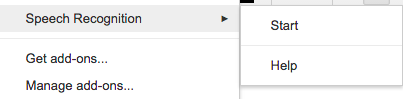
I currently have a student using this tool. He finds it difficult to get his thoughts from his head to his fingers. He’s been using this tool with great success. The tool is simple to use. Go to ‘Add-ons’ > ‘Speech Recognition’ > Start. A toolbar will appear on the right side of the screen. Press ‘Start’ and begin speaking. The text will appear in the space. Once you are done speaking, press ‘Stop’ and the text will automatically be inserted in the document.

Just like voice recognition texting, the speaker will have to say, “Period,” in order for periods to be inserted. So in the case of the school’s Speech teacher, she’ll have to go back and insert them herself, but hey that beats transcribing the whole conversation! I also suggested recording it on her phone for reference.

Get The Add-On 

What Motivates Learning?

This week’s #youredustory prompt is:

What motivates learning?

Innate curiosity motivates learning.

I know it sounds simple, but we all have it. In the right setting we are encouraged and our curiosity is fostered. In the wrong setting, our curiosity is squashed and we become resistant.

So What Is The Proper Setting?

One in which we are encouraged to ask questions, probe further, and investigate that which interests us. Some great examples of setting that foster learning are: Genius Hour, 20% Time, Maker Space/Maker Movement, and Project Based Learning. In each of these examples, students are encouraged to take ownership over their learning, investigate, create, question, an expand themselves.

What Happens In A Wrong Setting?

In the wrong setting, students have little to no control over what they are to learn. Learning is mandated with a top-down approach. Pacing guides, mandated (use with fidelity, no supplements allowed) curriculum, over testing, high stakes testing, etc. I think you get the idea. Basically, traditional school.

How To Break Free

The excitement is evident. This excitement translates to learning.

Push and challenge the thinking at your school. Start small, and build upon your successes. Begin with Genius Hour. Prove to the powers that be that there IS a different way to teach and learn. MAKE learning fun for your students. Tap into their interests and build on that. Change the culture of your classroom and then the school.