Over the summer I read an article about this. I was intrigued. I contacted my district’s tech person. After several tries (apparently there is a small checkbox or toggle that was causing an issue), he got it working for me and my students!
I had been thinking about potential uses in the classroom. One idea I had was to use it as a collection tool in the same way many of us use Padlet. I love Padlet but I am a teacher. What I mean by that is that I can now only have 5 for free. If I want to create more, I need to purchase the premium version. I don’t use it enough to justify the cost.
Then this week happened. The week before Winter Break. The week we teachers try to keep it together. So, I did a bit of experimenting. Each year I have students create ninjas using Google Draw. I am 1/2 of TLC Ninja after all. This year’s ninjas were awesome! My favorite was the Ninja Avengers. Normally, I would collect and display them on Padlet. However, I decided to experiment with Jamboard. I did a bit of prep with my class. I told them that all this could go terribly wrong. They were up for the challenge and did NOT disappoint.
After creating our ninjas, we downloaded them as JPEG files. I then set up the Jamboard so that 5 ninjas were on one jam, thus creating a total of 5 jams for the ninjas. The class was super respectful of each other’s work. I was so happy!
 That is not to say that the process wasn’t without its pitfalls. First of all, one of my darlings kept selecting the > on the top of the Jamboard which, at one point, created 28 jams. Secondly, all uploaded images upload in the center of the jam. Fortunately, I was demonstrating when a student uploaded hers on the same jam as I was on. This allowed us to stop and see what happens. Great learning opportunity! That happy happenstance helped students to be respectful when uploading.
Overall, I’d say the experiment was a success. I would say it’s an ‘aight’ replacement for Padlet, not great but you can make it work. I can see other uses for Jamboard, too: exit ticket, voting, catch the pulse of the class, and brainstorming. I know there’s more, but like I said, it’s the week before Winter Break.



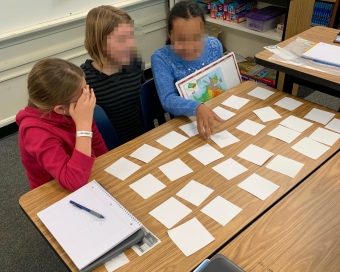 I love to incorporate games into the day. I mean, we
  I use Google Forms to collect adjectives from students. The students don’t know why I’m doing it. I ask for three adjectives to describe their classmates. We brainstorm a list of positive qualities that could be used to describe someone. I do 3 students at a time. Any more than that and the students start to repeat themselves and it’s less personal. I take the adjectives, check spelling, and place them in a word cloud generator. I use
  This is a sample I created for my class. My intent was to review some basic math concepts while having fun. The rules are simple:
 The question became: How am I going to communicate with my students? At first, I thought about doing videos on YouTube. Easy enough. I could record on my phone and upload. Then, after talking to a friend, I decided that Flipgrid was a better option. I could keep it private AND use the students’ names. I wanted to remind O to clean up, remind A to do work and not surf the web, and give shout outs to those who I was sure were doing the right thing. This worked out well. I was in contact with the sub and could customize my message each day. The kids really enjoyed it and LOVED hearing their names in the morning.
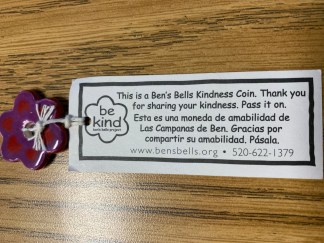 At some point last year at a Google Innovator event I was given one of these. I liked the idea of passing along a note to recognize kindness in others.
