FAIL

Remember that Mult/Div math paper I was sooooo excited about the other day? Well, it was an EPIC fail. Monday morning I introduced the paper to the class. They freaked out. Okay, that’s normal. It was new and unexpected. We walked through each part together…slowly. Oh. So. Slowly. They could almost handle the paper until…division! Yup, that killed ’em. And here is where the fail occurred. I was so excited, I didn’t worry about the 2 numbers they would be dividing. BIG mistake!

failCreative Commons 3 – CC BY-SA 3.0 NY – http://www.thebluediamondgallery.com/scrabble/f/fail.html

I don’t remember what the numbers were, but it was a HOT mess! They were over it, I was over it, and they were super confused – it didn’t divide evenly and decimals were needed. For 5th graders who forgot how to divide in most cases, it was too much. So last night I reflected. I needed to choose the numbers (not let the kids) at least for now.

Today I went into class and discussed how that was an EPIC failure. I got jazz hands. Yes, we celebrate failure in my class. I told them what I thought and how I think it could be fixed. Then I asked what they thought. They agreed, the numbers needed to be smaller. So we went through the paper in a slightly different manner. We chose the whole number first. THEN, we went to the tool box and created equations. From here, we were able to find a decimal (first number box) that we knew would divide evenly. We had to manipulate the number (multiply 1/10 or multiply by 1/100) to get our desired decimal, but it worked. And hey, they are getting extra practice with place value!

I am happy to report that things went much more smoothly today. They kids were still a little perplexed as to how to confidently divide, but that’s why we’re in school; to learn. They got to see me fail, which is always a bonus. And they saw how the reflection and iteration are a part of the failure process.

Finding Your Learning Style – FTW

This week in Social Studies I have students using a Hyperdoc to research information on the Great Plains Indians (the information is then recorded on a Google My Map). This is the 3rd installment in a 4 part study series. In the first 2, I told the students to only use the information provided. I intentionally incorporated videos  as a part of their resources knowing that this learning style suits some of my students better. However, this time, I left off any video resources and added the task of finding at least one of their own resources. They are to record information and the search query used.

Then this happened…

img_4640

I know what you’re thinking, “Uh, huh. A student found a video and is taking notes. Um, wasn’t that the assignment?” And yes, yes it was. BUT…this is no ordinary student. This is the student that has declared (several times), “I hate reading! Don’t make me read. I’m not reading anything!” This is the student that will play around in order to NOT do work – I suspect much of it is too difficult for Student X. This is the same student that can’t sit still for more than 30 seconds. YET, after Student X stopped freaking out that I didn’t include a video and realized they could look one up, Student X then sat for 40 MINUTES watching the video and taking notes…away from the group…working the entire time.

THIS is what happens when we give students the Freedom to learn in a style that best suits them. Student X knew what style worked best for him/her. Student X researched and learned the necessary material in order to support the group project.

This was a HUGE win!

Standing Desk

Recently I submitted a project to Donors Choose for a Standing Desk with a swing bar. It’s not uncommon for any teacher to have fidgety students. I wanted to try one out and gauge its effectiveness to those students. I have heard about many teachers trying it with great success. This week my standing desk arrived.
IMG_4558

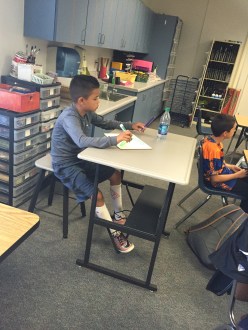
I also had a matching stool ordered for the desk. This gives students the option to stand or sit. Either option gives the student/students the ability to use the foot swing bar. As I found out, the desk is large enough to have 2 students share it comfortably. Needless to say, the desk has been a big hit with many students testing it out.

This year I have a particularly wiggly student. The student is great, just has LOTS of energy. Wiggly ventured back to the new desk. One afternoon this past week, wiggly student declared that (s)he was going to use it all next week. (S)he has decided (s)he loves it. I silently agreed that the desk was perfect for her/him. At one point the wiggly student was working while (s)he had the swing bar going a mile a minute. The amazing part was that the rest of her/him was content and focused. After being with the student for less than a month, it was the most focused I had ever seen her/him.

I am officially a fan of these types of desks. Will the ‘newness’ wear off with my students? Possibly, but I’m sure that my wiggly student will find success with this desk for the rest of the year. In fact, I’m such a fan I’m going to submit another project for a second Standing Desk with Stool on Donors Choose. So if you are thinking of getting one of these, I say go for it!

Elementary Mornings

I HATE busy work! I am done with the ridiculous morning routine of giving the kids something to do – usually a worksheet – while I take attendance, check in on certain kids, and take lunch count.

So many of us give our students a ‘spiral review’ sheet to work on. Which we then have to check. Which sucks up more precious time during our day. And since we assigned it, we want the kids to at least pretend to take it as serious as we do and actually complete it. Which leaves me being the drill sergeant getting after the ‘usual suspects’. You know, those same students that talk and never complete the assigned morning work.

Yeah, I’m done! My mornings are so much nicer and more relaxed. Over the summer, a colleague and I were talking about things we were going to change in our classroom. She relayed an idea she had read in a blog post. Have the kids do low risk, NO paperwork, play type activities.

This slideshow requires JavaScript.

So now my students come in and play games: Uno, Connect 4, Snap Circuits, checkers, or geometric shapes. I will switch out certain items throughout the year, but for now, everyone seems happy. And most importantly, I don’t have to get after anyone for not completing a paper that no one really cares about.

As I said, my colleague gave me the idea. She is using this in her 1st-grade classroom. She allows her students, by table, to choose their daily activity. By contrast, I set out an activity for my students. They have the same activity for a week. This allows them to dig in or really learn strategies of a game. Many of them are learning to play checkers or Uno properly for the first time.

This is a great way to start the day!

NOTE: I would like to give credit to the teacher who originally wrote the blog post, but I don’t know who it was.

UPDATE: Credit goes to Brown Bag Teacher (@brownbagteacher) for the idea and conversation starter.

Place Value Basics

Last year, I began using Jon Corippo‘s 8 p*ARTS . I saw great success with the repetition. As a result, I thought I’d like to do something along similar lines with Math. Now, I will admit, what I came up with isn’t nearly as fun. However, the repetition is there. This is for 5th grade and can easily be modified for other grades. Here’s what I came up with.

Place Value Basics

The plan:

  • Today’s Number – Have the student of the day decide on the day’s number anywhere from billion to thousandths place. However, the number must be at least to the tenths place.
  • 10 times greater – Take the original number and make it ten times greater.
  • 100 times greater – Take the original number and make it one hundred times greater.
  • 1,000 times greater – Yup, take the original number and make it one thousand times greater.
  • Add 10 times greater and 100 times greater – add the numbers.
  • Write a number that is GREATER – Have students change ONLY a digit that is AFTER the decimal.
  • 1/10 times less – Take the original number and make it ten times less.
  • 1/100 times less – Take the original number and make it one hundred times less.
  • Subtract 1/10 and 1/100 – subtract the numbers.
  • Write a number that is LESS – Have students change ONLY a digit that is AFTER the decimal.
  • Prime factors of the first 2 digits of the whole number – Only take the numbers in the ones and tens place and find the prime factors.

An example is given on the second slide. This should be done daily, with an assessment each week. The first week or two should be done as a group until the class understands what is expected. Once they ‘get the hang of it’ all that is needed is the number and the students can do this independently.

No Rules!

Last week was the first day of school for my district. I went through many of the first day rituals: greeting my students, introducing myself, identifying specific areas in the classroom, you know, all the usual. In the past, I have given the students the power to create classroom rules. But not this year! This year I allowed them to create Classroom Norms. I know, not so different. This year, I was completely hands off. I tasked them with working as a table group (I have 5) to list 2-3 norms they wanted for the year. I was happy to see that most were positive: listen to others, help, raise your hand, etc.

After a few minutes, I had the students sharing out what their table came up with. THEN, I asked each table to choose their favorite. They then created an illustration in Google Draw of their Norm. This was a sneaky way of me registering my students into a specific Google Classroom.

I split each table in half so that I would have 2 illustrations of each Classroom Norm. I then only allowed 2 people at each table to use their computers to create the illustrations. The results?

Draw Norm (beginning of year) Through this process, I was able to monitor relations, collaborative skills, leadership skills, attitudes, creativity, computer skills, and so much more. Now we have these great posters hanging in our room. It truly is their classroom!
Breakdown of the Process:

  1. Work in table groups to create 2-3 norms for the classroom for the year.
  2. Share out with class.
  3. Have each table group choose their #1 norm.
  4. Write down all #1 ideas on board.
  5. Split each group into smaller groups (in 1/2).
  6. Using Google Draw, the smaller groups (2-3 students) then create 1 illustration of their norm.

The teacher’s only role is to monitor students and print out the results.

Homework Parents Like

Tonight we had our Back to School Night. School starts tomorrow and as per tradition, we hold our Back to School Night the night before school starts. It’s smart. It’s a long day for us teachers, but I really like it.

During the Welcome presentation, I talked about homework. As usual, parents politely listened to my spiel. I’m sure that what I said about homework was NOT something they had expected. It’s 5th grade. They’ve heard it all before – expectations, do homework, come to school on time, yadda, yadda, yadda. However, this year my partner teacher and I agreed that we needed to do something different with homework. So, we created this (make a copy of your own):

I began by asking how many of them had signed a homework log/reading log either knowing that their child did NOT do the homework, or weren’t even sure if their child did the homework. At first, most were hesitant to admit it. Fortunately, my translator’s daughter is in my class this year. She eagerly raised her hands. That got the ball rolling. I then went on to say that I don’t always check the homework, and the kids don’t always take their time and will rush by putting anything. I then explained our proposed homework. I read some examples and pointed out that there would be no fighting and no tears for this year’s homework. This led to several parents openly smiling at the idea, commenting on what a great idea it was, and how happy they were with it.

My principal is more nervous with this idea. He fears that we are not preparing students for high school. But, um, they are 10. They are in 5th grade. And high schools need to change their focus too. High schools have clubs where students indulge in their passions. Hm, maybe more elementary schools should have passion focused clubs.

I am optimistic that this will be a success. I explained to parents that we would like each child to read 20 pages daily. I am hopeful that with this user-friendly homework, parents and students will honor the 20 pages. At the very least, parents have this year to relax and have peaceful evenings knowing that there will be no fighting over homework.


Writing With Literacy Shed

I know I’ve written about this site in the past. I thought it deserves to be talked about again, especially with the beginning of the school year upon some of us. So…. If you STILL haven’t checked out The Literacy Shed, do it. Like right now!

Literacy Shed

What is it?

Simply put, it is an amazing – FREE – writing resource. It will work with any writing program you have going on in your classroom or district. The creator and curator, Rob Smith, explains:

“The aim is to provide high-quality resources that can be used in stand-alone literacy lessons, can form the basis for a whole Literacy unit or can support literacy units that you already have in place.”

Rob has most certainly provided those high-quality resources.

AND, many of the video resources are non-verbal making them perfect for the ELL students.

Why use it?

First of all, it has beautiful quality videos. In addition to the videos, the site has several lesson ideas for each video. This isn’t put together by some corporation or publisher. This was created by a teacher who freely shares his knowledge and ideas.

About the Sheds

There are ‘Sheds’ that are essentially themes. There are so many sheds, and more being added, there is no shortage of resources. I love looking around the site and getting ideas. Word of warning; once you jump into this rabbit hole, it may be a while before you emerge. But it will be well worth it! Currently, I’m looking at the Rio Olympics Shed and getting REALLY excited about the possibilities for my classroom.

One Last Thought

I wish I were in the UK so that I might attend a training. Maybe someday there will be a training here….


Homework: We All HATE It!

Yes, it’s true, even teachers hate homework. We all know that kids hate homework and really, who can blame them? I mean they are in school all day working and then have to come home and do MORE work. Parents hate it – many find it a nightly struggle to get their child to do it. Whether the child has difficulty or wants to play outside, or both, homework is creating friction in homes. And finally, teachers hate it. First of all, we have to check it. Many times it’s done quickly and with many mistakes. This is painful for us! Secondly, we have to ‘get on’ those students who don’t complete it or complete it haphazardly. Again, painful and a losing battle.

I could go on and on about why homework is wrong on so many levels, but I’ll save that for another post. I’ve decided that next school year, I’m NOT giving homework! Instead, I’m giving activities that can be done at home. I know what you’re thinking, “Isn’t that homework?”

The answer is, “NO!” and here’s why:

  • I want it to be fun.
  • I want it to be low pressure.
  • I want the students to have a choice.
  • It would be super awesome if the whole family got involved in some of the activities.
  • The students have the option to do it with their friends. For example, if one activity they choose is to learn a dance and teach it to the class, why NOT have a few students learning the same dance to teach to everyone?
  • If a student doesn’t do it, I’m not going to freak out.

So here’s my proposal: Create a ‘Home Activities‘ choice list where students choose 2 activities to complete during a month. At first, I was going to have the students do one each week, but quickly realized I was creating way to much work for myself. Definitely, NOT what I like to do. Since this is my first attempt, I am sure that it will evolve. I also welcome feedback. While this first ‘choice list’ has few digital choices, I plan to create another with more – create a video, take artistic photos, podcasting, etc. I can also incorporate more digital choices into this list as well. However, many of my students come from lower income families and don’t yet have a strong sense of digital citizenship. These are things that will need to be taught before I ask them to do several digitally related tasks.

At the end of the month, the students can showcase what they’ve been working on. Not sure how this would work. Maybe as they complete an activity they share it with the class. That way there won’t be 30 projects to present in one day. As I’ve said, the kinks are still being worked out.

So, here’s my first attempt. Feel free to take and amend to fit your needs. Please remember to share out! We’re all in this together.

HomeActivities1 (PDF)

Screen Shot 2016-07-02 at 4.15.15 PM

Drone On

This week I received a set of 4 Mini Parrot Drones, courtesy of CUE Steampunk Mobile Labs  What a GREAT week it’s been. Well, not all great. We finally finished state testing on Tuesday, with 15 days left in the school year.

So it’s a bit of a crazy week with finishing state testing, completing our movie (A Tale Unfolds), and the valley fair begins on Thursday. This week has been the perfect week to have the students code and complete tasks using the drones.

On Monday, we started with me attempting to give them a challenge to complete. Yeah, that was a flop. They were more interested in exploring the drones and programming them to do various tasks. I quickly let go of my idea that they could focus on a given challenge.

TueIMG_0006.JPGsday, they were ready for a challenge. We took them outside to see if we could land them in a target. We had a few obstacles in our way: the biggest one being the wind. This proved to be perfect for their collaboration and problem-solving skills. Using the Tickle App on the iPads, the students programmed their Mini Parrots to lift off, go forward for a specific amount of time, and land. It was pretty cool to see!

Today the students were tasked with programming the drones to take selfies. THIS was a huge hit. At first, there were several random pictures taken. Then once they got the hang of it, they took some great selfies, which they downloaded onto their Google Drives.

(Selfie Photo credit: the students – they gave me permission to post)

It’s nice to have students finish the sentence, “Can we…” with something other than “…play a game”, “…have recess”, or “take a break.” They beg to code and explore every day. They are sad that they will be leaving at the end of the week and truthfully, so will I.

Thank you, CUE and Jon Corippo!