State Test & Slime: Perfect Pairing

img_0003.jpgSlime. A craze that is still going strong in my classroom. While many teachers find it the bane of their existence; I do not. Okay, fidget spinners might be the new bane of our existence. I don’t ban the slime, or fidget spinners, mainly because my students seem to understand that each has a time and place. My students, for the most part, have found a balance between work and slime.

This past week, my students began taking the state test. Again, I didn’t ban slime, nor did I encourage it. It’s just a ‘thing’ that exists in the classroom. As I was monitoring the students, I noticed an interesting phenomenon: while taking the test they were playing with slime. Let me be clear. It’s not all students, in fact, it’s about 5 or so and they were completely focused on their tasks.
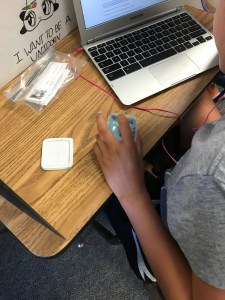
IMG_0006One student kept the slime in her container, read, and simply played with it by dipping her finger in and out of the slime. She gets a bit nervous because she wants to do well. I believe it helped relieve some anxiety. I took a quick picture and texted it to her mom (our school’s secretary). We just giggled.

Meanwhile, a few other students had it on their tables, off to the side. They poked at it, rolled it, and kneaded it all while focusing on the test.

So if you’ve banned slime in your classroom, you may want to rethink it. Of course, there have been times where I had to confiscate slime because someone was focused on playing with it rather than working. However, if it helps calm students, why not let them play?
This slideshow requires JavaScript.

Coordinates Breakout Continued

Yesterday, my class began creating a Coordinates Breakout. They figured out which locks to use and what the codes would be. Today, I tasked them with creating the clues and a story to accompany the Breakout.

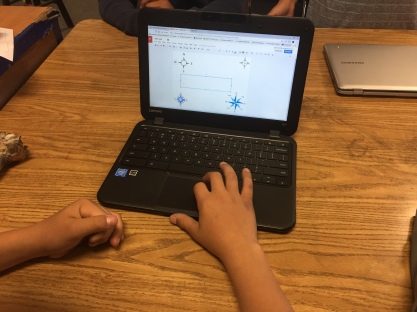
IMG_5343We had a bit of trouble coming up with a story so I had them creating some of the clues to the locks. They were RockStars creating the clues! They really thought out how to make the clues meaningful, with a bit of depth. One clue deals with the compass rose. We are still debating if we should have different ones on one page or split them up onto different pages and have them placed around the room. I think we will have to run the game with another class to work out some of the kinks.
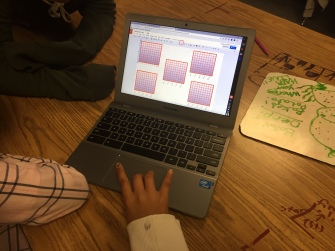
Another clue, or three, deals with coordinate planes – first quadrant. Each group took aIMG_5346 different approach in creating the coordinateplane. One group created a visually pleasing one with gradient coloring and took the time to draw each line. Meanwhile, another group struggled to create one; they needed four or five. The struggling group asked if the gradient colored group would mind sharing so they could copy their coordinate plane. And of course, the group was kind enough to share!
Then, while in the middle of creating, a student came up to me with a back story for our game. We bounced ideas off of each other and made it better. Tomorrow, I think I am going to have the students work together to make the story even better.

So far, this experience has been challenging, yet rewarding. It is our plan to submit the game to the Breakout EDU website. I think before that happens, I will share it out to make sure it’s in tip-top shape!

Coordinates Breakout

This year I have done a few Breakouts with my class. To say that they love them would be an understatement. So this week when we started coordinates in math, the wheels in our brains started turning. Seriously, there are so many things a person can do!

As we were walking to lunch one student suggested that we do a Breakout based on coordinates. I thought this was a GREAT idea and told him that I would search to see if there were any already made. However, by the end of the 45-minute lunch break, I had decided that making our own would be more fun!

I have been wanting to create my own Breakout for over a year. I have had a few ideas. One was an entire Breakout based in Google Maps. Another was based on directions and graphing. Unfortunately, I could never really get clues and ideas that I felt were good enough. Today was a different story. With the help of 28 other brains, we began creating an exciting Breakout – if I do say so myself.

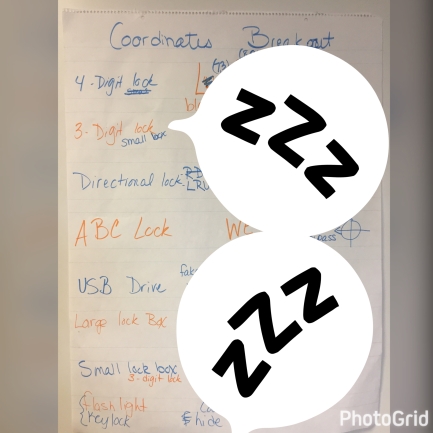
IMG_5342I posed the idea to the class and they went for it. We decided which locks and accessories to use, created codes, and clue outlines. They even designed a distractor that should be used. They had some great ideas! We’re not done yet, but we will definitely share when we are done. I will have them create the clues and the story. I’m pretty excited for what they will come up with.
They know that I introduced this concept – BreakoutEDU – to the staff last week. They want to run their Breakout with the staff. I don’t think there’s time for that, but hopefully, we can run it with the other 5th-grade class.

Google Classroom – Personal Accounts

So I received this today in my inbox!

Screen Shot 2017-03-28 at 5.49.59 PM A few days ago I wrote about Google Classroom and Personal Accounts. I applied for early access and was granted it today! The nerd in me is super geeked.
This is a game changer for me. First of all, I enjoy sharing my knowledge of Google Classroom with the masses. Secondly, a friend and I thought about created classes that people could take to become more proficient in technology use in the classroom. THIS is the perfect tool to get that going.

I can’t wait to see what uses others come up with.

Biggest, BEST Fail of the Day

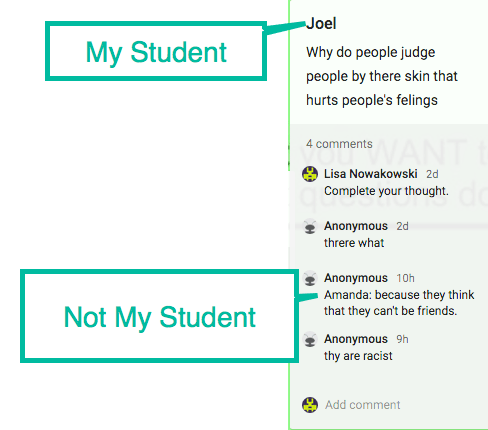
Yesterday I wrote about the MLK Hyperdoc my students are doing this week. Today we discovered that at least one other class is using it. While doing their work today, a student approached me asking, “Who are some of these people?” My student was on the MLK Padlet doing their assignment. I looked, and sure enough, there were names on it of students who weren’t in our classroom or school.

When I shared the Hyperdoc I forgot to unlink the padlet and make a note to create your own padlet. The other teacher must not have thought about it either.

padlet-1I got pretty excited about this. THIS makes their learning even more relevant. They now have a chance to talk with another class somewhere in the US. I encouraged my students to answer questions and check out what the other students had written. Some were silly (a string of letters) and my students were disturbed by this. Which I took as a compliment. This means they know what I expect from them and that that sort of Internet activity isn’t acceptable. My students then began answering questions and reading the information.
This was such a GREAT learning opportunity for them (and me). So yes, my Padlet is a ‘hot mess’, but a wonderful ‘hot mess’!

Student ‘Ransomes’

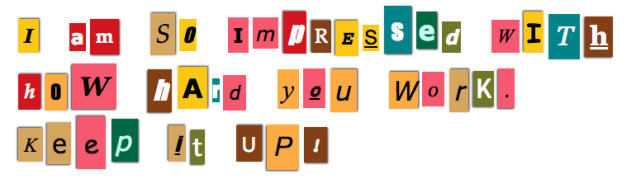
This year I have been giving out a few ‘Ransomes’ each week. I know what you’re thinking, no I did not hijack personal objects from students and offer to return them in exchange for payment of Kit Kat minis (my totes faves!) No, Ransomes are little notes I leave for students like this one:

screen-shot-2016-10-03-at-8-03-17-pm

I do usually put their name on them as well.

I didn’t think much of the habit. I just thought it was cute and a nice way to send a positive message to my students. It wasn’t until Parent-Teacher Conferences last week that I realized how much they mean to the students. Sometimes it’s easy for us to overlook how much a simple gesture means to a child. One of my parents told me that the Ransome I had given her son had made his day. He was so proud of that note, he put it in his room at home. It was something that made his day and the mom’s day, too.

What I Do

Go to Ransomizer and type your message in the box provided. When you’re ready, select the ‘Ransomize’ button. You can customize the font, colors, etc. I then take a screenshot of the Ransome Note and place that in a Google Doc to print. I print 5 per week.

Give it a try. Your kids will love it and it’s a great way to connect with your students.

Finding Your Learning Style – FTW

This week in Social Studies I have students using a Hyperdoc to research information on the Great Plains Indians (the information is then recorded on a Google My Map). This is the 3rd installment in a 4 part study series. In the first 2, I told the students to only use the information provided. I intentionally incorporated videos  as a part of their resources knowing that this learning style suits some of my students better. However, this time, I left off any video resources and added the task of finding at least one of their own resources. They are to record information and the search query used.

Then this happened…

img_4640

I know what you’re thinking, “Uh, huh. A student found a video and is taking notes. Um, wasn’t that the assignment?” And yes, yes it was. BUT…this is no ordinary student. This is the student that has declared (several times), “I hate reading! Don’t make me read. I’m not reading anything!” This is the student that will play around in order to NOT do work – I suspect much of it is too difficult for Student X. This is the same student that can’t sit still for more than 30 seconds. YET, after Student X stopped freaking out that I didn’t include a video and realized they could look one up, Student X then sat for 40 MINUTES watching the video and taking notes…away from the group…working the entire time.

THIS is what happens when we give students the Freedom to learn in a style that best suits them. Student X knew what style worked best for him/her. Student X researched and learned the necessary material in order to support the group project.

This was a HUGE win!

Standing Desk

Recently I submitted a project to Donors Choose for a Standing Desk with a swing bar. It’s not uncommon for any teacher to have fidgety students. I wanted to try one out and gauge its effectiveness to those students. I have heard about many teachers trying it with great success. This week my standing desk arrived.
IMG_4558

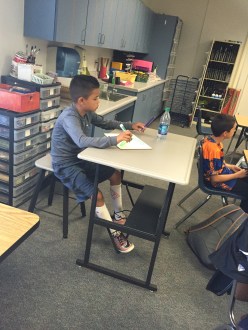
I also had a matching stool ordered for the desk. This gives students the option to stand or sit. Either option gives the student/students the ability to use the foot swing bar. As I found out, the desk is large enough to have 2 students share it comfortably. Needless to say, the desk has been a big hit with many students testing it out.

This year I have a particularly wiggly student. The student is great, just has LOTS of energy. Wiggly ventured back to the new desk. One afternoon this past week, wiggly student declared that (s)he was going to use it all next week. (S)he has decided (s)he loves it. I silently agreed that the desk was perfect for her/him. At one point the wiggly student was working while (s)he had the swing bar going a mile a minute. The amazing part was that the rest of her/him was content and focused. After being with the student for less than a month, it was the most focused I had ever seen her/him.

I am officially a fan of these types of desks. Will the ‘newness’ wear off with my students? Possibly, but I’m sure that my wiggly student will find success with this desk for the rest of the year. In fact, I’m such a fan I’m going to submit another project for a second Standing Desk with Stool on Donors Choose. So if you are thinking of getting one of these, I say go for it!

Dear Parents: About Your Child’s ID Card

School has started up again or will be in the near future. This leads to many parents posting First Day Photos. We all love them, well, maybe not the older students, but they humor most parents with a small smile before grumbling. And then the new student i.d.’s arrive. Parents are proud of many of the milestones their children are achieving. I have seen photos of some of the i.d. cards. I am a bit shocked…

2000px-SurprisedSmiley.svg

Dear Parents,

We all love seeing that new i.d. of your child’s. It’s a wonderful feeling to know that you have raised a great child and they have reached high school, are in their Senior year, or are in Middle School, or whatever grade. However, I must ask, why are you posting a photo with ALL information of your child online? I know, it’s probably not something you have thought about.

Just think about this for a moment. When you post a photo of that brand new i.d. without blocking information you have just shown the world the following information:

  • First name
  • Last name
  • School name (possibly city where school is located)
  • Grade (which leads to age)
  • Teacher’s name (in some cases)
  • Picture of child
  • Possible i.d. number (or some variation)
  • QR Code or Bar Code (with who knows what information)

If you’re still not sure why this is a bad thing, think about a stranger calling you and asking your child’s full name, school, location of school, grade, their teacher’s name, a picture of your child (to send electronically), and any other additional information they may want. Would you give them this information? Probably not. Well, by posting the i.d.’s without blocking some of the information, you just gave (who knows how many) strangers that information. If it’s put on the Internet, it can be found.

So parents, we do want to see those great photos: first day, i.d.’s, special moments, but we want to keep everyone safe. So please, block important information.

Thank you.

Lead By Example

At our first staff meeting, my principal, Brad Smith (tweet at him, he’s terrified to tweet #truestory), encouraged each staff member to look into the Google Educator tests. He reminded us that we are, indeed, a GAfE district. He went on to state that anyone that passes the level 1 Educator Exam, would receive their test money back (out of his own pocket, and since we have no money in our budget I know it’s literally out of his pocket).

This is where he began to lead by example. He gave the staff the resources needed. Then today, he sent us a quick memo. At the bottom was his Educator Level 1 badge!

He is the type of leader we need. Someone who does what he challenges others to do. So, seriously, tweet at him!

kcarts