I like to stay in contact with my students’ parents. One way in which I do so is through a weekly email. Each Thursday I send home an email updating the parents on what we have been learning, what we will be learning, and any important dates or events that are coming up.
The Problem:
How do I create a form that I can use week after week? I like to have the subheadings ‘pop’ with color. I didn’t want to have to rewrite the ‘Update’ weekly, nor did I want to copy and paste the previous week’s ‘Update’ for 36 weeks.
The Solution:
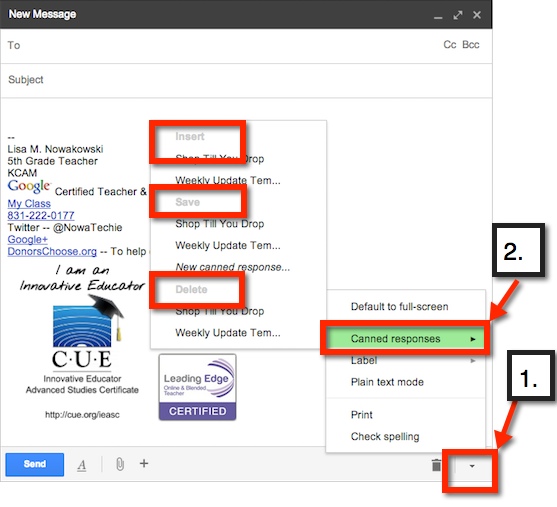
Canned Response! I created the first ‘Update’ email, and saved it as a Canned Response template. Now when I send out my ‘Update’, I simply insert the ‘Weekly Update’ Canned Response template. It’s so simple.
How:
Canned Response can be found on the bottom of an email draft – 1 (bottom right, small arrow). Once it’s chosen, additional choices can be made. Choose – 2– ‘Canned Response’. From here, you can: ‘Save a Canned Response’ (save to use in the future, like I did with my ‘Update’), ‘Insert a Canned Response’ (like I do each Thursday), or ‘Delete a Canned Response’.
My district is trying to put together some great resources for teachers. At a recent meeting the 5th grade team looked at all the CCSS that have technology built in. From this we created a document that has possible suggestions and resources. Feel free to share and/or add your suggestions.
Another feature that allows for easy collaboration in Google Documents is the ‘Comment Feature’. This feature allows me to highlight a particular text and comment on it, for clarification or questions. It’s really very easy.
First, highlight the desired text (can be a word, phrase, sentence).
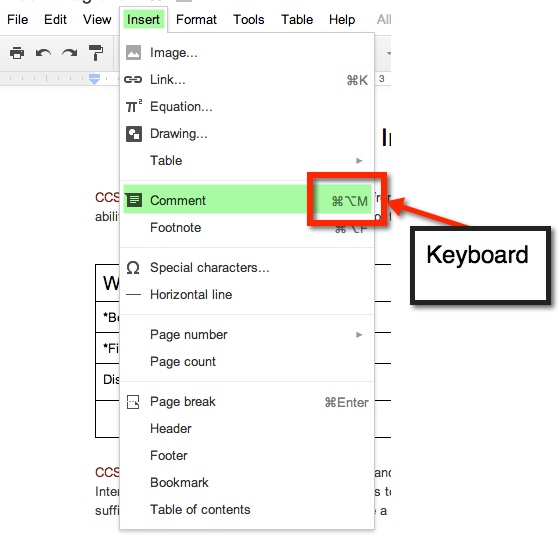
Now you can add your comment. There are 4 ways in which to access the ‘Comment Feature’:
1. From the Tool Bar icon
2. ‘Insert’ option on Tool Bar
3. Keyboard Shortcut
4. Gray Comments button next to Share button on top right.
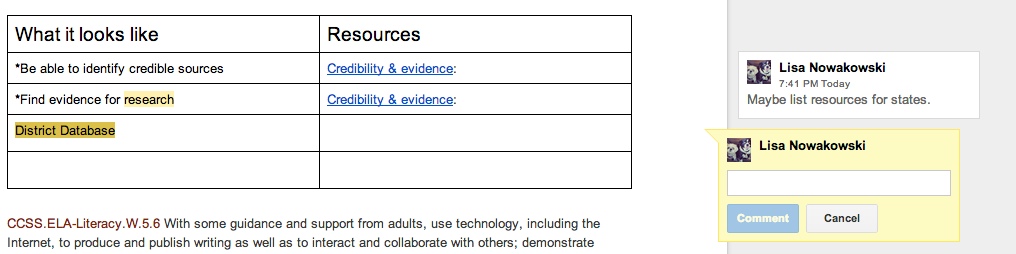
A yellow comment box will appear to the right of the document. This is where you will type your comment.
If more than one comment is on the document, and you are unsure of which comment goes to which highlight, simply click on either the comment or the highlighted section. If the highlighted text is chosen, then the comment will ‘pop up’ and show in the yellow box. If the comment is chosen, the highlighted text will become a darker yellow.
When you have finished making your comment, be sure to chose the blue comment button.
Last year a friend of mine, who teaches in Spain (Basque Country), contacted me with the idea about our students becoming pen pals. There were several issues that needed to be worked out before we could begin. Her students spoke very limited English, their 1st language varied from Spanish to Basque to Arabic. A group of her students were Gypsies and had little interest in school, and her school has VERY strict Internet policies for students.
Problems Solved:
Of course my initial response was to have my students use Google to communicate, but with her school’s policies, that wasn’t possible. Our next best idea was to use Dropbox. She had her students type letters on her computer which she then uploaded into a shared file in Dropbox. When all the files were ready, I passed them out to my students. The initial reaction was that of excitement. My students loved that they had a connection to a student in another country, on another continent.
Student Response:
While they were excited with the new activity, they were also intrigued to see that many of those in Spain were just like them. The boys (in Spain) that had written that they enjoyed soccer were the Pen Pals that my boys fought over. One student (Spain) wrote that her brother plays soccer, but she didn’t like it and went on to describe all the things that she liked to do. Of course, my girls all wanted to write back to her. Then there was one special student. My friend had told me about her. I chose a student who would be sensitive and write a quality letter back. This particular student was having a hard time assimilating to her new home in the Basque Country. She was from the Middle East and bullied at school. The student I chose to pair her up with was an outgoing and kind girl. When my student wrote her response, the bullied girl was envied because her Pen Pal had written so much. It also helped her to gain confidence.
All in all it was a success. The Spanish students were able to practice their English, and even the most reluctant student was completely engaged. My friend reported seeing a change in those students who had little interest in school. Some of her students asked to write. It was a first for many of them to want to do something school related.
So Now What?
Well, today I was pleasantly surprised with an email from my friend. It seems that her current group of students are aware of the Pen Pal program we had going and asked her when they get to do it! So here we go, our second go-around with this. We are even thinking of doing videos this year. There are still the same strict policies that she must adhere to, but we think we can work it out. We will be using Dropbox again. Today I shared with my class what we will be doing. They seem eager and on board.
Recently I have begun to incorporate projects more and more into my classroom. The latest was ‘Shop ‘Til You Drop’. This activity gave students real-world experience adding and subtracting decimals (This is a 5th grade Common Core Standard – NBT.7). It also incorporates 4 other Common Core Standards. It was a project that my partner teacher found online. And like any good teacher, I have had time to reflect on the project; take note of what went well, and what I will do differently next time.
Photo by geschenkhamster.de via wiki commons
What went well:
Students begged to work on the project.
Students took the assignment seriously.
Students asked for help with subtracting across zeros – I need to go back and reteach.
Students helped one another solve problems and find gifts.
Many quality presentations were made.
Many students viewed their project on the TV, seeking feedback.
Students took feedback and made adjustments – even after their presentation was given.
Templates were used and modified.
Things that need improving:
Work space on paper (just to make sure they’re not using a calculator).
Rubric/Scale that fits my needs – Marzano based.
Give more time. Took longer than I anticipated.
Ask what student would do with left over money. While some volunteered this information, many did not. It wasn’t something that I thought about until one student shared her thoughts – she wanted to donate the rest to a charity.
And because I am a firm believer in sharing, here is the lesson – templates included. I have included the NETS-S as well. Feel free to share, modify, and use.
Earlier this year, I instituted Genius Hour. It has become the students’ favorite time of the week. I blogged about it recently, and you can read it in Why Genius Hour.
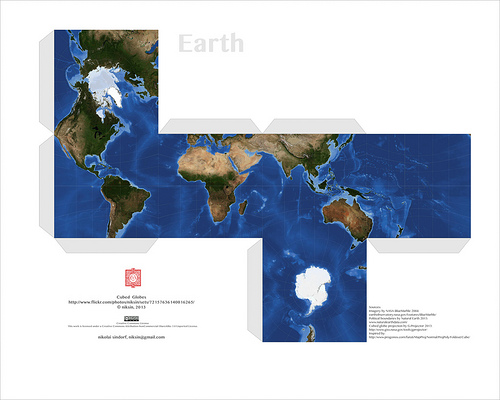
One of the biggest successes has come from Isaac. He is a creator by nature – tape and paper are his mediums of choice. In the past (I taught Isaac a few years ago) he would cut, tape, and draw on his creations. Well, he has since discovered Minecraft and Papercraft – the paper version of Minecraft. At first, he would have me print out Papercraft creations he found online. Much like this:
Those are pretty cool and all, but then I showed Isaac Google Draw. That was it for him. His creativity kicked in and he hasn’t asked me to print out a prefab one in a while. Why? Because he now creates his own! At first they were pretty basic as he was getting to know the program. I showed him some simple tricks, like copy and paste, so that he could have congruent figures.
Okay, so the sword is pretty cool, and not so basic. Since this one, he has started putting faces on his creations, and becoming a bit more precise.
I can’t tell you how to put them together, but then again, I’m not into Papercraft. Isaac, however, is thrilled to have his creations brought to life. When I asked him about putting tabs on them and writing instructions for those like me; he says that it’s easier for him without the tabs and never really answered me about directions – I’ll take that as a ‘Not going to happen’.
It has been more than thrilling to watch Isaac’s progress. When I asked him if I could write about him on my blog, and share a few of his creations, his eyes sparkled and a HUGE grin spread across his face. I told him that he would get full credit for all of his work. He then told me that I had to put his full name on his creations. Yeah, after reminding him about Internet safety he was okay with just his first name and my name – so that no other Isaac could take credit.
I can’t wait to see what creations he will have for us in the new year!
Combining a fractions lesson and recipes is a natural combination. It connects the real world with a student’s learning. For the past month or so, my students have been learning about fractions: what they are, adding, subtracting, and multiplying them. Combine that with a teacher who is easily board with the norm, and you get a FANTASTIC lesson. One in which students ASK, “Can we work on our Recipe Project now?” Yes, students wanting to learn and were engaged.
What did we do? Well, we found some recipes. Okay, actually I found them in a cookbook that I had, from when I was a kid. They definitely weren’t the most healthy, but they were kids’ cookbooks, and worked well. I went through and found several recipes that involved fractions. Some had 2 fractions, others had 5 or more and included mixed numbers. Our student teacher handed out the recipes. Because there were various difficulties with the recipes, this allows the teacher to differentiate based on a student’s ability. The students were allowed to work together, but must hand in his/her own paper. The students had to: list the original ingredients, double the original recipe, cut the original recipe in half, and then make exactly 28 servings – one for each student, the student teacher, and myself. This took a few days. Fortunately, I do have a student teacher in my room so we were both able to filter around and help struggling students. Once they were done with the math portion, they had to create a presentation to show off to the class – and put in their ePortfolios.
We worked on this project for 3 or 4 days, including polishing the presentations. Each day the students would ask, “Can we work on our Recipe Project now?” Even the most reluctant, insecure math student was completely engaged. There were students strewn throughout the classroom at desks, under desks, and sprawled out on the floor. One group of boys worked outside to create a cardboard oven for their presentation. Other students chose to use Animoto and Google Presentation. They projected their ‘work in progress’ presentations on a big screen TV to get input from others. The room was so engaged and buzzing with creativity and learning, I HAD to call my principal down to see. He was impressed, and began asking the students questions about fractions, their algorithms, and gave suggestions for their presentations. The lesson was such a hit, my students told the other 5th grade teacher that she HAD to do it with her class, because it was so much fun. My students were happy to hear that her students had begun the project too.
Presentations will be next week. I admit, this was so much fun and worthwhile, that I am on the hunt for more lessons like this. Anything I can do to engage my students, I will. THIS is what Common Core is about: the four C’s. And this lesson had them all! Here is the lesson: Adjust a Recipe
This group will be incorporating an Animoto video into their presentation. Last week, they were practicing what they were going to say along with their video.
Yes, I found the lesson online. It is my belief that there is a plethora of information, lessons, and ideas out there. I do not need to reinvent the wheel. I am thankful to all who FREELY share. In turn, I FREELY share what I have found, my knowledge, and lessons I create. We are all here to help one another, and to help our students learn.







 Nowa Techie