Sometimes We Fail

I’m Not So Brilliant After All

So in late January, early February, I came up with – what I thought – was a super fun, creative American History lesson. It was sort of a success. I blogged about it in Student Choice. In short, it was a ‘short’ lesson on the reasons for the Revolutionary War. Yeah, here I am in April STILL dealing with this ‘great idea’. See, I’m not so brilliant after all!

The Problem?

There are a few problems that I am encountering. First, and most obvious, it is taking way to long to finish. Initially, I thought a month, month and a half tops. Um, nope. Not so much. At this point, I just want it to be done or stab myself in the eye. Not really sure which option is more feasible at this point. It’s sort of a toss up. The other, more disturbing problem, is that the question sets were designed to get them excited – and hopefully retain – the information. Sadly, they answer the questions and forget the information. Then they have to do the research all over again in order to complete the tasks.

So Now What?

Well, the way I see it, I have three options. Option 1 – stay the course. Keep up with the question sets and tasks. Option 2 – ditch the question sets and focus on the tasks (which are way more fun and higher up on the DOK charts. Option 3 – scrap the whole thing, even though we are only half way through; and move on to the next topic.

Option 1 will definitely require me to stab myself in the eye. Since I’m fond of seeing, and my eyes; this option is out. Option 2 is definitely doable. I can adjust and modify. Roll with the punches, right? Option 3 doesn’t ‘feel right’ at the moment. I’m not really willing to give up on something so easily. I’d rather try a few other options before declaring this a complete failure.

Option 2 It Is!

After discussing that the progress of this project isn’t working for me with the students, we decided Option 2 would be best. This way, they still get to learn in a fun and interesting fashion. We have taken out the boring question sets – which they weren’t retaining the information from anyway. The students seemed happy with the change in plans – half way through. Love how they can adjust.

Lessons Learned

  • While I have one vision as to how things will go, classroom life definitely has the control.
  • My students whizzed through the question sets, thus proving that my questions were too easy and obviously low on the DOK charts.
  • It’s okay to change the lesson/plan/unit/whatever midstream. No one will get hurt; be flexible.
  • Will it push them to finish the tasks any sooner? Probably not. Will I still want to poke my eyes out? Probably – which will lead to further modification as I like my sense of sight.
  • It’s all okay. I tried and the first time out wasn’t a success. If I continue to reflect, and modify, I will find the right balance; the right lesson.

My Advice?

As educators we all fail from time to time. Embrace that failure as an opportunity to learn and grow. Most of us like to brag about a great lesson; about our successes. Those are great too as we like to learn from others about what works. We need to start talking about our failures. Why? Failures show the multitude of ways that don’t work, thus leading to the path that does. Because failures show we take risks. They show that we are vulnerable, that we think outside of the box. Failures show that we are learning and growing.

Embrace your failures, and learn from them.

Math Curricula Are Like Jelly Doughnuts

Odd analogy, I know. But hear me out.


creative commons licensed ( BY ) flickr photo shared by Evelyn Saenz

Today the (grade) 3-5 teachers in my district met to look at available Math Curricula to adopt. We looked at 5 or 6 to begin with and narrowed it down to 2. We used the Math Toolkit (CCSS) in order to narrow our selection down. We focused on some of the basics – quality over bells and whistles.

We were then left with 2 programs. Neither one was all that great. This speaks to the crap that publishers are pushing out. After we narrowed our choices down, we then took a deeper look. Looking at standards, quality, focus, consistency, etc. Then it occurred to me, the two programs were like jelly doughnuts – in very different ways. [It could have also been that it was just before lunch when I had this thought.]

So here it goes. For reference a regular jelly doughnut is the perfect balance for all things that could be included in a math program.

Option 1: The over-stuffed jelly doughnut

This program offers an immense amount of information on a daily basis for a regular lesson. The heart of this program has so much crammed into it, that you walk away like you just had Thanksgiving dinner. Belly bulging, slightly cramped and sweaty. Simply -Waaaaaay too much!

Option 2: The overdecorated jelly doughnut.
creative commons licensed ( BY ) flickr photo shared by Vegan Feast Catering

Unlike the previous one, this has a normal amount of jelly – content – for one lesson. A person/student can digest this without feeling like Violet (well, her demise) in Willy Wonka. However, this doughnut is covered with glaze, then deep fried, then has layers of frosting, sprinkles, nuts, and chocolate chips. In other words, Waaaaay too many ‘bells and whistles’. There was a book for: intervention, help for ELL’s, a video component, books to read, and so on. In the end, most of these items will be left to collect dust on a shelf.

In the end both leave you with a less than completely satisfied feeling.

Teachers & districts – WE need to demand better quality options. How? Refuse to buy the crap they are pushing. Prove to them that WE do know OUR business and can do it without them. Or be so vocal that they will have no choice but to listen to our expertise.

Move PlaceMark Between Layers

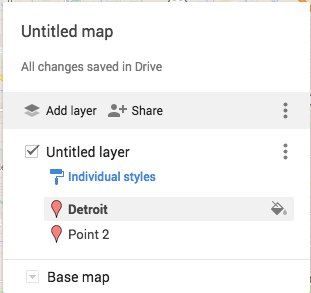
I have begun to plan my trip to Italy. As part of this I am creating a Google Map for each city I will visit. Within each city, I have different layers: Transportation, Hotels, Sights. While creating my Rome Map, I accidentally placed a hotel in the Sights Layer. My initial thought was that I would have to delete it and start over again, making sure that I placed it in the correct layer. Then…I thought, “Wait a minute, this is Google. I wonder if I can drag and drop the hotel to the correct layer.” Happily the answer was yes! So easy.

Check it out. The image on the left has Hotel Oceania on the Sights Layer. I drug that up to the Hotels Layer, where it now resides – shown in the image on the right.

A Few Of My Favorite Extensions

Google Dictionary

Google Dictionary allows you to look up a word on any webpage quickly.

Too Many Tabs

Too Many Tabs allows you to manage your tabs. Can make tabs ‘idle’ and view how many tabs are open.

One Tab

One Tab is similar to Too Many Tabs. With one click, all your tabs are condensed into one list with hyperlinks.

Adblock

Adblock blocks ads on webpages thus optimizing your browsing experience.

Goo.gl

Goo.gl is a Google URL shortener. It also creates a QR Code for the webpage.

Diigo

Diigo allows you to archive, annotate, and bookmark any webpage. Diigo is accessible from anywhere.

Feedly

Feedly is my favorite RSS Reader. I can easily follow new posts on my favorite blogs.

Google Cast

Google Cast is a must for anyone with Chromecast. Google Cast allows you to send content from your phone, tablet, or computer to your TV.

ColorZilla

CollorZilla identifies any color on any webpage; gives the hex code and keeps a history of identified colors.

Move It

Move It is a fun extension. You set the intervals at which an exercise challenge will appear on your screen.

Add This

Add This is a new favorite of mine. Have you ever stumbled across a great website that you wanted to share? Then you needed to copy and paste the link to Facebook, GMail, Twitter, or where ever. Skip that with Add This. Automatically lets you share a site to the media of your choice.

Clearly

Clearly cleans up posts, blogs, and articles. Read without the clutter.

WhatFont

WhatFont can identify any font on any website. Great for design purposes, or the curious.

Snagit

Snagit Extension in conjunction with the App is perfect for any classroom. It allows the user to do screen captures – video and pictures. Automatically saves to your Google Drive.

Techie Chicks Chrome Extension

My students think BIG! I have a group of 5th grade girls that created a website. I know you’re probably thinking, “Yeah, so what? Lots of kids create websites.” And you’re right – which is totally rockin’! But do they have a Chrome Extension in the Chrome Webstore? Mine do.

Techie Chicks ExtensionBackground

I do Genius Hour in my class each Friday. In the beginning of the year, a group of girls decided to do a website with tutorials. They named themselves ‘Techie Chicks’, inspired, in part, by this blog ‘NowaTechie’. Each week they decide what they would like to show the world how to do something techie. So far they have focused on a variety of tools. They have also become ‘known’ at my school. It’s not uncommon for teachers (and sometimes the Principal) to call asking for a Techie Chick or two for tech support.

Chrome Extension

One week Sabi asked if there was an easy way for others to get to their website. I said to bookmark it. She was not having that. I told her that we already set up a bit.ly for the site. You guessed it, still wasn’t good enough for her. Then she asked, “No, can we have an Extension or something?” See, they think big and don’t settle for less than what they’ve imagined. A week or so prior to Sabi’s insistence, I read how Alice Keeler got an extension for her website via fiverr. So that Friday during Genius Hour, we sent off their order.

By Monday they had their own Chrome Extension in the Chrome Store. We were all pretty excited. And now my students are officially WAAAAY cooler than me.

Side Note

Flynntes was great to work with. Advertised the product would take 7 days, had it in 4 days. The ‘Enter Site’ image was all Flynntes. It was a great experience!

What Common Core IS and ISN’T

There have been many jokes, comments, and criticisms against Common Core State Standards (aka Common Core/CC/CCSS). Many of them are made in ignorance; whether in not understanding the new standards or methods, I’m not sure. So let’s take a look at what Common Core is and isn’t.

What Common Core Is

Common Core is a group of standards (goals or objectives) that are set for all students. Some states have pulled out of Common Core, but still have their own state standards that are set for their students. CCSS simply states that for all students in Grade X, they will meet these objectives, regardless of where they live. So what 5th graders in CA are learning, is the same as what 5th graders in MI are learning. According to Common Core State Standards Initiative:

State education chiefs and governors in 48 states came together to develop the Common Core, a set of clear college- and career-ready standards for kindergarten through 12th grade in English language arts/literacy and mathematics. Today, 43 states have voluntarily adopted and are working to implement the standards, which are designed to ensure that students graduating from high school are prepared to take credit bearing introductory courses in two- or four-year college programs or enter the workforce.

Seems pretty benign, right? One would think so. So why all the hate? Some groups have twisted the facts, and money makers (i.g. textbook companies) have put their own spin on it.

What Does a Standard Look Like?

Here are some Language Arts and Math Standards at different grade levels:

  • 3rd Grade Language Arts: CCSS.ELA-LITERACY.RF.3.3.C
    Decode multisyllable words.
  • 7th Grade Writing: CCSS.ELA-LITERACY.W.7.7
    Conduct short research projects to answer a question, drawing on several sources and generating additional related, focused questions for further research and investigation.
  • 1st Grade Math: CCSS.MATH.CONTENT.1.NBT.C.6
    Subtract multiples of 10 in the range 10-90 from multiples of 10 in the range 10-90 (positive or zero differences), using concrete models or drawings and strategies based on place value, properties of operations, and/or the relationship between addition and subtraction; relate the strategy to a written method and explain the reasoning used.
  • 5th Grade Math: CCSS.MATH.CONTENT.5.NF.B.6
    Solve real world problems involving multiplication of fractions and mixed numbers, e.g., by using visual fraction models or equations to represent the problem.

What Common Core Isn’t

It isn’t a Standardized Test – The high stakes testing came about during George W. Bush’s Presidency with the introduction of No Child Left Behind. It also tied test scores to sanctions against poor performing schools.

It isn’t a specific way of solving a math problem; a method – Yes, both examples of math standards (above) state two (2) ways to solve. HOWEVER, nowhere does it state that a student must draw a subtraction problem in one particular way. NOR does it state that there is one correct equation format. Ideally, a teacher models several methods and the student chooses the one(s) that is/are right for him/her. The idea is to have the students actively thinking and solving problems in various ways.

It isn’t the same – No longer are we teaching the ‘shortcuts’. For example, telling students to regroup or ‘borrow’ with a problem like: 34 – 19. No longer do we just say, ‘More on the top, no need to stop; More on the floor go next door‘ without explaining (and showing through various models) why. It’s now about the deeper understanding.

Still Against Common Core?

Which standard should your child NOT learn?

Spring Cleaning

The things you find when you start cleaning house. This weekend I had had enough of my desk, in my home office. It was getting out of control! As I was sifting through everything, I ran across an article about something I started in October of 2008. I was ‘Skyping’ in the classroom before it was trendy.

I had to reread the article to remind myself of some of the details. The basics were that another teacher in the district (at another site) and I video chatted – well, our students did. I had gone to a meeting at our county office of education and gotten the idea from something I had seen there. We used Apple products – what our district invested in at the time – and iChat to communicate. We began with a closed network.

We had a great time that year. We began by focusing on speaking and listening skills, as many of our students were second language learners. We ‘met’ most Wednesdays to talk and share. At the end of the year, we met at a local non-profit art gallery. They were kind enough to let us use their backyard space for a picnic and gathering.

I love when spring cleaning results in such a treasure!

Inspiring Teachers

Lately I’ve been thinking, what makes a great teacher, an inspiring teacher?  What characteristics do they possess? Who do I aspire to be like?

creative commons licensed ( BY-NC-SA ) flickr photo shared by courosa

1. Sharing is Caring

These people share everything they do – FREELY. They share their ideas, successes, and failures. Whether they are sharing with people in the department, site, or on the Internet via blogging or tweeting. They realize that by sharing, not only are they impacting their students, they can impact hundreds.

2. It’s Not About Them

This goes along with sharing. These teachers realize that education is bigger than them, or their classrooms. It’s about helping to create thinkers, doers, and problem solvers. They understand that what they do is for the greater good.

3. Connected

These educators realize that in order to grow and learn, they need to seek out others. You can find them on Twitter, Google+, LinkdIn, writing blogs, etc. They attend conferences, local and otherwise.

4. A Need to Learn

The learning never stops. Thus the conferences, blog reading, #brewcues, #coffeecues, and ed tech meet-ups. They go back to school, enroll in MOOCs, or take courses. There is a constant need to learn and improve themselves.

5. Collaborators

Along with sharing and being connected, collaboration is another key. They listen, and welcome, other ideas. The act of building upon one another’s ideas is a regular conversation.

6 Humble and Uplifting

When I really thought about it, I realized these people are humble about their abilities and help others along on their journey. This, I think, is by far their greatest asset.

These are the qualities of a great teacher. This is what I aspire to be.