Publish To the Web – Google Docs

Throughout this past school year, I had students write their blog posts in Google Drive. This was a great way for them to get peer feedback, edit, and save their work. In the beginning, I told them to ‘copy’ and ‘paste’ their work into a new blog post. This was NOT acceptable for many of them. Many took their time getting just the right font (NEVER comic sans – responsible digital citizenship and all) and color. So I agreed to show them how their original work could be viewed on their blog posts – Publish to the web.

Here’s what we did:

Publish to web

First we chose the ‘Embed’ code, not the link. Then we copied the ‘Embed’ code (Control + c – PC; Command + c – Mac). Finally, we chose the blue ‘Published’ button. 

On our blogs, we found the ‘Text’ option – Not ‘Visual’. We use Edublogs, most blogs give you a Visual or Text option. Within Text, we placed our cursor where we wanted our document to be viewed, and ‘pasted’ (Control + v – PC; Command + v – Mac) the ‘Embed’ code. Below is an example of the results. We did play around with the Height and Width to get a visually pleasing outcome.

The Good, The Bad, The Frustrating

The school year ended, for me, two days ago. As most of us do, I reflected upon the year: What went well, what fails did I have, how will I change things for next year?

The Good

There were many good things that occurred this year.

  • Google Maps – This was a big one for me. I slowly began to integrate Custom Maps into my curriculum. The result? A fun interactive way to do State Reports.
  • Splitting the 5th Grade Curriculum with my Partner Teacher – Amber Pursley. She taught ELA and Science; while I taught Math and Social Studies. Together we planned for Writing and ELD. This arrangement allowed for each of us to be creative and push ourselves and the students.
  • Teaching more digital citizenship to my students and staff.
  • Having students enter films in the California Student Media Festival. They didn’t win, but we got our feet wet!
  • Getting a 3D printer via Donors Choose & Chevron.
  • Having a student do research on the 3D printer on her own. She knew more than any of us – and it was one of my shyest girls.
  • Having an AWESOMESAUCE class! They were kind, respectful, worked well together.

The Bad

These were more like ‘FAILs’ (First Attempt In Learning), so I can change it up for the future. Maybe it should be called ‘What I learned’.

  • That really great, “It’s only going to last a month” Road to the Revolution lesson. Yeah, that thing lasted like 3 months! My bad. I had it set up that students would be self guided with questions and tasks. Brilliant idea, right? Not so much. The students were answering the questions, but not retaining the information. So in the middle of the lesson I took out the questions and only had them focus on the tasks. The tasks covered the Stamp Act, Famous People, the Boston Tea Party, and the Battles at Lexington and Concord. Changes will includeDeadlines for each task, better oversight on my part (making sure they are using the resources that I provided for them, and NOT gamifying it. I’m sure there will be more, as each group of students has different needs.
  • Depression sucks! Started the year in a major funk. Fortunately, things got better!
  • Silent Sustained Reading (SSR). This one wasn’t so much a fail as it evolved throughout the year. By the end, I liked what I had. It started off as all students reading, or listening and following along, for half an hour. By the end of the year it had evolved into a half an hour of (your choice): Raz-Kids, reading a book, listening and following along, or Duolingo (there were 5 different languages students were learning). Students often switched it up and didn’t do the same thing everyday.
  • Coding – I started off strong, then it kind of fizzled. Not sure how to transform this. I do want this in my classroom. Will work on this problem during the summer.

The Frustrating

These were things that frustrated the living daylights out of me, and I had zero control. There were a lot this year, so I’ll try to stick to the most frustrating.

  • NO YouTube! – Not for teachers or students. At one point there were work arounds that my students found. We used them to enhance our learning, but they eventually got blocked. There were a myriad of reasons given: not enough bandwidth, can’t filter out the bad stuff, TESTING.
  • NO online editing software – I started the year off using WeVideo. My students have 1:1 Chromebooks so everything we do is online. We have 3 old iPods we use to videotape. We were in the process of editing our video class rules when ALL editing tools were blocked.
  • The ever-changing focus. First it was focusing on opinion writing, then it moved to speaking and listening, then it was ‘You MUST use Engage NY (aka Eureka Math) with fidelity, NO supplements allowed. Okay, full disclosure on this one. I supplemented, then stopped using it. So I guess that wasn’t so frustrating. A teacher’s got to do what he/she feels is best.

All in all, it was a good year. As they say, it’s all in your perspective. I chose to focus on what I could do and change. I tried not to worry about things that were out of my control. So, the ‘Good’ I’ll keep, the ‘Bad’ I learned from, and the ‘Frustrating’ I can only hope it changes for the better next year.

Working WITH Technology

This school year has had its ups and downs. One of the ‘Ups’ were my students’ State Reports. We used Google Maps to accomplish the same task that use to take 10 type written pages. I still maintain, no one wants to read a 10 page report – let alone 47? Yeah, much happier with the Maps idea. As we went through it, I saw ways to improve; and will implement those changes next year.

Then there were the ‘Downs’. Yeah, some of those made me want to pound my head against a brick wall. My ‘Road To the Revolution’ project. I thought I was soooo brilliant. Not so much! I will attempt it again next year, but will make several changes. Then, there are the downers that I have little to no control over. One that popped up throughout the year, were the ones where teachers and/admin wanted to block/ban sites. (This is where my head hangs low, before I hit a wall) Banning/blocking is NOT the answer. As with anything, education is. We not only need to educate our students, but we need to educate the teachers.

The answer is to teach our teachers HOW to work with technology. We need to show teachers and students what it means to integrate technology. When students are doing research; provide a list of acceptable sites,create a custom search engine via Google, and teach students HOW to search. Typing ‘What is the state flower of Maine?’ is not an efficient search. These are tools that students, and teachers, need. It is a district’s responsibility to provide the training so that quality instruction can occur. Far too often, a district thinks that giving a classroom a set of computers will be the answer, but it’s not. What ends up happening – more often than I care to think about – is that the computer becomes a babysitter, time filler, or dust collector.

I understand the need to block certain sites – like the super bad ones (remember: I’m coming from an elementary perspective). But in general, I am an advocate of keeping the sites open. Yes, students will push the limits. Yes, they will try to find inappropriate pictures, videos, whatever. But it’s our job to guide them along the path.

Teachers need to work WITH technology. We need to use the inappropriate searches as teachable moments. We need to monitor, walk around, give students the tools to be successful. Will we catch everything? No. But my teachers didn’t catch all the notes and things I tried to get away with, and I came out fine – mostly.

Awards – We’re Doing It Wrong

medal-646943_1280Awards

Awards should be given out to those who earn them. If I have a student who Perseveres, is Enthusiastic, and Cooperative, then they should receive all three awards. Likewise if there is a person who does their job well several months, they should be given “Employee of the Month” for all the months they have earned it.

Why Am I Talking About This?

Recently, we had another Citizen of the Month Award Ceremony. Yeah, it’s become a ‘Let me make you feel good for the few minutes while you get to stand up in front of everyone’ sort of thing. I know this is not just happening in my district. In fact, I’d be willing to bet that it is more common place than I’d care to think about.

This got me thinking, why am I giving out this award? I don’t always necessarily think that student A deserves the Patience award, but they sort of fit that category. And since EVERYONE gets a COM Award, student A gets Patience.

The same goes for teacher awards. Years ago, my district participated in an award that celebrated teachers who brought literacy to their classrooms. It could have been through innovative ways, starting clubs, or getting hundreds of book donations. Those individuals deserved the award. But because my district wanted to be involved in it every year – which I applaud – they would often scramble to find someone to get it. It often times became meaningless.

It’s Okay NOT To Give Someone An Award

Yes, it’s fine NOT to give every child in your class an award. We really want students to work, persevere, be enthusiastic, etc. By the time students hit 3rd grade, they’re on to the game. They know they don’t really have to work at any of the character traits. They know at some point in the year, they will get an award. Then their parents will come with a minimum of 3 mylar balloons, candy and/or a stuffed animal, but that rant is for another time.

Back to the literacy award. I mentioned several reasons why employees received the award, but didn’t talk about the MANY years that we scrambled to have a person. And why did we scramble? Well, there were many times when the discussion was, “Who hasn’t gotten it yet?” That is NOT how we should be celebrating our accomplishments. What if person A created an after-school literacy group year 1; then year 2 provided training for others to have their own literacy group? Well, person A was then out of the running because they had already received the award year 1. What a shame.

What Should We Be Doing Instead?

With my students, each month they should start with a clean slate. If some students don’t get an award that year, that’s okay. If a student gets an award twice, that’s okay too. Looking at the literacy award, if person A did amazing things to improve literacy, they should have received the award more than once, because yes, that’s okay too.

We need to stop making these awards meaningless. My job is not to make a child feel good in the moment, but to teach them to be a better person. Study after study has shown the negative affects of giving everyone an award.

We need to celebrate those that are deserving – even if they’ve been acknowledged before.

Google Maps & Adding Piskel From URL

This year a student found a free pixel art creator, Piskel. This has become all the rage in my classroom. The students can create original art or create gifs based on their work. So when we started on our state reports, I had a few students ask if they could create their state flag using Piskel. Of course I said yes! Mind you, I have no idea how this Piskel thing actually works – downloading, saving, file types, etc.

Then came the time to insert the image on their map via the URL. Yeah, this took a bit to figure out. BUT Jason, a student, and I figured out a work-around. LOVE figuring this stuff out with the students. So this is what we did:

On the right side we chose the ‘Export’ icon.

Then downloaded it as a png file (it wasn’t a gif)

Next we opened up Google Draw – yup handy work-around – and inserted the png. We then published the Drawing, and grabbed the link (URL)

Publish to Web: Go to file > scroll down to Publish to Web. Then:

Choose Link > Blue publish button > Copy link (URL) to the clipboard (PC – Control C; Mac – Command C)

Now in your map, locate the location you’d like to insert the image and choose ‘Image URL’. Next, paste (PC – Control V; Mac – Command V). Finally, choose the blue ‘Select’ button.

And that’s it! Collaborating with students can be VERY satisfying! Here’s the final product:

Thank you Jason & Andrew for allowing me to collaborate with you, and use your work.

Language Monsters

This is what my students are! Several of my students (and myself), have started using Duolingo to learn a new language. Currently I have 5 languages being acquired in my classroom: Spanish (most popular), French, Portuguese, Italian, and English.

duolingoIt all started several months ago with an ELL student. She was still having trouble acquiring English after being here for a few years. One suggestion I received was to have her get on Duolingo. So, we set her up in her native language (Spanish). She took the placement test and began learning English. She loves doing it, and feels that it’s been helping her. In order to have her not feel different during our Silent Reading time, I agreed to brush up on my Spanish. As time has progressed, more and more students have asked to learn a language. Yes, I realize some were asking so they could ‘get out’ of reading during Silent Reading time (SSR). I said, “Yes!” Yup, I’m that teacher that is okay when a student says they hate reading. I know they just haven’t found the right books yet, or it’s hard for them and SSR is no fun. So, learning a new language can be fun – and yes they are reading too!

What really excites me, is that some of the students asking to learn Spanish come from Spanish speaking homes. Some of these students have ‘forgotten’ their first language, in varying degrees, want to speak with their grandparents, or just want to learn the language their family knows. I think it’s all very exciting!

Now my SSR has students reading books – inside or outside; real or digital – learning a new language, listening to a book on CD, or reading a story (and taking a quiz) on Raz-Kids. Will all of them stick with learning a new language? No, and that’s okay. I love their willingness to try and learn new things.

Making Manipulatives

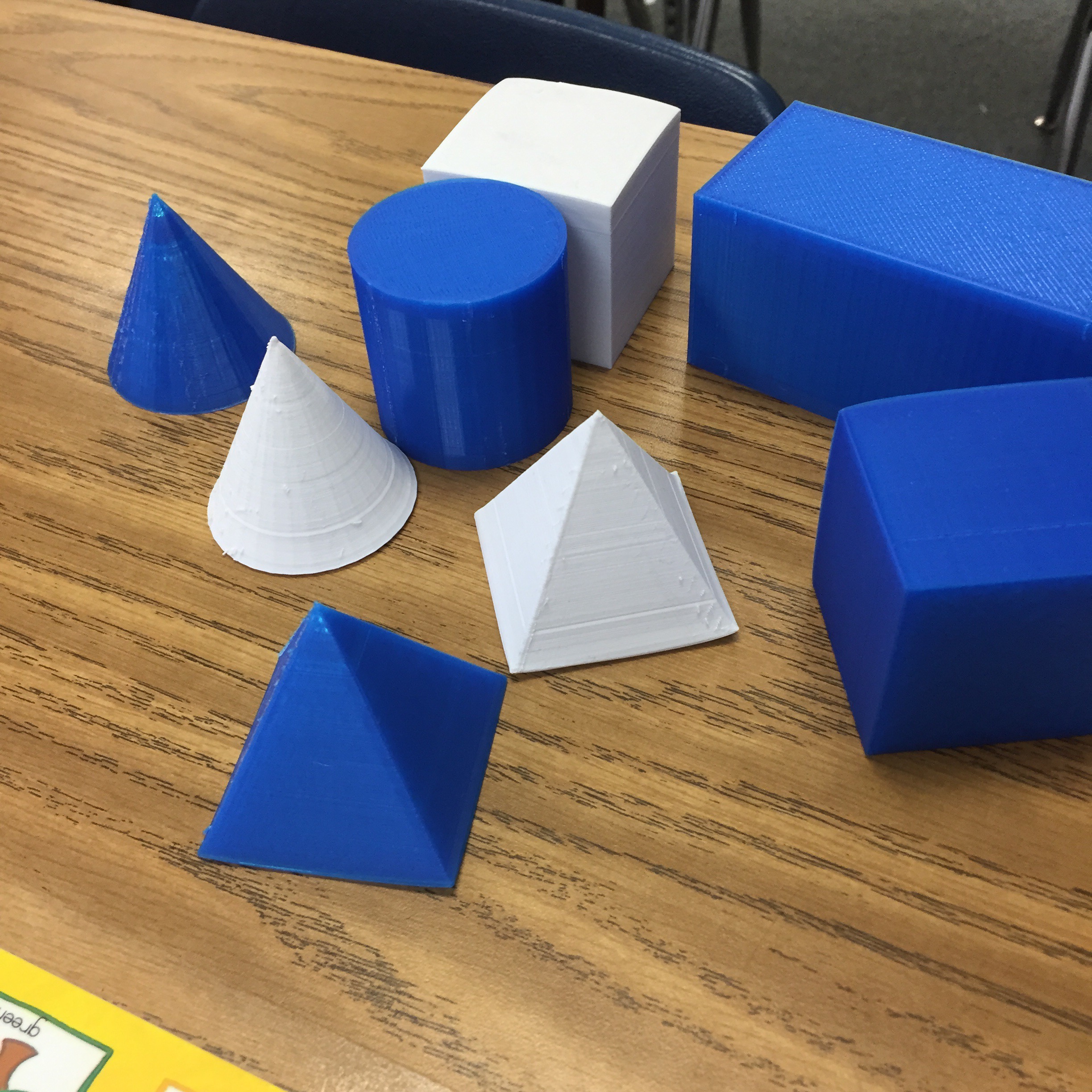
Last week I spoke with one of the first grade teachers. They are learning about 3D shapes. I asked if she had any, cuz ya know I had a plan. And she didn’t! Oddly this gave me a bit of a thrill. She was the same teacher that I would go to throughout the year and throw out tech ideas for her to try. And she would happily try them. So my plan…

Was to make her some with my 3D Printer! Is it wrong that I was thrilled I could do this (If it’s wrong, then I don’t want to be right). So that’s exactly what I did; I made her 3D shapes for her class.


It took a while, but the final ones were handed over today. She expressed her gratitude, and told me how much more meaningful the lessons have been for her students. She was telling me about a center she has where they have to classify the objects. And apparently, the blue ones are a big hit! Silly first graders.


Yeah, I’m lovin’ the printer and what it’s been able to do; in my classroom and for others.

Maps & State Reports

Okay, it’s been a week, and I’m still feeling like a Rock Star! The students are really into their reports. So far the only hang up has been that YouTube is STILL blocked in my district. It happened to be open 1-day last week and some of the students were able to insert some videos – not many I’m afraid.

They are still working on them, but I’m still hopeful. I had many tell me that they WANTED to work on them at home. A few ASKED if they could write about MORE than one Indian Tribe. Yes, they are doing more than the minimum required, on their own! This is cool. Usually, it’s like pulling teeth for them to write the reports (and I could say the same about me when it comes to reading the reports. THIS is way more fun. I’m enjoying watching the process and guiding them along the way. Here is our Thinglink:

Update 10-16-15: Due to Google moving Maps to Drive and my district’s ‘sharing’ permissions no one outside our district is able to view the state reports. As a fix for this upcoming year, I will create a map for each student or group and give them sharing permissions. This way, the world will be able to see their work – which is what it’s all about.

Hashtags In 5th Grade

Last week I had a great discussion with my class about the use of hashtags (#). What is appropriate, how many to put in a post, what they really mean. Talking about hashtags in the classroom always reminds me of Diane Main. When I attended the Google Teacher Academy in 2012, she was the one that had the revelation on their meaning and how to use them in the classroom. Diane’s ‘ah-ha’ moment included the idea that hashtags were much like the main idea.

Hashtag

So keeping this in the back of my head, I brought it up to my class last week. We were doing a lesson on dialog. I asked them how they would hashtag the lesson (after explaining that it was the main idea). At this point, I realize that they had missed the point of the entire lesson. Yup, a fail.

So after going back and re-explaining the lesson, they came up with #quotations and #dialog. This has lead me to the conclusion, that I need to ask students, “How would you hashtag this lesson?” Using Diane’s idea – Main Idea – I can quickly get a pulse on the class if they ‘got the point’ of the lesson.

My point? Hashtag your lessons! It’s relevant. It’s fun. It’s informative. And Diane is/was brilliant!