Here are some great Chrome Extensions. You can save the actual document if you’d like. Please share out any awesome ones that may have been missed.
Author: Admin
Create A Google Form
Some people I have talked to still aren’t sure how to create a Google Form. I say jump in and start clicking! Don’t worry, you won’t break Google. Start off small with a few questions and question types. Once you get more comfortable, try something new. In the meantime, here’s a quick tutorial on how it’s done.
Voice Typing in Google Docs
Not so long ago, I wrote about a handy Add-On for Google Drive called Speech Recognition, here. It allows the user to talk into the microphone and have their words transcribed. Google has now incorporated Voice Typing in their Tools Menu, which does the same thing!
A microphone icon will appear on the side of the d
ocument. Click it. The first time you use this feature, you will be prompted to allow Google Docs to use your microphone. Choose allow and start talking.
Google Docs Now Has Templates
One of the best features of Google (and all that it encompasses) is that it is always changing and updating. This is true for Google Docs. You can now easily create a Document from a template.
You can also type: docs.google.com in the URL
This opens the home page for your Docs (documents). There is now a bar across the top with several template options. Not satisfied with those? Choose the ‘More’ option with several choices in each category.
If you are already in a document and wish to create a new one, you can quickly click the upper left corner. This will take you to your Docs home page.
Create Announcement in Google Classroom
Create Assignment in Google Classroom
Classroom Updates August 2015
Quick Overview
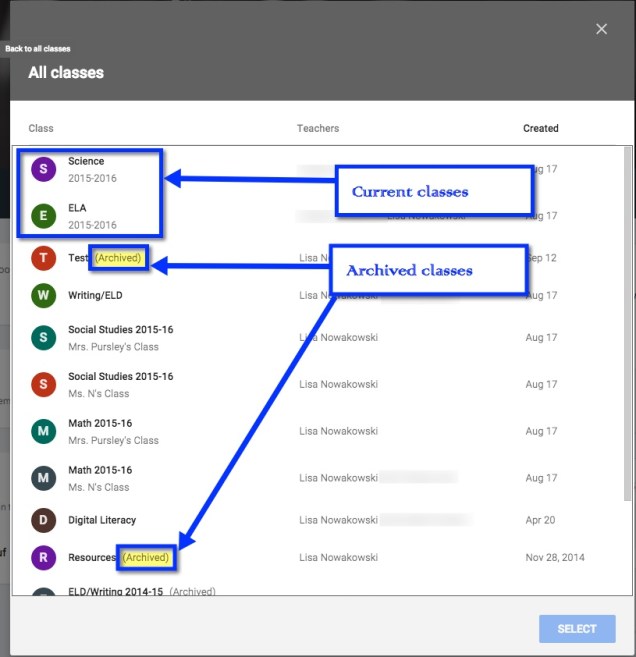
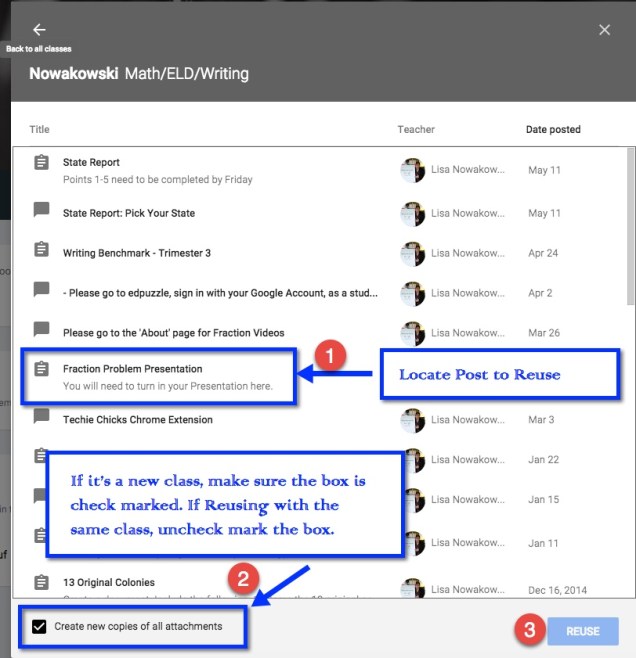
Reuse Post
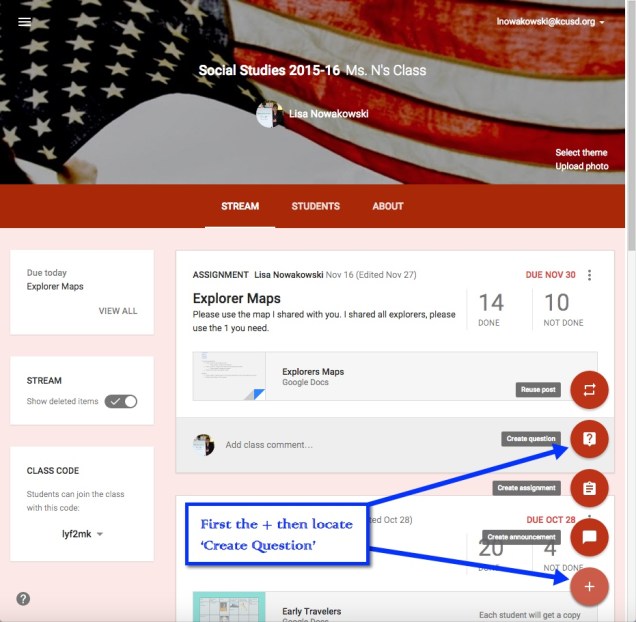
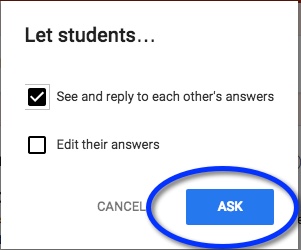
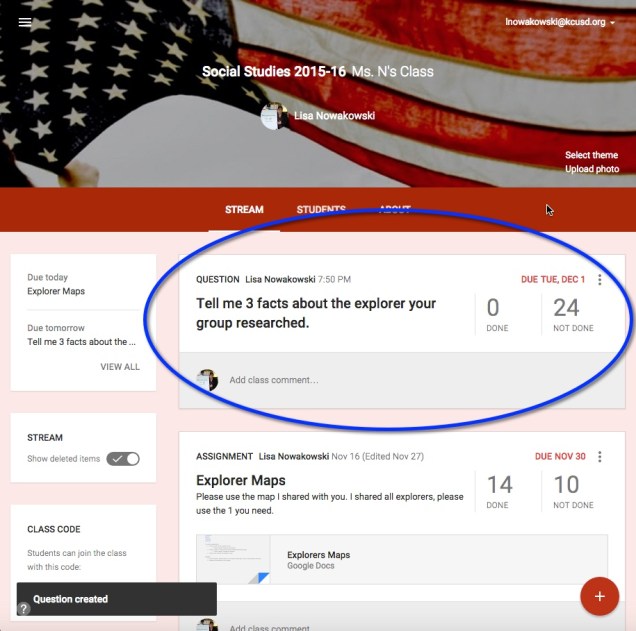
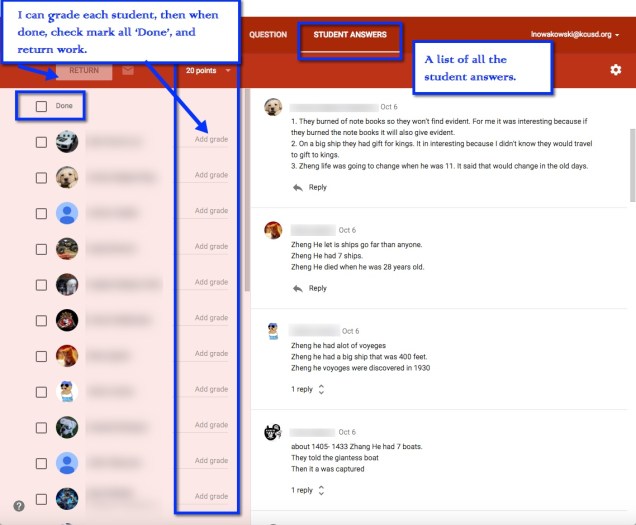
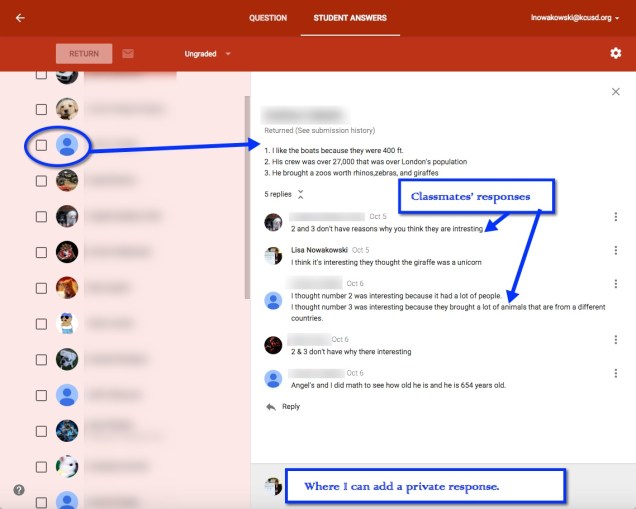
Create Question
Google Docs – Speech Recognition
Have a student who has great ideas, but can’t get them written down? Google Docs has a great Add-On to help: Speech Recognition.
In a Google Doc, look for Add-Ons in the toolbar.
You will need to get the Add-On.
Now it’s ready to use. In the toolbar in your document, Speech Recognition is ready to use.
A sidebar will appear on the right side. Choose ‘Start’ and begin speaking.
When you finish speaking, press the ‘Stop’ and your text will appear in your document.
First Day
Start Off Positive
We’ve all heard this, but what does it really mean? Yes, we all greet our students at the door and welcome them with a smile on our faces. Many of us have ‘fun’ activities planned in order acclimate our new students to our ways, rules, expectations, and personality. How many of us bust out the technology on the first day? How many of us have students creating something meaningful the first day?
Here’s what we did
- Wrote out all expectations (learning goals, personal goals) on sticky notes and posted them around the classroom. As a group, we read them and talked about them. What I think I will do next year: write these expectations on a Google Form, take their answers and create a word cloud using abcya, wordle, tagxedo, or tagul (my personal favorite).
- Paper Bag 5 ‘W’s – I wish I could site this, as it wasn’t my idea. I read it online somewhere. The idea is to give each student a paper bag with 5 items in it (I put in a pencil, eraser, Hershey Hug, mini candy, and a Smartee). Students answer the 5 W questions (Who, What, When, Where, Why). They then take the bag home, put in 5 items that represent them, and present it in class the next day. A bonus was, I was able to see the quality of their writing in a low-risk setting.
- Students also worked together in the Marshmallow Challenge. I modified it to fit my needs. Students used spaghetti, mini marshmallows and 4 large marshmallows. I was able to see which groups/individuals communicated, collaborated, planned, thought out, and were innovative.
Finally, each student created a Voki to tell me a little bit about themselves. This was a fun way for students to introduce themselves to me. They got to use technology, create something meaningful, and were able to view it online (and show their families). Here is my class and the other class (Mrs. Pursley).
This was a great way to begin the school year! We just finished our second week, and things are going GREAT. I am blessed with an amazing group of students. This may be the best year yet (and that’s saying something as this is my 20th year teaching).
Engage Students With Mangahigh
Making Homework Engaging
A few years ago, I started to ponder how I could make my homework more engaging. I wanted students to be proud of their work and not just do it as fast as possible or not at all. I began giving less, but more thoughtful work. In other words, NO worksheets. Then last year I discovered Mangahigh. This was a game changer for me. You can read some of my initial thoughts about it here: Gamifying My Homework. As the year progressed, I liked it more and more. And so did my students.
When summer was upon me, I did what most teachers do: I reflected on the previous year. What worked, what didn’t, and what I was going to do for the next year. Continuing with Mangahigh was a no brainer. Last year I experimented with the Free version. This was good, but I wanted to up my game with the Premium Version. This will allow me to tailor a curriculum for each student.
Why Mangahigh
Last year, I used it as homework. The students were completely taken with it. They loved earning badges, points, and awards. One morning ‘K’ came in stating that she worked on a particular challenge (which is practice on a concept/standard) in order to pass ‘B’. What I was finding was that students were spending more time on the Challenges and Games than I assigned. I had students, who completed their homework, coming in early in the mornings in order to get more points, get to the next level, ‘beat’ a game or their friend, and win a ‘Fai-To!’. A Fai-To! is where one school challenges another school; the schools compete for a week. The competition is based on how many badges each school can get per day. My students LOVED this aspect.
What The Students Had To Say
They had a lot to say. Many quickly went through the challenges that I assigned. They pushed themselves to do more. They quickly became obsessed with certain games. Mangahigh has nearly 20 games, that resemble video games. They all focus on math (Common Core Standards) and are fun to play. Their favorites were PEMDAS Blaster (PEMDAS rules), Tangled Web (degrees of angles), and Pyramid Panic (Circumference and Diameter). Some of these concepts are above 5th grade. The beauty of this is that they were learning new concepts in a fun way. All they saw was a fun game, badges, and high scores.
Towards the end of the school year, my school purchased a (different) program. I decided to use it and have the students compare the two. They were both game based and web based. Very quickly my students started to complain. They all wanted to go back to using Mangahigh. I encouraged them to give the other program a chance. They did and were not impressed. When I encouraged them to have an open discussion on why they felt Mangahigh was better; it was eye opening for me. I was prepared to hear them say that the graphic and games were better. While this is valid, it’s superficial (in my opinion). I wanted well-thought reasons. To my pleasure, that’s exactly what I got. Yes, they appreciated the graphic of Mangahigh, but more importantly they appreciated the learning that occurred. They explained to me that when they got an answer wrong, or needed help, on the challenges; Mangahigh provided quality guidance that helped them understand their mistakes. The other program didn’t provide this and, therefore, was an inferior product in their eyes.
My Thoughts
Even though I used the Free version last year, I could still review some data. I was able to see who completed an assigned challenge, their score, percentage, and time spent on the challenge. This information was useful when I referred struggling students to our Student Study Team.
I watched struggling students gain confidence as they completed challenges. ‘C’ was one of my struggling students. She was one student who came in early in the mornings to complete challenges. While talking to her, she told me that she liked practicing and understand more. I watched her confidence grow as the year went on. She went from below grade level in the area of number sense to proficient. Her story was not the only one like it in my class.
Then in early July I received an email from a student that solidified my thoughts about Mangahigh. ‘J’ emailed me to tell me that she had finally completed PEMDAS Blast. Yes, students continued playing during the summer! You can read about it in Math In the Summer. If I wasn’t already convinced that this is a great way to help students, this email would have done it.

One Final Note
As I have committed to upping my game this year, and using the premium version, I plan to tailor the goals to each student’s needs. I have several students receiving additional help in math from a resource specialist. I will be able to give them different challenges than those students who require more advanced challenges. My principal and I are excited to see the growth and progress that each student makes using Mangahigh.
From my success last year, I can say that students spend more time reinforcing concepts through this type of homework than traditional homework. Even those students who aren’t really into video games enjoyed the gaming aspect and collecting badges. The Fai-to! challenges spurred many students to push themselves in order to beat the opposing school (and it doesn’t hurt that their teacher is competitive).
Finally, I’d like to point out that I work at a school where over 80% of the students qualify for free or reduced lunches. We are a Title 1 school. We are located in a rural, economically depressed area. Many of my students do not have internet access at home; yet found ways to complete their challenges daily. Some went to the local library, others stayed after school, many came to school early, or used a parent’s phone/tablet. It’s that type of motivation that has proven that Mangahigh IS engaging for all students.