CUE 13

Annual CUE

What a difference a year makes! This was my second year attending the Annual CUE Conference. CUE, which stands for Computer Using Educators, hosts an amazing conference each year in Palm Springs, CA. Imagine being surrounded by hundreds, and thousands (4,000 this year) of like minded educators. The amount of knowledge flowing around the conference is mind boggling.

So you’re probably thinking, “What does all that have to do with a year ago?” Well, last year when I went, I knew few people and met even less. To be honest, I knew only the people I went with, and met exactly ZERO people. This year…It was a completely different story. I knew tons of people, and met with just as many more. Last year I had around 20 Twitter followers; this year I have over 230 — and growing. Last year all that I had planned were sessions and 1 dinner. This year, session to attend, sessions to help, 2 dinners, 1 Coffee CUE event and 1 ‘tweet up’ for #caedchat were planned. Needless to say, I was a very busy educator this year.

I was able to meet up with some fellow Google Teacher Academy, Mountain View attendees, meet several Google Certified Teachers for the first time, and other really innovative educators. I was also able to meet some of my ‘Heros’ in the teaching world, it was sort of like meeting a celebrity for me! Connections are key to growing and developing as an educator. Without those connections, I wouldn’t be half the teacher I am today. I am inspired by these people that I only speak to online. While speaking to one of my ‘Heros’, Lisa Highfill, I told her that she makes me a better teacher. Her ideas are great. They make me want to be in her classroom. Most importantly, she inspires me to do more, be better, and step up my game. Please check her out, she does some great things in her classroom. Another one of my ‘Heros’ is Linda Yollis. That woman ROCKS!

All the presenters I saw were fantastic! There were so many that I wanted to see, there just weren’t enough of me to go to all the sessions I wanted to. That’s where having friends helps. When going with a group, just split up and share your notes. This year, like last, we created a Google Folder which was shared by all of us. So whatever session we went to, we took notes and put it in the shared folder. Now we have notes and links for all of us to check out.

Finally, no conference would be complete without the vendors. There were so many great products and give aways. I was able to leave with books related to Common Core for a friend and myself. When talking about vendors, I can’t leave out OtterBox! Lisa Flint, who was the representative there, hooked me up. OtterBox has a good reputation for quality products. Knowing this, I stopped by to chat with them. While chatting with Lisa, I mentioned that our school has Generation 1 iPads, and that we really don’t have protective cases. She generously offered to give us OtterBox cases for all our iPads! Her generosity doesn’t stop there, she also gave me an iPad case for my personal iPad 3 and my iPhone. Seriously, when I say that OtterBox is the best, I’m not playing around.

All in all it was a great conference. Will things change even more in the coming year for me? I’m hoping so. I have started presenting, about technology, locally, and am hoping to expand that to Fall CUE and Annual CUE 2014, and many points in between!

Web 2.0 Tools

Web 2.0 Tools Bloom’s Taxonomy 

Objectives:

  • You will leave today with an understanding of Web 2.0 Tools
  • You will be able to implement at least one Web 2.0 Tool into your class
  • You will begin to create your own global PLN

What are Web 2.0 Tools? Simply put, they are tools that are web based (no program to download) that are interactive with the user. They can be accessed at anytime, from anywhere as long as there is an internet connection. Instead of using the Internet to look up information and it being a one way process, today’s users interact with websites. We mold and shape the way the web is used and is evolving. We no longer are passive participants, we have become active participants.

This list is by no means a complete list. This will be an ever changing and evolving list. There are so many tools out there, you are bound to find the right ones for your needs.

Create Your Own Global PLN

Google+My Profile

Twitter@MsNsClass

PinterestMy Boards

LinkedinMy Profile

Classroom 2.0

The Educator’s PLN

Social Bookmarking

Delicious

Diigo — My bookmarks

Discussion Ideas

Corkboard — online bulletin board

  • Can be used to organize summaries of a read aloud

Go Soap Box — Student response system used with smartphones, computers, and tablets

Lino — online sticky note & photo sharing

  • Can be used as a ‘ticket out the door’.

Socrative — Student response system used with smartphones, computers, and tablets

Tagxedo — Word clouds

  • Use as a visual for synonyms

Voicethread — Allows students to respond verbally. $70/year

Padlet (Formerly Wall Wisher) — online bulletin board. Can insert images and video

  • Collect informative information on what kids already know about a subject.

Wordle — Word Cloud

  • Create 2 wordles on 2 separate reading passages and use as compare/contrast.

Content and Assignment Delivery

Educreations — Create screencast videos on your iPad and upload.

Glogster — Graphic blog. Acts as a visual poster where images, text, and video can be displayed.

Go Animate — Create free animated videos. Check this out

Knowmia — Create screencast videos. Similar to Educreations with more bells and whistles.

Prezi — Cool presentation tool, not your same old power points! Here’s an example

Symphonical — Organizing your collaborations just got easier.

Trello — Task/project management

Xtranormal — Free animated videos

Vimeo — Great alternative to YouTube. Example

Voki — Customize, animate, and vocalize your avatar.

Audio & More Video

Animoto — Great 30 second (free) videos from your pictures like this

Screencast – o – matic — Free screen capture recording.

Soundcloud — Voice recording. Students can read stories that they’ve created. A few more options than Vocaroo.

Vocaroo — Voice recording service. Great for podcasting or fluency. Easy to use.

Visuals

Dipity — View and create timelines. 2010 Year in Review

Gliffy — Great for mind maps and Venn Diagrams

Glogster — Graphic blog. Acts as a visual poster where images, text, and video can be displayed.

Google Draw — Found in your Google Drive. It’s simplified version of paintbrush. Great for Venn Diagrams.

Popplet — Mind maps, collaboration, and more

Blogs

Blogger — This is a part of your GAFE (Google Apps For Education). If you have a Google email, you can have Blogger.

Edublogs — Easy to set up several blogs under one teacher (for a yearly fee $40).

Kidblog — This one is a great beginner blog for teachers and students. It is very user friendly.

Other Cool Tools

Class Dojo — Behavioral management system.

Dropbox — Online Web-based file system.

Evernote — Great for note taking and organizing.

Google Apps — Drive, YouTube, Calendar, Sites, Maps, Earth…

Scootpad — k-5 CCSS aligned. Asks questions and tracks progress.

Todays Meet — Great for backchanneling (real time discussions, questions, and comments during lessons)

You Need a Place to Store and Organize It All…

Edmodo — It’s sort of like Facebook, but safer and self contained.

Google Sites — Yes, it’s a part of your GAFE — this is mine (msnsclass.com)

Haiku Learning Management System

Moodle — A learning management system

Schoolology — A learning management system. Like Edmodo. WonderTech explains why she chooses Schoolology.

Weelby — Easy, friendly way to create a website

This was originally created for King City Union School District Inservice by Lisa Nowakowski for 1-23-13

Create Site Using a Template

Many at my school were interested, yet unsure, about creating a class website. I assured them it was easy, and sure enough the majority of staff at my school have a website. In order to make things easier, I created a template within my district’s Google Apps. So when the teachers were ready to create their site, they only needed to fill in basic information and they were on their way. Here is a quick step-by-step video to help.

Google Hangouts

ImageRecently Google has opened up Google+ to K-12 schools. This was welcomed by many in my district and me. Since I teach in a K-8 district, the district wisely chose to open it for staff only, and keep it locked for our students — as they are under 13. Within a week of this happening, a friend and I got together and tried it out…with our classes. She teaches 4th and I teach 5th, and we are located across town from one another. We thought the kids would get a kick out of it. And of course they did.

Her class was learning how to multiply two digit numbers by two digit numbers. I had told her about the lattice method my class likes to use. She gave us a call to have one of my students show and explain the lattice method to her students. It was such a hit, one of her students HAD to show us how to do it their way. 

When all was said and done, the students got to say, “Hi” to one another. Many of them have been on sports teams or in plays together. They found it exciting to see their friends. It was such a hit, that we are now planning on having Hangouts a few times a month. 

Another great learning tool in our Google Apps arsenal!

Cool Teaching Moment

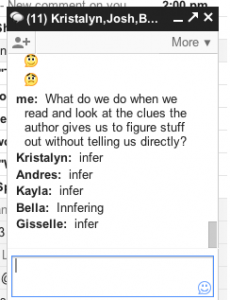
Today while working on our Google Apps (Gmail), the students discovered (Kristalyn to be specific) that they could have a group chat. So using our Google Chromebooks we had a giant group chat. This then turned into a vocabulary review. I joined in the discussion and began asking them questions. What a great impromptu learning opportunity! I have never seen a group of students so motivated to work. I’m still buzzing with the excitement that was generated. It’s days like this that make teaching the best profession!

Google Teacher Academy

Well, I have just submitted my application for Google Teacher Academy New York 2012. As I was filling out the application and working on the 1 minute video I was nervous. However, that is nothing as to what I feel now…Super nervous! Then some self doubt entered. That was so not nice or welcomed! That silly little voice that says, “Google wants someone who can reach large crowds. You don’t.”

To that voice I say, “QUIET! I did more with 3rd graders than most teachers do with middle school kids 😛 I am an amazing teacher!”

Then that silly little voice says, “Good point.”

So all that aside, I’m nervous, but hopeful. I am a tech savvy teacher. I do amazing things in technology with 3rd graders. Now that I am going to 5th grade, the possibilities seem endless! My brain is spinning with all the project based learning that will happen.

Oh, and here is that video…