Don’t shoot! I know, I said the dreaded ‘H’ word… Homework. So yes, I give homework: read 20 pages and write a summary, 2 math problems (review of previously taught material), Mangahigh, and play outside for 30 minutes.
At first I thought I was pretty slick assigning homework online (I have a paper option for students without Internet access. Most come in early to complete the Mangahigh portion). I would routinely check their work online and in class together. Then it became apparent (okay, I was a little slow on this one) that I was missing the feedback step.
In order to change this, I use a combination of steps to allow students access to their work, with my feedback included. First, I set up a Google Form that I use for the entire week. This way, I just need to change the 2 math questions daily. However, I can’t just ‘edit’ the problems I have to ‘duplicate’ then ‘delete’ the original. Otherwise, I delete the original problem, and that sort of defeats the purpose of giving feedback if they don’t know what the problem was.
It’s not perfect and I’ll probably change it in a few months with a better system, but for now it works. I also set it up at the beginning of the week so that each time there is a response it auto updates. (Note: I turn row-call off when I’m responding.)
Last night I was fortunate enough to share the awesomeness that is Google Classroom with the IEC (Innovative Educators Certification) class – put on by CUE and Fresno Pacific University. One of the more convenient features is the ‘Mute a Student’ choice. Generally I allow my students the ability to post and respond in the Stream. However, there have been a few cases in which I needed to Mute a student. In the past, I located the student on the ‘Student’ page and muted them from here.
However during last night’s class, we discovered that a student can be muted from the Stream. If a student posts a comment on an Announcement, Assignment, or questions, there is now the option to Mute the student from here. In addition, if a student creates a post the teacher can Mute the student from here.
On the post or comment from the student 3 vertical dots appear. Choosing that will bring up the option to either Delete the comment or Mute the student. Choosing to Mute a student then brings up a pop-out window to which allow the teacher to also delete the comment if necessary. This will prevent the student from commenting or posting throughout the classroom until the teacher ‘Unmutes’ the student.
I love using Google Forms for my homework. It allows me to manage the results in a Sheet. I have it all organized on my website for my students. The advantage of this is that my students don’t need to login to Google – like they would have to do for Google Classroom. With some of my students, Sites is the better option. Here’s how I do it:
I like to have a theme that matches my classroom. For example, my Math Classroom has a chalkboard with numbers and equations. An added bonus to using Google Classroom is that it finds complimentary background colors for me. Changing the theme is simple:
Last night there were a series of hurried texts between a group of friends and myself. At first, I was going to ignore them. It was, after all, almost 10 pm – way past my bedtime! Then curiosity got the better of me, and boy am I glad it did. A friend who teaches at another site within my district was telling the rest of us that school was cancelled for today, because of bomb threats at one of the campuses. Before long, I was communicating with my site administrator who asked me to post the information on our school’s Facebook page.
How do we get our information?
When I first heard the news, guess where I went first? The district’s website? The local news station’s site? Facebook? You guessed it, Facebook. Isn’t that what most of us do?
Spreading the Word
The district was in the process of recording a message that would auto call all the parents. However, the system had already shut down for the night and the calls wouldn’t be made until morning. This is a problem.
Living in a small community such as mine, word travels fast. So by harnessing the power of social media, we were able to inform many, who in turn helped to spread the word, about the school closings. Within 16 hours, our post had been viewed by nearly 9,900 people. That’s almost the size of our town!
118 Shares! I have heard that some district administrators are not a fan of schools having a Facebook page. They feel that it puts them at risk of negative attention or criticism. While this is true, the risk is minimal. In the 3 to 4 years we’ve had ours, I can only recall 2 instances where someone was negative, and one of those the person had some misinformation (which we were able to clear up immediately).
I’m sure you would agree, this was an amazing way to harness the power of social media. On another note, the majority of our posts show students engaged in learning and having fun. If your school doesn’t have a Facebook Page, I think it’s a missed opportunity to connect with parents, students (depending on age), and your community.
This was one of the many inspirational things I got out of David Theriault’s keynote speech at Fall CUE 2015. At one point, he asked why we take pictures during holidays and birthday parties. Simply put, because they are memorable moments (Mr. Theriault describes it in his blog). This gave me the inspiration to have my students become photographers; asking them to photograph the memorable moments in the day. Then allowing them to post their favorite to my Instagram account (@Nowatechie). We’ve created our own hashtag (#msnsclass).
I want my class, and their 5th-grade year, to be memorable. It is my hope that we do 1 thing each day they will want to remember.
A few years ago, I started to ponder how I could make my homework more engaging. I wanted students to be proud of their work and not just do it as fast as possible or not at all. I began giving less, but more thoughtful work. In other words, NO worksheets. Then last year I discovered Mangahigh. This was a game changer for me. You can read some of my initial thoughts about it here: Gamifying My Homework. As the year progressed, I liked it more and more. And so did my students.
When summer was upon me, I did what most teachers do: I reflected on the previous year. What worked, what didn’t, and what I was going to do for the next year. Continuing with Mangahigh was a no brainer. Last year I experimented with the Free version. This was good, but I wanted to up my game with the Premium Version. This will allow me to tailor a curriculum for each student.
Why Mangahigh
Last year, I used it as homework. The students were completely taken with it. They loved earning badges, points, and awards. One morning ‘K’ came in stating that she worked on a particular challenge (which is practice on a concept/standard) in order to pass ‘B’. What I was finding was that students were spending more time on the Challenges and Games than I assigned. I had students, who completed their homework, coming in early in the mornings in order to get more points, get to the next level, ‘beat’ a game or their friend, and win a ‘Fai-To!’. A Fai-To! is where one school challenges another school; the schools compete for a week. The competition is based on how many badges each school can get per day. My students LOVED this aspect.
What The Students Had To Say
They had a lot to say. Many quickly went through the challenges that I assigned. They pushed themselves to do more. They quickly became obsessed with certain games. Mangahigh has nearly 20 games, that resemble video games. They all focus on math (Common Core Standards) and are fun to play. Their favorites were PEMDAS Blaster (PEMDAS rules), Tangled Web (degrees of angles), and Pyramid Panic (Circumference and Diameter). Some of these concepts are above 5th grade. The beauty of this is that they were learning new concepts in a fun way. All they saw was a fun game, badges, and high scores.
Towards the end of the school year, my school purchased a (different) program. I decided to use it and have the students compare the two. They were both game based and web based. Very quickly my students started to complain. They all wanted to go back to using Mangahigh. I encouraged them to give the other program a chance. They did and were not impressed. When I encouraged them to have an open discussion on why they felt Mangahigh was better; it was eye opening for me. I was prepared to hear them say that the graphic and games were better. While this is valid, it’s superficial (in my opinion). I wanted well-thought reasons. To my pleasure, that’s exactly what I got. Yes, they appreciated the graphic of Mangahigh, but more importantly they appreciated the learning that occurred. They explained to me that when they got an answer wrong, or needed help, on the challenges; Mangahigh provided quality guidance that helped them understand their mistakes. The other program didn’t provide this and, therefore, was an inferior product in their eyes.
My Thoughts
Even though I used the Free version last year, I could still review some data. I was able to see who completed an assigned challenge, their score, percentage, and time spent on the challenge. This information was useful when I referred struggling students to our Student Study Team.
I watched struggling students gain confidence as they completed challenges. ‘C’ was one of my struggling students. She was one student who came in early in the mornings to complete challenges. While talking to her, she told me that she liked practicing and understand more. I watched her confidence grow as the year went on. She went from below grade level in the area of number sense to proficient. Her story was not the only one like it in my class.
Then in early July I received an email from a student that solidified my thoughts about Mangahigh. ‘J’ emailed me to tell me that she had finally completed PEMDAS Blast. Yes, students continued playing during the summer! You can read about it in Math In the Summer. If I wasn’t already convinced that this is a great way to help students, this email would have done it.
Photo Credit: Jasmine
One Final Note
As I have committed to upping my game this year, and using the premium version, I plan to tailor the goals to each student’s needs. I have several students receiving additional help in math from a resource specialist. I will be able to give them different challenges than those students who require more advanced challenges. My principal and I are excited to see the growth and progress that each student makes using Mangahigh.
From my success last year, I can say that students spend more time reinforcing concepts through this type of homework than traditional homework. Even those students who aren’t really into video games enjoyed the gaming aspect and collecting badges. The Fai-to! challenges spurred many students to push themselves in order to beat the opposing school (and it doesn’t hurt that their teacher is competitive).
Finally, I’d like to point out that I work at a school where over 80% of the students qualify for free or reduced lunches. We are a Title 1 school. We are located in a rural, economically depressed area. Many of my students do not have internet access at home; yet found ways to complete their challenges daily. Some went to the local library, others stayed after school, many came to school early, or used a parent’s phone/tablet. It’s that type of motivation that has proven that Mangahigh IS engaging for all students.
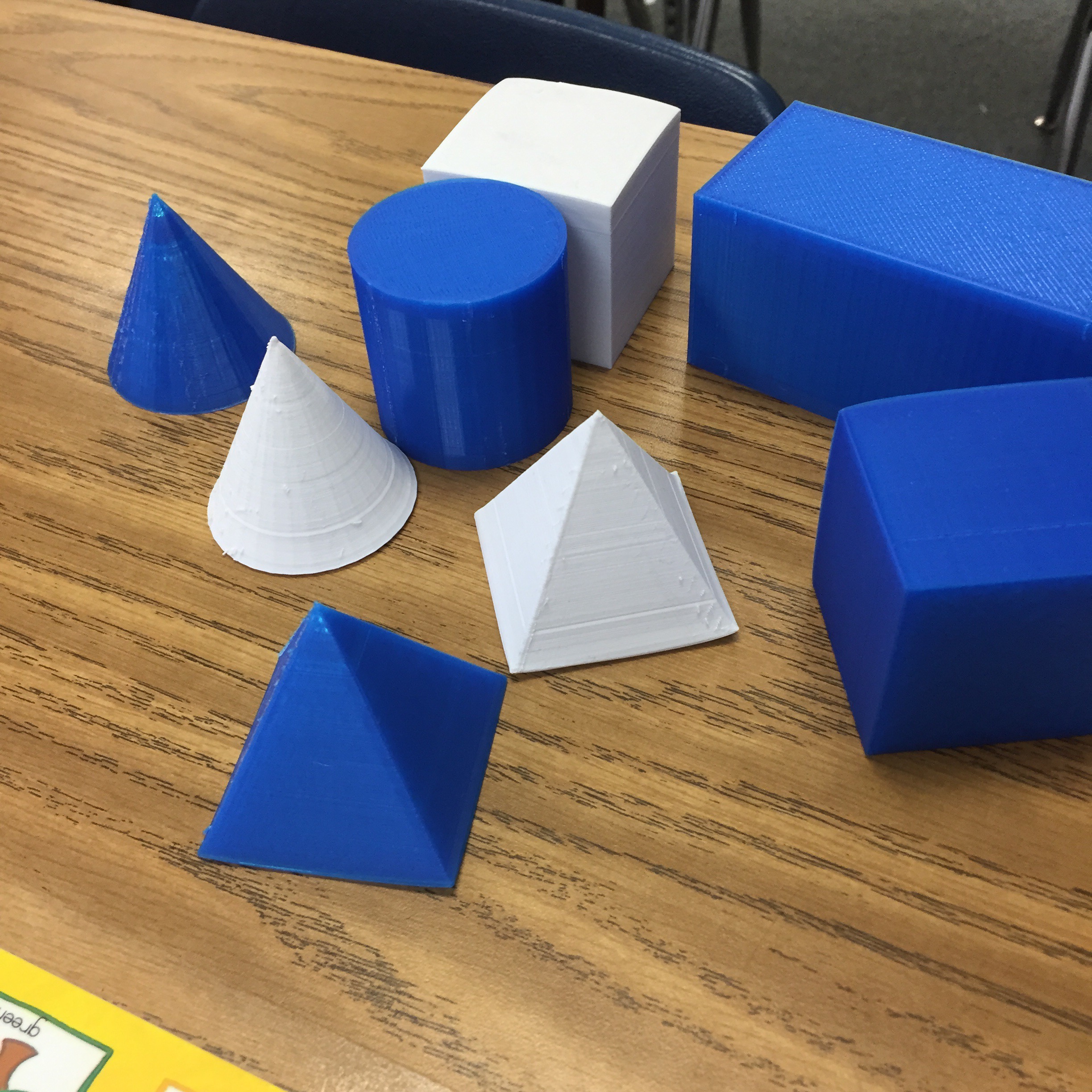
Last week I spoke with one of the first grade teachers. They are learning about 3D shapes. I asked if she had any, cuz ya know I had a plan. And she didn’t! Oddly this gave me a bit of a thrill. She was the same teacher that I would go to throughout the year and throw out tech ideas for her to try. And she would happily try them. So my plan…
Was to make her some with my 3D Printer! Is it wrong that I was thrilled I could do this (If it’s wrong, then I don’t want to be right). So that’s exactly what I did; I made her 3D shapes for her class.
It took a while, but the final ones were handed over today. She expressed her gratitude, and told me how much more meaningful the lessons have been for her students. She was telling me about a center she has where they have to classify the objects. And apparently, the blue ones are a big hit! Silly first graders.
Yeah, I’m lovin’ the printer and what it’s been able to do; in my classroom and for others.