I love using Google Forms for my homework. It allows me to manage the results in a Sheet. I have it all organized on my website for my students. The advantage of this is that my students don’t need to login to Google – like they would have to do for Google Classroom. With some of my students, Sites is the better option. Here’s how I do it:
Uncategorized
Change Classroom Theme
I like to have a theme that matches my classroom. For example, my Math Classroom has a chalkboard with numbers and equations. An added bonus to using Google Classroom is that it finds complimentary background colors for me. Changing the theme is simple:
Harness The Power
Last night there were a series of hurried texts between a group of friends and myself. At first, I was going to ignore them. It was, after all, almost 10 pm – way past my bedtime! Then curiosity got the better of me, and boy am I glad it did. A friend who teaches at another site within my district was telling the rest of us that school was cancelled for today, because of bomb threats at one of the campuses. Before long, I was communicating with my site administrator who asked me to post the information on our school’s Facebook page.
How do we get our information?
When I first heard the news, guess where I went first? The district’s website? The local news station’s site? Facebook? You guessed it, Facebook. Isn’t that what most of us do?
Spreading the Word
The district was in the process of recording a message that would auto call all the parents. However, the system had already shut down for the night and the calls wouldn’t be made until morning. This is a problem.
Living in a small community such as mine, word travels fast. So by harnessing the power of social media, we were able to inform many, who in turn helped to spread the word, about the school closings. Within 16 hours, our post had been viewed by nearly 9,900 people. That’s almost the size of our town!
118 Shares! I have heard that some district administrators are not a fan of schools having a Facebook page. They feel that it puts them at risk of negative attention or criticism. While this is true, the risk is minimal. In the 3 to 4 years we’ve had ours, I can only recall 2 instances where someone was negative, and one of those the person had some misinformation (which we were able to clear up immediately).
I’m sure you would agree, this was an amazing way to harness the power of social media. On another note, the majority of our posts show students engaged in learning and having fun. If your school doesn’t have a Facebook Page, I think it’s a missed opportunity to connect with parents, students (depending on age), and your community.
Make It Memorable
This was one of the many inspirational things I got out of David Theriault’s keynote speech at Fall CUE 2015. At one point, he asked why we take pictures during holidays and birthday parties. Simply put, because they are memorable moments (Mr. Theriault describes it in his blog). This gave me the inspiration to have my students become photographers; asking them to photograph the memorable moments in the day. Then allowing them to post their favorite to my Instagram account (@Nowatechie). We’ve created our own hashtag (#msnsclass).
I want my class, and their 5th-grade year, to be memorable. It is my hope that we do 1 thing each day they will want to remember.
Literacy Shed
Extensions: Making Your Life Easier
Here are some great Chrome Extensions. You can save the actual document if you’d like. Please share out any awesome ones that may have been missed.
Engage Students With Mangahigh
Making Homework Engaging
 A few years ago, I started to ponder how I could make my homework more engaging. I wanted students to be proud of their work and not just do it as fast as possible or not at all. I began giving less, but more thoughtful work. In other words, NO worksheets. Then last year I discovered Mangahigh. This was a game changer for me. You can read some of my initial thoughts about it here: Gamifying My Homework. As the year progressed, I liked it more and more. And so did my students.
When summer was upon me, I did what most teachers do: I reflected on the previous year. What worked, what didn’t, and what I was going to do for the next year. Continuing with Mangahigh was a no brainer. Last year I experimented with the Free version. This was good, but I wanted to up my game with the Premium Version. This will allow me to tailor a curriculum for each student.
Why Mangahigh
Last year, I used it as homework. The students were completely taken with it. They loved earning badges, points, and awards. One morning ‘K’ came in stating that she worked on a particular challenge (which is practice on a concept/standard) in order to pass ‘B’. What I was finding was that students were spending more time on the Challenges and Games than I assigned. I had students, who completed their homework, coming in early in the mornings in order to get more points, get to the next level, ‘beat’ a game or their friend, and win a ‘Fai-To!’. A Fai-To! is where one school challenges another school; the schools compete for a week. The competition is based on how many badges each school can get per day. My students LOVED this aspect.
What The Students Had To Say
They had a lot to say. Many quickly went through the challenges that I assigned. They pushed themselves to do more. They quickly became obsessed with certain games. Mangahigh has nearly 20 games, that resemble video games. They all focus on math (Common Core Standards) and are fun to play. Their favorites were PEMDAS Blaster (PEMDAS rules), Tangled Web (degrees of angles), and Pyramid Panic (Circumference and Diameter). Some of these concepts are above 5th grade. The beauty of this is that they were learning new concepts in a fun way. All they saw was a fun game, badges, and high scores.
Towards the end of the school year, my school purchased a (different) program. I decided to use it and have the students compare the two. They were both game based and web based. Very quickly my students started to complain. They all wanted to go back to using Mangahigh. I encouraged them to give the other program a chance. They did and were not impressed. When I encouraged them to have an open discussion on why they felt Mangahigh was better; it was eye opening for me. I was prepared to hear them say that the graphic and games were better. While this is valid, it’s superficial (in my opinion). I wanted well-thought reasons. To my pleasure, that’s exactly what I got. Yes, they appreciated the graphic of Mangahigh, but more importantly they appreciated the learning that occurred. They explained to me that when they got an answer wrong, or needed help, on the challenges; Mangahigh provided quality guidance that helped them understand their mistakes. The other program didn’t provide this and, therefore, was an inferior product in their eyes.
My Thoughts
Even though I used the Free version last year, I could still review some data. I was able to see who completed an assigned challenge, their score, percentage, and time spent on the challenge. This information was useful when I referred struggling students to our Student Study Team.
I watched struggling students gain confidence as they completed challenges. ‘C’ was one of my struggling students. She was one student who came in early in the mornings to complete challenges. While talking to her, she told me that she liked practicing and understand more. I watched her confidence grow as the year went on. She went from below grade level in the area of number sense to proficient. Her story was not the only one like it in my class.
Then in early July I received an email from a student that solidified my thoughts about Mangahigh. ‘J’ emailed me to tell me that she had finally completed PEMDAS Blast. Yes, students continued playing during the summer! You can read about it in Math In the Summer. If I wasn’t already convinced that this is a great way to help students, this email would have done it.

One Final Note
As I have committed to upping my game this year, and using the premium version, I plan to tailor the goals to each student’s needs. I have several students receiving additional help in math from a resource specialist. I will be able to give them different challenges than those students who require more advanced challenges. My principal and I are excited to see the growth and progress that each student makes using Mangahigh.
From my success last year, I can say that students spend more time reinforcing concepts through this type of homework than traditional homework. Even those students who aren’t really into video games enjoyed the gaming aspect and collecting badges. The Fai-to! challenges spurred many students to push themselves in order to beat the opposing school (and it doesn’t hurt that their teacher is competitive).
Finally, I’d like to point out that I work at a school where over 80% of the students qualify for free or reduced lunches. We are a Title 1 school. We are located in a rural, economically depressed area. Many of my students do not have internet access at home; yet found ways to complete their challenges daily. Some went to the local library, others stayed after school, many came to school early, or used a parent’s phone/tablet. It’s that type of motivation that has proven that Mangahigh IS engaging for all students.
Making Manipulatives
Last week I spoke with one of the first grade teachers. They are learning about 3D shapes. I asked if she had any, cuz ya know I had a plan. And she didn’t! Oddly this gave me a bit of a thrill. She was the same teacher that I would go to throughout the year and throw out tech ideas for her to try. And she would happily try them. So my plan…
Was to make her some with my 3D Printer! Is it wrong that I was thrilled I could do this (If it’s wrong, then I don’t want to be right). So that’s exactly what I did; I made her 3D shapes for her class.
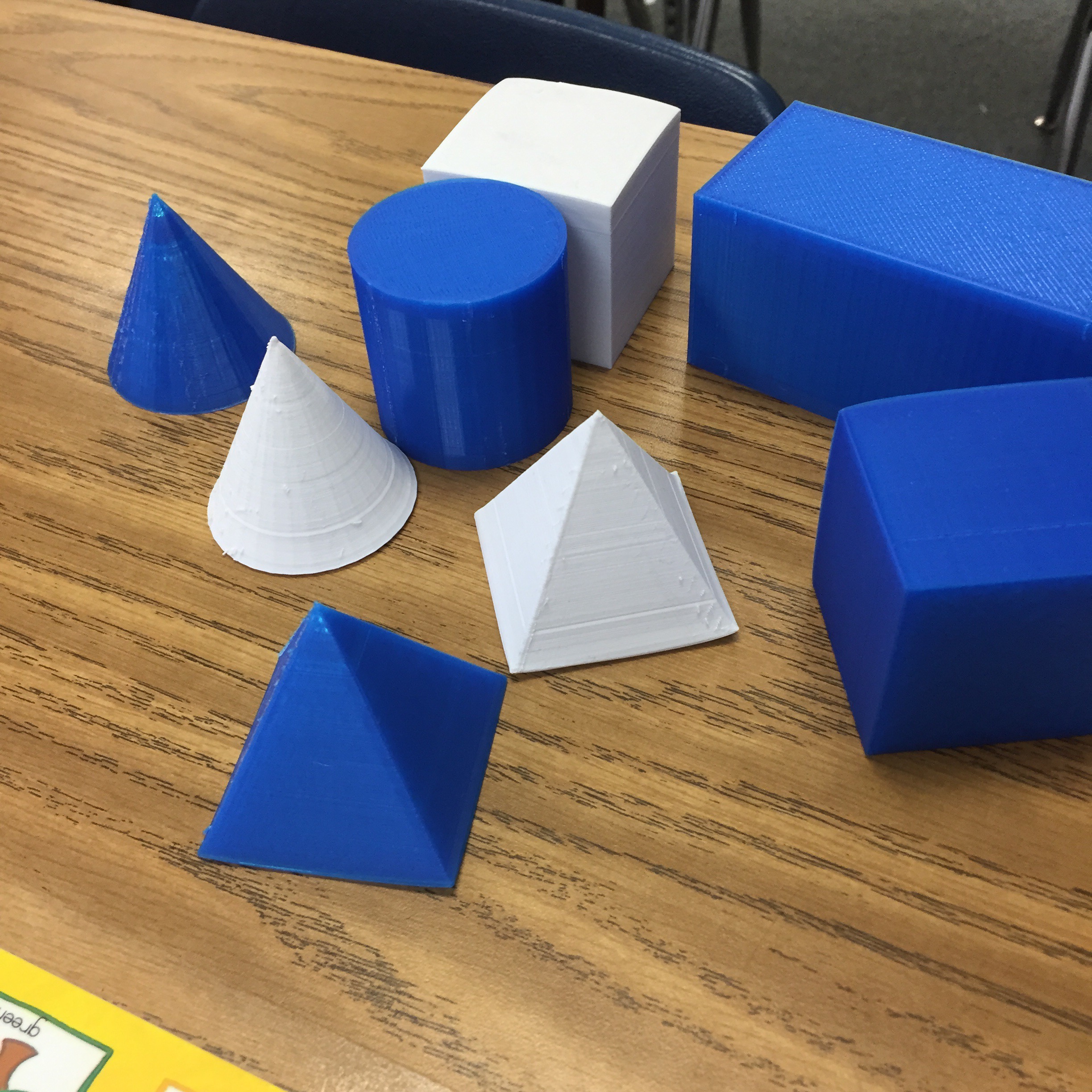
It took a while, but the final ones were handed over today. She expressed her gratitude, and told me how much more meaningful the lessons have been for her students. She was telling me about a center she has where they have to classify the objects. And apparently, the blue ones are a big hit! Silly first graders.

Yeah, I’m lovin’ the printer and what it’s been able to do; in my classroom and for others.
Testing: Then and Now

flickr photo shared by albertogp123 under a Creative Commons ( BY ) license
This week my 5th Graders started taking the new State Test – SBAC. This got me thinking about how I did things this year as opposed to how I did things just a few years ago.
Then
- At least 1 month of test prep AKA No actual teaching occurs.
- Bribery – If you come every day you’ll get… (Make ups were grueling).
- More Bribery – If you are ‘caught’ working hard you’ll get… This ‘helped’ with the ‘I don’t care’ attitude; which was really focused on schools getting money that we desperately needed.
- Pep Rallies – Everyone goes into their multi-purpose room for a ‘You’re awesome, you’re smart, you’re gonna do great’ cheer/dance/chant…
- Test Taking Skills – These were drilled during the month long test prep period.
- Tricks – During the days of the test ‘Here’s a pack of Smarties, cuz you’re so smart’.
- More Tricks – Chewing gum helps you focus. You get to chew gum during the test!
- Snacks – Some years, the school provided snacks so kids had food in them to… yup you guessed it, do better on the test.
- Paper/Pencil – Teachers freaked if a kid erased, and they didn’t do it well enough. The state might think we were cheating or mark it wrong – EEEK!
- I had a MAJOR case of anxiety one year – full on tears, couldn’t breath, and ‘flappy’ hands. This went on for WEEKS!
- Stress, Stress, Stress!
Now
- Me to my principal- Wait, when is the test?
- The Friday before the test to the class – Oh, by the way, we start State Testing on Monday.
- My students – Can we chew gum? Can we bring candy? What about…?
- Me to my Students – I expect you to try your best and work hard.
Looking back, I can’t help but wonder how much undo stress our well meaning ‘encouragement’ gave students. THEN, there was a month long build up with the focus on doing well. A student’s efforts or growth was of no interest. The only interest anyone had were the numbers. What percentage of students are Proficient or Advanced? Did we meet AYP? API? All our Subcategories? AHHHHHHHH!
Currently, I am happy to report that I haven’t had 1 anxiety attack this year. I am so NOT stressed! I’m a much happier teacher. I think my students are still a bit worried, but I would gather to say that it has more to do with past pressures – flashbacks if you will. I have jumped off the ‘Testing Wheel of Insanity’. I am proud of my students. They all tried their best and took their time. Honestly, I don’t care how they do. I know how far they’ve come this year; and how hard they’ve worked. They are amazing!
I’m sure in a few years that some – okay probably many – will choose to go back to the ‘Testing Wheel of Insanity’. I will wave to them and continue doing what I do. I will focus on growth, their perseverance, and efforts. In the long run, those qualities will make them better prepared for the future than an arbitrary stamp of approval by some legislator.
I dare you to join me in celebrating something other than a number, and avoid the ‘Testing Wheel of Insanity’.
Rock Star Lineup: CUE RockStar Google Edition
This summer marks the first time that CUERockStar will host an all Google Edition!
How is this RockStar different?
This RockStar will focus on Google and Google related applications. In addition, all faculty members are Google Certified – either Google Certified Teachers or Google Educators.
Why attend the Google Edition RockStar Camp?
Like all RockStars, there will be 3 days of direct hands-on learning. The ratio of faculty to attendee is 10:1 per session. Each session is 2 hours; with only 2 sessions per day. This means attendees can really dig deep, and receive individualized attention.
There is also a 2 HOUR LUNCH! When was the last time a teacher got a 2 hour lunch? The 2 hour lunch allows you to network, ask questions, share your learning, and relax! Oh, and there will be ice cream at each lunch. The last day features HOMEMADE ice cream cookie sandwiches! (Note: for those with dietary needs, non-dairy products are available).
flickr photo shared by vasta under a Creative Commons ( BY-NC-SA ) license
In true Rock Star fashion, each day will begin at 9 am (yes, this means you get to sleep in!) with a ‘Shred Session’ by the faculty. The faculty will try and woo you to attend their session. These are fun, light-hearted, and show off each faculty member’s passion. These are a must-see!
You will end your day with the option of extending your learning and networking with other attendees and faculty members. After days 1 and 2, there will be a meet-up at a local place of interest.
The amazing faculty:
 Dan Bennett is an EdTech Coach and Science Teacher at Los Alamitos High School. He is also a Google Certified Teacher and Education Trainer. Within the classroom he has supported student learning in 1:1 iPad, Chromebook and PC laptop environments. Beyond the classroom Dan provides professional development and support to teachers across his district and at conferences. Above all Dan’s passion is helping others discover new and more powerful ways to learn.

Jed Butler is a groupie of the math and tech community (#MTBoS, mathbutler.wordpress.com). He specializes in visualizations for relationships and numbers (making sense of math with pictures). You can see more at transformulas.org. You’ll find him playing with Desmos, Geogebra, and Google Apps most days of the year.
He’s taught nearly every math course and grade for the secondary classroom. Throughout his careers he’s found that leading, facilitating, and supporting groups has been a natural position for him. He’s lead successful small PLC groups and is now the Math TOSA/coach for Perris Union High School District.
 Ed Campos grew up in Earlimart, CA. He’s been teaching high school math for 11 years in Central California. Before he started teaching, he was an IT consultant in the Bay Area for 3 years. He knows first hand what an education in math and technology can do for a young person and has dedicated his life to sharing what he’s learned and what he’s continuously learning. Ed has successfully incorporated 360 Degree Math into his classroom.
 Robert Hochberg is a content specialist for Teacher Support Services at the Ventura County Office of Education. He is a Google Certified Teacher, a Microsoft Innovative Educator, and holds a Master’s Degree. He is member of the Gold Coast Cue Board of Directors and an organizer of #edcampvc. He has been in education for 10 years and formerly taught middle school history. He was also the Director of Technology for his school and introduced a 1:1 “BYO Laptop” program in the middle school. In his spare time he adjuncts for Concordia University Irvine in the Masters of Educational Technology program. He is passionate about technology use in education and tries to make learning engaging and enjoyable all at the same time.
 Eric Jarvis is sixth-grade ELA/STEAM teacher at Los Osos Middle School where students work in a one-to-one laptop environment using Google Apps for Educators to demonstrate their knowledge of content by CREATING products that require a multitude of twenty-first century skills. Eric is a Google Certified Teacher. Eric has been an innovative ed tech leader for over a decade.
 Joe Keays has an inescapable passion to create a learning environment that is timeless, physically boundless, nurturing and empowers students and parents. He desires every student to live passionately, think creatively, expect excellence from themselves, recognize the beauty to look, see and be seen, and to control their lives from their position of authority. Joe has taught high school mathematics for the past 17 years at Agoura HS and has been a natural leader integrating technology, creative methodology and modeling risk. Joe is also a Google Certified Teacher and 2014 Edublog Lifetime Achievement Award.
 Tara Linney is a Google Certified Teacher, and Google Education Trainer, currently working as an Instructional Technology Coach for a K-8 district in Crest Hill, IL. She has worked in education for 5 years. She holds an M.S. degree in Instruction from Drexel University and is certified as an Instructional Technology Specialist. Her primary background is grounded in helping educators incorporate meaningful technology experiences into their instruction.
 Nancy Mincozzi has been teaching in one way or another most of her life. She holds several degrees, including a Master’s degree in Educational Technology. For the past 3 years, she has worked in the Las Virgenes Unified School District as a media specialist, helping teachers integrate technology into their classrooms. She is passionate about helping other educators to innovate their practices and has presented at local CUE events and at the annual CUE conference. A firm believer in collaborative professional development, Nancy is the founder of PLAYDATE Los Angeles and is a member of the EdCamp Ventura County organizing team. She blogs at http://www.coffeenancy.com. She is a former attendee of CUE Rock Star.
 Lisa Nowakowski is a Google Certified Teacher & Trainer, and has presented at CUE RockStar events in California. She was in the first cohort for Innovative Educators Certificate and a Leading Edge educator. In 2010 Lisa was awarded the Crystal Apple Award sponsored by the local NBC affiliate. She has been an Ed Tech innovator in her district for over 15 years. Lisa currently teaches 5th grade at King City Arts Magnet. As a district technology leader, she has brought 1:1 Chromebooks to her classroom with great success. As a 3rd grade teacher, she incorporated GAfE into her classroom.
 Teresa Ozoa is a lawyer turned educator, credentialed for both primary and secondary school, now teaching AP English Language, American Lit and a Contemporary Lit elective at University High School in Irvine. An edtech early adopter with a lifelong fascination with tech, from a Kaypro II to an iPhone 6+, she is also an energetic professional development presenter in tech for Irvine Unified SD, SGVCUE and the UCI Writing Project.
Her CUE RockStar Manhattan Beach experience inspired this year’s motto and a new approach to student creation: “Make Good Stuff and Share!”
 Amanda Steinacher is a Teacher on Special Assignment in Technology Integration for the Redondo Beach Unified School District. Before her job on special assignment she taught 4th, 3rd, 2nd, and 1st grades in elementary schools for 15 years. As a teacher on special assignment, her job has been to “Googlify” her district. Through the roll out of 7,100 Chromebooks in grades 3rd-12th grade and a pilot of 650 Android Tablets in TK-2nd grades, Google has become her new language this school year. If you peek into Amanda’s day, you’d find her creating support documents for teachers in docs, building sites that support the common core standards, answering questions on all things Google, blogging, growing her PLN on Twitter and Google+, and HAPPILY supporting the teachers of RBUSD. She is a new blogger, new Tweeter, and a new Google Educator.
 Nowa Techie